# Concrete Docs - LLM Full Context
Generated: 2026-10-26T10:52:48.463Z
Source repository: concrete-docs
Canonical docs URL: https://docs.concrete.xyz/
This file consolidates every Markdown documentation page in `src/**/*.md` for retrieval and LLM ingestion. Active sidebar pages appear first in sidebar order; Markdown pages not present in the active sidebar follow afterward. Static binary/media assets are listed at the end by path and public URL.
# Table of Contents
1. Concrete: Earn Yield on Supported On-Chain Assets [sidebar] - src/01-Overview/welcome.md
2. Yield Vaults and ERC-4626 Standard [sidebar] - src/01-Overview/yield-vaults-and-erc-4626-standard.md
3. Concrete Vault Shares [sidebar] - src/02-Using-Concrete-Vaults/concrete-vault-shares.md
4. Deposit [sidebar] - src/02-Using-Concrete-Vaults/deposit.md
5. Withdraw [sidebar] - src/02-Using-Concrete-Vaults/withdraw.md
6. Vault Transparency [sidebar] - src/02-Using-Concrete-Vaults/vault-transparency.md
7. Bridging and Depositing with Enso [sidebar] - src/02-Using-Concrete-Vaults/bridging-and-depositing-with-enso.md
8. Fees [sidebar] - src/02-Using-Concrete-Vaults/fees.md
9. Concrete Points Program [sidebar] - src/02-Using-Concrete-Vaults/concrete-points.md
10. Architecture: Core Concepts [sidebar] - src/03-Developers/architecture-core-concepts.md
11. Overview [sidebar] - src/03-Developers/SDK/overview.md
12. Setup Configuration [sidebar] - src/03-Developers/SDK/setup-configuration.md
13. Migrating from 1.x [sidebar] - src/03-Developers/SDK/migrating-from-1x.md
14. balanceOf(address) [sidebar] - src/03-Developers/SDK/read-methods/balanceOf.md
15. getAddress() [sidebar] - src/03-Developers/SDK/read-methods/getAddress.md
16. getUnderlyingDecimals() [sidebar] - src/03-Developers/SDK/read-methods/getUnderlyingDecimals.md
17. getVaultDetails() [sidebar] - src/03-Developers/SDK/read-methods/getVaultDetails.md
18. getVaultTransparencyStats (API) [sidebar] - src/03-Developers/SDK/read-methods/getVaultTransparencyStats.md
19. getApyDetails() [sidebar] - src/03-Developers/SDK/read-methods/getAPYDetails.md
20. getAllWithdrawQueueRequests(owner) [sidebar] - src/03-Developers/SDK/read-methods/getAllWithdrawQueueRequests.md
21. getWithdrawalForecast(options) [sidebar] - src/03-Developers/SDK/read-methods/getWithdrawalForecast.md
22. getDepositLimits() [sidebar] - src/03-Developers/SDK/read-methods/getDepositLimits.md
23. getDepositLockWithFeeHook() [sidebar] - src/03-Developers/SDK/read-methods/getDepositLockWithFeeHook.md
24. previewConversion(amount) [sidebar] - src/03-Developers/SDK/read-methods/previewConversion.md
25. totalAssets() [sidebar] - src/03-Developers/SDK/read-methods/totalAssets.md
26. symbol() [sidebar] - src/03-Developers/SDK/read-methods/symbol.md
27. decimals() [sidebar] - src/03-Developers/SDK/read-methods/decimals.md
28. applyDecimals(amount) [sidebar] - src/03-Developers/SDK/read-methods/applyDecimals.md
29. toUnderlyingDecimals(amount) [sidebar] - src/03-Developers/SDK/read-methods/toUnderlyingDecimals.md
30. approve(spender, amount) [sidebar] - src/03-Developers/SDK/write-methods/approve.md
31. deposit(amount) [sidebar] - src/03-Developers/SDK/write-methods/deposit.md
32. redeem(amount) [sidebar] - src/03-Developers/SDK/write-methods/redeem.md
33. transfer(to, amount) [sidebar] - src/03-Developers/SDK/write-methods/transfer.md
34. transferFrom(from, to, amount) [sidebar] - src/03-Developers/SDK/write-methods/transferFrom.md
35. Decimals & Conversion Helpers [sidebar] - src/03-Developers/SDK/decimals-and-conversion-helpers.md
36. Examples [sidebar] - src/03-Developers/SDK/examples.md
37. Troubleshooting & Error Handling [sidebar] - src/03-Developers/SDK/troubleshooting-and-error-handling.md
38. Schema & Queries [sidebar] - src/03-Developers/Subgraph-and-Events/schema-and-queries.md
39. Event Reference [sidebar] - src/03-Developers/Subgraph-and-Events/event-reference-and-use-cases.md
40. Live Vaults [sidebar] - src/04-Live-Vaults/index.md
41. Overview [sidebar] - src/05-Institutional-Vaults/overview.md
42. AssetCX [sidebar] - src/05-Institutional-Vaults/assetcx.md
43. Pre-Deposit Vaults [sidebar] - src/06-pre-deposit-vaults.md
44. Completed Campaigns [sidebar] - src/05-completed-campaigns.md
45. Important Disclaimers [sidebar] - src/09-important-disclosures.md
46. Audits [sidebar] - src/06-Audits.md
47. Risks and Safety [sidebar] - src/07-risks-and-safety.md
48. Restricted Jurisdictions [sidebar] - src/08-restricted-jurisdictions.md
49. Glossary [sidebar] - src/glossary.md
50. Support [sidebar] - src/support.md
51. How to Repay and Withdraw Borrowed Assets [unlisted] - src/03-Borrow/close-loan.md
52. How to Activate Concrete Borrow (Default Lite) [unlisted] - src/03-Borrow/enable-concrete.md
53. How to Borrow From External Market [unlisted] - src/03-Borrow/open-loan-externally.md
54. How to Borrow Against Collateral [unlisted] - src/03-Borrow/open-loan.md
55. Overview [unlisted] - src/03-Borrow/overview.md
56. Quick Start (Plug-and-Play Integration) [unlisted] - src/03-Developers/SDK/quick-start.md
57. How to Activate Concrete Protect [unlisted] - src/04-Protect/activate-concrete-protect.md
58. Overview [unlisted] - src/04-Protect/overview.md
# Document 1: Concrete: Earn Yield on Supported On-Chain Assets
Source: src/01-Overview/welcome.md
Doc ID: Overview/welcome
Public URL: https://docs.concrete.xyz/Overview/welcome/
In active sidebar: yes
Description: Official welcome guide to Concrete, explaining the platform mission, core product pillars, and how to get started safely.
Concrete operates [ERC-4626](https://docs.concrete.xyz/glossary/#erc-4626) vaults that accept deposits in a designated underlying asset and deploy that asset into vetted yield strategies. Concrete built the tech stack handles allocation between strategies, real-time accounting updates, and withdrawal processing through automated operator roles. Users interact only with the vault.
## What You Get
* **One deposit, fully deployed** – a single deposit puts your capital to work. Curators allocate it across strategies behind the scenes, so you do not juggle positions or chase yield across protocols.
* **Yield-bearing shares you actually hold** – deposit and you receive [ERC-20](https://docs.concrete.xyz/glossary/#erc-20) vault shares like [ctWBTC](https://docs.concrete.xyz/glossary/#ct-wbtc) or [ctDefiUSDT](https://docs.concrete.xyz/glossary/#ct-defiusdt). Your share count stays constant. Yield generation occurs through an exchange rate as the vault earns.
* **Points and rewards, tracked for you** – eligible vaults accrue on-chain rewards that are indexed automatically.
## Security
Concrete's security model has several layers:
* **Roles are separated** – governance roles (Vault Manager, Strategy Manager, Hook Manager) are held by the Vault Admin and handle low-frequency, high-impact decisions.
* **Operational roles are automated** – the Allocator and Withdrawal Manager execute high-frequency, low-impact actions through automated services built and run by Concrete.
* **Assets live in custody, not the vault** – deposits forward to a MultisigStrategy backed by a Gnosis Safe or Fordefi [MPC](https://docs.concrete.xyz/glossary/#mpc) wallet.
* **Accounting updates are bounded on-chain** – a change threshold, cooldown, and validity window constrain how off-chain values move the vault.
* **Monitoring is independent** – Blockaid provides real-time risk detection.
* **Pause authority is pre-delegated** – ZeroShadow can pause vaults per mandate.
* **Code is audited before it ships** – The protocol has undergone security audits by Halborn, Cantina, Zellic, and Code4rena. Each audit covers a specific version of the codebase; refer to the [published reports](https://docs.concrete.xyz/Audits/) for exact scope and coverage.
* **Upgrades are pull-based** – vault owners pull from the factory; Concrete cannot push changes to deployed vaults.
**Risk.** Yields are not guaranteed and may fluctuate. Strategy losses reduce share price. You may lose some or all of your deposited assets. Past performance is not indicative of future results.
For full risk disclosures see [Risks and Safety](https://docs.concrete.xyz/risks-and-safety/).
---
# Document 2: Yield Vaults and ERC-4626 Standard
Source: src/01-Overview/yield-vaults-and-erc-4626-standard.md
Doc ID: Overview/yield-vaults-and-erc-4626-standard
Public URL: https://docs.concrete.xyz/Overview/yield-vaults-and-erc-4626-standard/
In active sidebar: yes
Description: Concrete vault documentation for yield vaults, covering ERC-4626 shares, how yield accrues, the three vault implementations, and deposit limits.
A Concrete vault is a smart contract that accepts your deposits and issues you shares in return. Concrete vaults are built on the [ERC-4626 Tokenized Vault Standard](https://ethereum.org/en/developers/docs/standards/tokens/erc-4626/). When you deposit, you receive vault shares (an [ERC-20](https://docs.concrete.xyz/glossary/#erc-20) token, e.g. [ctDefiUSDT](https://docs.concrete.xyz/glossary/#ct-defiusdt)) that represent your portion of the vault.
## How You Earn Yield
Your share balance does not change over time. Instead, each share becomes worth more (or less) of the underlying asset as the vault's value changes.
In practice:
- You deposit 1,000 [USDT](https://docs.concrete.xyz/glossary/#usdt) → you receive a fixed number of vault shares.
- Over time, the vault's strategy generates yield.
- The exchange rate between your shares and USDT increases.
- When you withdraw, you redeem your shares for more USDT than you put in.
Where the yield comes from depends on the specific vault's strategy, which is managed by the curator operating the vault. The protocol itself does not prescribe a yield source.
### Vault Implementations
Concrete offers three [ERC-4626](https://docs.concrete.xyz/glossary/#erc-4626) vault implementations, each suited to a different operational pattern. All three share a common base: full ERC-4626 compliance, multi-strategy support, fee management, hooks, and role-based access control.
- **Atomic Vault** – The base implementation; deposits and withdrawals execute in a single transaction. It suits vaults where strategy liquidity is always available on-chain and can be unwound atomically.
- **Queued Withdrawal Vault** – Adds an epoch-based withdrawal queue to the Atomic vault, where requests are collected during an epoch, processed at a scheduled point that locks a share price and reserves assets, then claimed by users. Toggled on or off by the Vault Manager, it is the most common production configuration and suits strategies with off-chain custody.
- **Pre-deposit (Cross Chain) Vault** – Extends the Atomic vault for cross-chain launches: users deposit on a source chain, the vault locks, assets bridge to a target chain, and users claim shares there via LayerZero messaging. This phase-specific type is typically succeeded by a Queued Withdrawal Vault on the target chain after launch.
Because they share this base, the Queued Withdrawal and Pre-deposit vaults retain every capability of the Atomic vault.
### Limits to Be Aware Of
Each vault can enforce:
- A maximum total deposit cap for the vault.
- Minimum and maximum amounts per deposit and per withdrawal.
- Optional per-user deposit caps.
If the vault is full or your amount is outside the configured range, the transaction will not go through.
---
# Document 3: Concrete Vault Shares
Source: src/02-Using-Concrete-Vaults/concrete-vault-shares.md
Doc ID: Using-Concrete-Vaults/concrete-vault-shares
Public URL: https://docs.concrete.xyz/Using-Concrete-Vaults/concrete-vault-shares/
In active sidebar: yes
Description: Concrete Earn documentation for Concrete vault shares (ctAssets), including deposits, withdrawals, and yield participation mechanics.
**ct[asset] tokens** are [ERC-20](https://docs.concrete.xyz/glossary/#erc-20) vault shares that users receive when they deposit the underlying asset into a Concrete vault. The token name and symbol (e.g., "Concrete Senior [USDC](https://docs.concrete.xyz/glossary/#usdc)" / "ctSrUSDC") are set when the vault is deployed.
A user's share balance does **not** change over time on its own — what changes is the **value** of each share. Concrete vaults follow the [ERC-4626](https://docs.concrete.xyz/glossary/#erc-4626) standard, where yield accrues by increasing the share's exchange rate rather than by minting more shares to the user.
Per-user yield works as follows: When a user deposits, they receive shares priced at the current exchange rate: `shares = assets × totalSupply / totalAssets` (with a +1 in numerator and denominator to prevent inflation attacks).
As strategies generate yield, the vault's `totalAssets` increases while `totalSupply` stays the same, so each share is now redeemable for more of the underlying asset. The share price is `totalAssets / totalSupply`.
Each user's share of the yield is therefore proportional to the number of shares they hold. Their realised yield equals the difference between the assets they can redeem now (`convertToAssets(shares)`) and what they originally deposited.
Yield is recalculated on-chain whenever `accrueYield()` runs, which is triggered automatically on every deposit, mint, withdraw, and redeem via the `withYieldAccrual` modifier.
For example, if a user deposits 1 [ETH](https://docs.concrete.xyz/glossary/#eth) into an ETH vault when the share price is 1:1, they receive approximately 1 [ctETH](https://docs.concrete.xyz/glossary/#ct-eth). Over time, as the vault generates yield, each ctETH becomes redeemable for more than 1 ETH — so 1 ctETH might later be worth 1.04 ETH after a 4% yield period. Share counts don't change; share value does.
## Advantages of ct[assets] Over Similar Tokens in [DeFi](https://docs.concrete.xyz/glossary/#defi)
## How ct[assets] Are Structured
ct[assets] are structured as [ERC-20](https://docs.concrete.xyz/glossary/#erc-20) tokens, providing flexibility and compatibility within the Ethereum ecosystem. Users can transfer or swap these tokens between wallets or protocols.
* **Type**: ERC-20
ct[assets] adhere to the ERC-20 standard, ensuring compatibility and interoperability within the [DeFi](https://docs.concrete.xyz/glossary/#defi) ecosystem.
* **Yield-Bearing**:
ct[assets] accrue yield from their respective vaults. Holders can claim the yield accumulated during their ownership period, giving them flexibility over when they receive returns.
* **Transferrable**:
ct[assets] are fully transferrable, meaning holders can move them between wallets or sell them, allowing for the development of a secondary market. This enables users to trade their positions based on the embedded value of the underlying assets and their projected future yields.
* **Redeemable**:
Users can redeem ct[assets] to withdraw their original assets plus the accrued yield. When redeemed, the ct[assets] are burned, and the equivalent underlying tokens are returned to the user.
## Tokenization of Deposits
Initially, users can only deposit into Concrete’s predefined vaults, which are programmed with optimized strategies. These vaults have varying risk profiles depending on the type of asset (e.g., [ETH](https://docs.concrete.xyz/glossary/#eth), [BTC](https://docs.concrete.xyz/glossary/#btc)) and the specific chain.
When a user deposits assets (e.g., ETH) into Concrete’s vaults, they receive ct[assets] (like [ctETH](https://docs.concrete.xyz/glossary/#ct-eth)) in return. These tokens function as a digital receipt, confirming the deposit and entitling the holder to the underlying assets plus any accrued interest.
### Example: How User Balances Increase Over Time
On Day 1, the user holds 1 ctETH (assuming 1:1 share price at deposit), redeemable for 1 ETH. After 90 days, if the vault has generated approximately 3.75% over the period, the same 1 ctETH is now redeemable for ~1.0375 ETH. The share count is unchanged; the exchange rate has moved. The dashboard reflects this through the underlying-asset balance, not a change in ctETH quantity.
## How Yield Accrues with ct[assets]
The accrued yield is based on the underlying performance of the vault strategies, and users can claim these yields when they choose.
Concrete currently offers flexibility in how yields are accrued and presented.
### Yield Accrual Tracking
Yield enters the vault when strategies report a higher allocated value than their last recorded value. The vault updates its cached total assets, then accrues management and performance fees by minting shares to fee recipients. Existing shareholders see this reflected as a higher exchange rate per share. Late depositors enter at the prevailing share price, which already accounts for prior yield — preserving fairness without per-user timestamps.
### Yield Calculation
Yield is calculated from the underlying performance of the vault's strategies, including [APY](https://docs.concrete.xyz/glossary/#apy) across allocated protocols, emission rates, and other relevant factors. The result is reflected in the share-to-asset exchange rate. A holder's redeemable value at any point is `convertToAssets(shares)` at the current exchange rate.
## How to Withdraw Liquidity from the Vaults
When a user wants to withdraw liquidity from the protocol, they can redeem or burn their ct[assets].
To redeem ct[assets], users simply convert their tokens back into the original asset. The system ensures that users receive the value of their deposit plus accrued yield. If liquidity is fully available, the process is immediate. However, for larger withdrawals or when liquidity is tied up in other strategies (funds may be deployed in other money markets), the platform might implement a queuing mechanism to manage the flow of funds effectively. This ensures stability and transparency in the withdrawal process.
### Redemption Queue
If immediate liquidity is unavailable, the protocol calculates redemption availability based on current utilization rates and forecasted redemption demands. If immediate redemption isn't possible, the user’s request enters a queue, ensuring that liquidity is released as it becomes available.
---
# Document 4: Deposit
Source: src/02-Using-Concrete-Vaults/deposit.md
Doc ID: Using-Concrete-Vaults/deposit
Public URL: https://docs.concrete.xyz/Using-Concrete-Vaults/deposit/
In active sidebar: yes
Description: Concrete Earn documentation for depositing into vaults, covering supported assets, deposit steps, and how yield accrues to your shares.
Connect your wallet, choose a vault, and deposit supported assets to start earning automated, risk-adjusted yield with a single deposit.
After you deposit, the vault puts your assets to work in the yield strategy. No further action is required. The steps below walk you through the full process, from opening the app to receiving your vault shares.
## Supported assets
Each vault accepts a specific asset, for example **[WBTC](https://docs.concrete.xyz/glossary/#wbtc) Vault** accepts WBTC, and the **Concrete [DeFi](https://docs.concrete.xyz/glossary/#defi) [USDT](https://docs.concrete.xyz/glossary/#usdt)** vault accepts USDT. Some vaults have Enso integration, meaning you can bridge, and/or swap and deposit into the vault using all of the listed tokens. See [Bridging and Depositing with Enso](https://docs.concrete.xyz/Using-Concrete-Vaults/bridging-and-depositing-with-enso/) for more.
## Depositing into a multi-asset vault
Some Concrete vaults accept deposits in more than one token. You can find the supported deposit tokens in the vault's Deposit tab.
When you deposit a supported token directly into a multi-asset vault, no swap or bridge is required, so you won't be asked to set a slippage tolerance. This differs from depositing through [Enso](https://docs.concrete.xyz/Using-Concrete-Vaults/bridging-and-depositing-with-enso/), which may involve swapping or bridging your tokens.
Withdrawals are available in a single designated token, which may differ from the token you deposit. Check the vault's withdrawal token before depositing.
## Before you start
- You need a Web3 wallet (e.g. MetaMask) connected to Concrete.
- Wallet connection on Earn requires Terms of Use and Privacy Policy acceptance, and the address is screened via Chainalysis for high-risk or restricted-jurisdiction addresses.
- Ensure you have sufficient tokens for any network fees, for example [ETH](https://docs.concrete.xyz/glossary/#eth) for Ethereum network deposit fees.
## Deposit steps
1. **Go to the Earn page** – Open [app.concrete.xyz/earn](https://app.concrete.xyz/earn) in your browser.
2. **Connect your wallet** – Click Connect Wallet and approve the connection request in your wallet.
3. **Select a vault** – Review the available vaults. Choose the one that matches the asset you want to deposit.
4. **Enter the amount** – Type the amount you want to deposit into the vault.
5. **Approve the token** – If this is your first deposit with this token, you will need to submit an approval transaction allowing the vault contract to spend your tokens. Confirm this in your wallet.
6. **Confirm the deposit** – Review the deposit summary and click Deposit. Confirm the transaction in your wallet.
7. **Receive your shares** – Once the transaction confirms, you receive [ctAssets](https://docs.concrete.xyz/glossary/#ct-asset) (for example, [ctWBTC](https://docs.concrete.xyz/glossary/#ct-wbtc)) in your wallet. These shares represent your proportional ownership of the vault and appreciate in value as the vault earns yield.
## What happens after you deposit
Once deposited, your capital is put to work across the yield strategies listed on the vault page. The number of shares you hold doesn't change. Instead, each share becomes worth more as the vault generates returns.
---
# Document 5: Withdraw
Source: src/02-Using-Concrete-Vaults/withdraw.md
Doc ID: Using-Concrete-Vaults/withdraw
Public URL: https://docs.concrete.xyz/Using-Concrete-Vaults/withdraw/
In active sidebar: yes
Description: Withdrawal documentation for Concrete vaults, covering vault types, the Withdrawal Queue, Epoch cadence, withdrawal caps, and withdrawal cooldowns.
Withdrawal behavior depends on the vault. Most Concrete vaults are Queued Withdrawal Vaults: you submit a withdrawal request, the vault groups requests into Epochs, processes them on a schedule, and makes the funds available to claim from the vault page. Other vaults settle atomically, and pre-deposit vaults exit through a cross-chain claim. Each vault's page in the Concrete app states which model it uses.
## Vault Types and Withdrawal Behavior
Concrete ships two vault implementations and one launch-time variant, each with different withdrawal behavior:
- **Atomic Vault** – The base implementation; deposits and withdrawals execute in a single transaction. It suits vaults where strategy liquidity is always available on-chain and can be unwound atomically.
- **Queued Withdrawal Vault** – Adds an Epoch-based withdrawal queue to the Atomic vault, where requests are collected during an Epoch, processed at a scheduled point that locks a share price and reserves assets, then claimed by users. Toggled on or off by the Vault Manager, it is the most common production configuration and suits strategies with off-chain custody.
- **Pre-deposit (Cross Chain) Vault** – Extends the Atomic vault for cross-chain launches: users deposit on a source chain, the vault locks, assets bridge to a target chain, and users claim shares there via LayerZero messaging. This phase-specific type is typically succeeded by a Queued Withdrawal Vault on the target chain after launch. See [Pre-deposit (Cross Chain) Vault](#pre-deposit-cross-chain-vault) below.
## Atomic Vault
An Atomic Vault returns assets in a single transaction. `withdraw()` and `redeem()` deallocate from strategies in the vault's configured deallocation order, burn your shares, and transfer the underlying asset to your wallet in one call.
1. **Submit your request.** On the vault page, open the Withdraw tab, enter the amount, and confirm in your wallet.
2. **The vault settles.** The vault deallocates from strategies in its configured order to cover the withdrawal.
3. **Receive your assets.** Your shares are burned and the underlying asset is transferred to your wallet in the same transaction.
## Queued Withdrawal Vault
1. **Submit your request.** On the vault page, open the Withdraw tab, enter the amount, and confirm in your wallet. Your ct[Asset] shares are held by the vault and the request joins the current Epoch.
2. **The cutoff passes.** At the vault's scheduled cutoff, the Epoch closes to new requests. You can cancel up to the cutoff; once it passes, the request is locked in and a new Epoch opens.
3. **The Epoch is processed.** Shortly after the cutoff:
- The share price for the Epoch is locked in at that moment, not at request time.
- Your shares are burned.
- Your assets are reserved for you to claim. They come from the vault's unallocated balance first (idle deposits and previous unwind leftovers); if that is not enough, the **Allocator** deallocates from strategies to cover the difference.
4. **Claim your assets.** Your withdrawal status moves to **Available** in the vault page. Click Claim, confirm in your wallet, and the assets arrive in your wallet. If you have multiple withdrawals ready across different Epochs, you can claim them together.
You can track each request in the vault page with status labels **Queued**, **Processing**, and **Available**. The app shows an **estimated withdrawal time** based on the vault's cadence and queue depth.
### Withdrawal Caps Per Epoch
Some vaults set a withdrawal cap that limits the total volume of redemptions processed in a single Epoch, expressed as a percentage of vault [TVL](https://docs.concrete.xyz/glossary/#tvl). Whether a cap is enabled, and at what threshold, is decided per vault based on the strategy's liquidity profile and unwind capacity. Not all vaults use caps. Caps work alongside cadence to keep Epoch sizes aligned with the strategy's unwind capacity.
To check the exact redemption process, including whether a cap is active and at what threshold, visit the specific vault's page.
**How caps behave**
When requests in an Epoch stay under the cap, the Epoch processes normally at the scheduled time. When requests exceed the cap, only requests up to the cap threshold are processed in that Epoch. The remainder roll forward to subsequent Epochs and are processed in the order they were originally requested (First In, First Out). Depositors waiting across multiple Epochs continue earning yield until their portion is processed.
:::info[Example: weekly vault with withdrawal cap]
Say a vault processes withdrawals every Tuesday with a cap of 20% of TVL per Epoch.
If Alice submits a withdrawal request on Friday, May 29, her request joins the queue for the next Epoch on Tuesday, June 3. If total requests that week are under the 20% cap, Alice receives her funds by Friday, June 6.
If requests in a given Epoch exceed the cap, the queue processes them in the order they were submitted ([FIFO](https://docs.concrete.xyz/glossary/#fifo)) across subsequent Epochs. Alice continues earning yield on her position while she waits, and her funds are returned as her place in the queue is reached.
:::
### Withdrawal Cooldowns
Certain vaults apply a withdrawal cooldown, which is displayed at the point of deposit. Where a cooldown applies, the shares issued on each deposit only become withdrawable, redeemable, or transferable once the cooldown period for that deposit has elapsed. Each deposit carries its own cooldown, so deposits made at different times become available at different times, and at any given moment only the portion of your holding that has completed its cooldown may be withdrawn or transferred.
The cooldown period is set per vault and disclosed for that vault, and Concrete may change the period applying to future deposits. Where a vault permits exit before the cooldown has elapsed, that option is offered at Concrete's discretion, may require a minimum holding period to have passed, and may incur an early unlock fee, paid in vault shares. A withdrawal cooldown applies in addition to, and not in place of, the withdrawal mechanics described above, such as a Withdrawal Queue, or Withdrawal Caps.
### Things to Know About Queued Withdrawal Vaults
- **Withdrawals are not instant** – there is a delay between requesting and receiving your funds, set by the vault's Epoch schedule and the time needed to deallocate from strategies.
- **Your share price is set at processing, not at request** – the share price applied to your withdrawal is locked in when the Epoch is processed, so your final amount can move up or down between submission and settlement.
- **You keep your position until the Epoch is processed** – your shares sit with the vault and are not burned until processing happens.
- **You can cancel, but only before the cutoff** – once the Epoch closes, the request is locked in and cannot be cancelled.
- **Requests can roll into the next Epoch** – when an Epoch hits the cap or processing is delayed, the remainder of a request can move to the next Epoch.
- **Each vault sets minimum and maximum withdrawal sizes** – your request must fall within these limits.
## Pre-deposit (Cross Chain) Vault
Some Concrete vaults are pre-deposit vaults, designed for launches where you deposit on one chain and receive shares on another. These do not use the Withdrawal Queue; instead, you claim your shares on the destination chain when the vault is ready.
**What you see in the app**
When a pre-deposit vault enters its claim phase, the vault page in the Concrete app shows a **Claim** action. Click it and confirm in your wallet. Your shares on the original chain are exchanged for shares on the destination chain, delivered to the same wallet address.
**Before you claim, make sure:**
- **You control the wallet on the destination network** – for some multi-sig wallets, you need to confirm you control the same address on the destination chain.
- **You have enough native token on the source chain to cover the fee** – the app shows the estimated fee before you confirm.
## Frequently Asked Questions
- **Do my shares continue earning yield while in the queue?** Shares are held by the vault and are not burned until the Epoch is processed. Share price is locked at processing time, so any yield (or loss) the vault records between request and processing is reflected in the price applied to the request.
- **Can I cancel a withdrawal request?** Yes, for the current open Epoch only, you can cancel on the vault page. Once the cutoff passes, the request cannot be cancelled.
- **What happens if my request cannot be filled in its Epoch?** When the Epoch reaches its withdrawal cap, the remainder of your withdrawal request is moved to the next Epoch. Your queue position is preserved ([FIFO](https://docs.concrete.xyz/glossary/#fifo)).
---
# Document 6: Vault Transparency
Source: src/02-Using-Concrete-Vaults/vault-transparency.md
Doc ID: Using-Concrete-Vaults/vault-transparency
Public URL: https://docs.concrete.xyz/Using-Concrete-Vaults/vault-transparency/
In active sidebar: yes
Description: How the Vault Transparency panel on the Earn vault page shows off-chain portfolio breakdowns by asset, protocol, and network, including the 24-hour data delay.
# Vault Transparency
On each Earn vault page, the **Vault transparency** panel shows how that vault's off-chain portfolio is distributed across assets, protocols, and networks. Use it to see where capital is deployed without leaving the vault detail view.
The panel sits in the left column of the vault page, below the withdrawal cycle section. It appears only when transparency is enabled for that vault and breakdown data is available. If transparency is disabled for the vault, or if no breakdown is reported, the section is hidden.
## What you see
The panel label is **Vault transparency**. A tooltip next to the label states that data is delayed by 24 hours.
Three tabs switch the chart. **Assets** is selected by default:
- **Assets** – share of the off-chain portfolio by token symbol.
- **Protocols** – share deployed in each protocol.
- **Networks** – share held on each network.
Each tab renders a segmented bar chart. Each segment is one row in the breakdown; segment width reflects that row's share of the total shown for the tab.
:::info
This page describes the panel and how the data is produced. Live amounts and per-vault composition appear only on the vault page in the [Concrete app](https://app.concrete.xyz/earn).
:::
## Data delay
Figures in the panel reflect the vault's off-chain portfolio as captured on the timestamp returned by the backing [API](https://docs.concrete.xyz/glossary/#api), roughly one day before you view the page. They are not a live, block-by-block snapshot of on-chain balances.
## How the app loads the breakdown
The panel reads `GET /v1/vault:transparency/stats` with the vault address and chain ID. The response includes:
- `totalPortfolioAssetsOffchainUsd` – total [USD](https://docs.concrete.xyz/glossary/#usd) value of the off-chain portfolio.
- `byAsset` – per-asset rows with `symbol`, `amount`, `amountUsd`, and optional `logoUrl`.
- `byProtocol` – per-protocol rows with `name`, `amountUsd`, and optional `logoUrl`.
- `byPlatform` – per-network rows with `platformId`, `amountUsd`, and optional `logoUrl`.
- `timestamp` – when the breakdown was captured.
The **Assets**, **Protocols**, and **Networks** tabs map to `byAsset`, `byProtocol`, and `byPlatform` respectively.
For the full request and response reference, see [Vault transparency stats (API)](https://docs.concrete.xyz/Developers/SDK/read-methods/getVaultTransparencyStats/).
---
# Document 7: Bridging and Depositing with Enso
Source: src/02-Using-Concrete-Vaults/bridging-and-depositing-with-enso.md
Doc ID: Using-Concrete-Vaults/bridging-and-depositing-with-enso
Public URL: https://docs.concrete.xyz/Using-Concrete-Vaults/bridging-and-depositing-with-enso/
In active sidebar: yes
Description: Concrete vault documentation for bridging into vaults with Enso, covering the cross-chain deposit flow, costs and slippage, and what to expect.
# Bridging and Depositing with Enso
If you hold assets on a chain different from your target vault, you can deposit directly using [Enso](https://www.enso.build/) without manually swapping or bridging first. This page walks you through what happens, what it costs, and what to expect.
Cross-chain deposit is available only for vaults whose assets Enso can route to. For example, you can deposit into a Berachain vault from [USDC](https://docs.concrete.xyz/glossary/#usdc) or [ETH](https://docs.concrete.xyz/glossary/#eth) on Ethereum, while some vaults (such as Katana) do not support it. The app shows which assets and vaults are available.
:::info[Example]
- You hold **USDC** or **ETH** on Ethereum mainnet.
- Enso **swaps** your asset into the vault's base asset (for example, USDC to [LBTC](https://docs.concrete.xyz/glossary/#lbtc)).
- That asset is **bridged** to the destination chain (for example, Berachain).
- The vault **mints your shares** (for example, `ctBeraLBTC`) and adds them to your portfolio.
:::
## Before you deposit
:::warning[Control your destination address]
Your shares are sent to the same wallet address on the destination chain. Make sure you control that address on the destination chain, because you withdraw your funds from there later. If you cannot control it, you will not be able to withdraw.
:::
For [ERC-20](https://docs.concrete.xyz/glossary/#erc-20) tokens such as [USDC](https://docs.concrete.xyz/glossary/#usdc), the app prompts you to approve the token before the first transaction. Native [ETH](https://docs.concrete.xyz/glossary/#eth) needs no approval.
## How it works
1. In the Deposit tab, open the Accepted Tokens dropdown to see which tokens are accepted using Enso.
2. Select the destination vault. Enso calculates the route.
3. Confirm the transaction. Enso swaps your asset into the vault's base asset if needed, bridges it to the vault's network, and deposits it into the vault.
4. Receive your vault shares, which appear in your portfolio like a direct deposit.
## Costs and slippage
Three things affect how much you receive. The app shows the estimates before you confirm.
- **Slippage** – Cross-chain routes apply a fixed slippage tolerance of 0.3%, which you cannot change. The route does not execute if the price moves beyond that gap between quote and execution.
- **Price impact** – Large trades, or trades routed through low-liquidity pools, move the market price. Higher-liquidity assets such as [USDC](https://docs.concrete.xyz/glossary/#usdc) and [WETH](https://docs.concrete.xyz/glossary/#weth) usually have lower price impact; thinly traded or volatile assets have more.
- **Gas** – Standard network gas applies on the source chain (destination execution is paid via the bridge fee, not as a separate user gas payment). The app shows an estimated gas cost in [ETH](https://docs.concrete.xyz/glossary/#eth) and [USD](https://docs.concrete.xyz/glossary/#usd).
- **Bridge fees** – The underlying bridge protocol selected by Enso may charge a fee. Any such fee is already reflected in the final amount you receive.
## What to expect
- **Route availability** – Swap and bridge routes depend on provider liquidity and are not guaranteed for every asset, amount, or moment. If none is available, the app tells you, and you can try a larger amount or deposit directly on the vault's chain.
- **Minimum deposit size** – Below a certain amount, route costs make a deposit inefficient or impossible. The minimum depends on the vault's base asset and current route cost, and the app warns you when your amount is too small.
- **Step-by-step progress** – Each swap and bridge step appears as it happens, linking to [LayerZero Scan](https://layerzeroscan.com) for source-side steps (sending the route, verifying DVNs, sealing) and to the destination chain's block explorer for destination-side steps (executor transaction, executing on destination, delivery). You can also check the status later by entering your original deposit transaction on LayerZero Scan.
- **Failures and gas** – If a route cannot be built or the first transaction reverts, your assets stay in your wallet, but the gas you paid for any failed transaction is not returned. If a later step fails after the first transaction, the swap or bridge is already in progress and gas is likewise not returned.
## Withdrawals
Cross-chain routing applies only to deposits. There is no bridge-out of a vault. When you withdraw, you always receive the vault's base asset in exchange for your shares, on the vault's own chain. To move those assets to another chain afterward, withdraw first, then bridge them yourself.
## Need help?
If you run into any issues depositing into a vault:
- Ask in the [Concrete Discord](https://discord.gg/concretexyz).
- Email [support@blueprintfinance.com](mailto:support@blueprintfinance.com).
---
# Document 8: Fees
Source: src/02-Using-Concrete-Vaults/fees.md
Doc ID: Using-Concrete-Vaults/fees
Public URL: https://docs.concrete.xyz/Using-Concrete-Vaults/fees/
In active sidebar: yes
Description: Complete fee reference for Concrete products, including how fees are calculated, applied, and communicated across workflows.
Concrete offers a transparent fee structure, ensuring competitive rates across its ecosystem. Not every vault applies all the fees. Each vault's fee configuration depends on its strategy and commercial terms.
Fees are paid by minting vault shares to a fee recipient rather than transferring the underlying asset, so the cost is reflected directly in the share price.
## Fee summary
| Fee type | Range | Description |
| --- | --- | --- |
| Deposit fee | None | No fees on deposits. |
| Withdrawal fee | None | No fees on withdrawals. |
| Cooldown Exit fee | 0–1% of position | The Withdrawal Cooldown can be bypassed for a fee. Fee size decays linearly as Cooldown approaches the expiry date. |
| Management fee | 0–10% of position | Annualized charge on vault [AUM](https://docs.concrete.xyz/glossary/#aum), accrued continuously based on time elapsed. Configured per vault, with a standard rate of 1.5% applied to most vaults. See individual vault pages for rates applied to your vault. |
| Performance fee | 0–30% of net positive yield | Charged only when strategies produce net gains after losses at the time of yield accrual. Configured per vault. See individual vault pages for current rates. |
| Hurdle rate on Performance fee | 0–30% of net positive yield | Target return (the hurdle) is defined for depositors, and fees apply only to yield generated above that threshold. Yield up to the hurdle is distributed to depositors.
**Fixed [APY](https://docs.concrete.xyz/glossary/#apy)** – a constant annualized target that compounds. **Fixed [APR](https://docs.concrete.xyz/glossary/#apr)** – a constant annualized target calculated on a simple (non-compounding) basis. **Dynamic hurdle** – a variable target that adjusts based on external rate. |
Actual rates are configured per vault. Refer to individual vault pages for current values.
Because fees are paid in shares, existing shareholders are diluted proportionally rather than charged separately. Every fee accrual emits on-chain events indexed by Concrete's subgraph, so share-price impact is observable in real time.
## How fees accrue
Fees are calculated as part of the vault's yield accrual process, in this order:
1. **Yield and loss update.** Each strategy's current value is compared to its last recorded value.
2. **Management fee.** Accrues on the updated total assets, calculated based on time elapsed since the last accrual.
3. **Performance fee.** Accrues on net positive yield (gains minus losses). If there is no net positive yield, no performance fee is charged.
---
# Document 9: Concrete Points Program
Source: src/02-Using-Concrete-Vaults/concrete-points.md
Doc ID: Using-Concrete-Vaults/concrete-points
Public URL: https://docs.concrete.xyz/Using-Concrete-Vaults/concrete-points/
In active sidebar: yes
Description: Campaign documentation for the Concrete Points Program, covering on-chain participation, Bags, and social quests.
# Concrete Points Program
Welcome to the **Concrete Points Program!**
The Concrete Points Program rewards users for participating across the Concrete ecosystem, both on-chain and through community engagement.
There are two ways to participate:
* **Concrete Points:** Earned through on-chain participation in the Concrete protocol, including depositing assets into eligible Concrete Vaults.
* **Bags:** Earned by completing eligible social and community quests.
At a later point in the campaign, **Bags will be converted into Concrete Points**.
The social campaign is powered by [**Fuul**](https://fuul.xyz).
## Bags and Points
### Concrete Points
Concrete Points are earned through eligible on-chain activity across the Concrete protocol.
Users earn Concrete Points by depositing into eligible Concrete Vaults and participating in the protocol. This on-chain program runs alongside the social campaign.
### Bags
Bags represent rewards earned through Concrete's social campaign.
Users earn Bags by completing eligible quests and community actions through the campaign powered by Fuul.
Bags and Concrete Points are tracked separately during the campaign. At a later point, **Bags will be converted into Concrete Points**.
## Social Campaign
To begin earning Bags, connect your wallet and any required social accounts through the Concrete Points campaign powered by Fuul.
### 1. Connect Your Wallet and Accounts
Connect the wallet you want associated with your campaign activity and link any social accounts required to complete eligible quests.
Make sure your accounts remain connected so eligible activity can be properly tracked.
### 2. Complete Social Actions
Bags are earned through eligible **social and community actions**.
Examples may include, but are not limited to:
* **Following Concrete on X:** Stay updated on the latest developments from Concrete ([Concrete on X](https://x.com/ConcreteXYZ)).
* **Joining the Concrete Discord:** Join discussions, share feedback, and connect with the Concrete community ([Concrete Discord](https://discord.gg/concretexyz)).
* **Writing a Blog Article About Concrete:** Use the rubric provided in Discord to participate in the Article of the Week campaign.
Some quests may have prerequisites. If a task is shown as **Locked**, complete the required action first to unlock it.
## Need Help?
If you have questions about the campaign or how to participate, please refer to the [main documentation's support section](../support.md).
---
# Document 10: Architecture: Core Concepts
Source: src/03-Developers/architecture-core-concepts.md
Doc ID: Developers/architecture-core-concepts
Public URL: https://docs.concrete.xyz/Developers/architecture-core-concepts/
In active sidebar: yes
Description: Technical architecture documentation for Concrete Earn V2 smart contracts, roles, modules, and operational design.
This page is for integrators and curators working against the Concrete Earn V2 smart contracts. It explains how the four layers fit together: a factory that deploys vaults, vaults that hold user deposits and account for value, strategies that route capital into yield venues, and hooks that gate behavior at specific lifecycle points. After reading, you can plan a vault deployment and reason about the operational pitfalls described at the end.
## System overview
A Concrete vault is an [ERC-4626](https://eips.ethereum.org/EIPS/eip-4626) single-asset contract. Users deposit one asset, receive shares, and those shares track their proportional claim on everything the vault holds. The vault itself does not seek yield. It delegates that to strategies, adapters that move the underlying asset into lending markets, looping positions, custodied venues, or wherever the curator chooses. The vault's job is custody, accounting, and access control; everything else is an attached contract.
Three things sit around the vault:
- **The factory** – deploys vaults and manages their upgrade paths.
- **Strategies** – each bound to a single vault, executing the actual yield logic.
- **Hooks** – optional modules that run before and after each user operation.
This separation is the central design choice. The vault's contract surface stays close to [ERC-4626](https://docs.concrete.xyz/glossary/#erc-4626); product-specific variants (epoch withdrawals, cross-chain claims) layer on top of the standard deposit / mint / withdraw / redeem interface rather than replacing it.; variation between products lives in the contracts the vault holds references to: what venues to use, what restrictions to enforce, and how withdrawals settle. A curator launching a new vault is composing modules, not forking a contract.
## Factory
The factory is a UUPS-upgradeable contract that CREATE2-deploys vaults as ERC-1967 proxies, maintains a registry of approved implementations, and controls upgrade paths between versions.
Two properties matter:
- **Vault deployment is permissionless.** Anyone can call `create()` to spin up a new vault, choosing from the implementations the factory owner has approved. The factory is the immutable admin of every vault proxy. Vault upgrade authority is anchored to the factory and cannot be moved off it short of upgrading the factory itself; the vault's Ownable owner, however, is transferable via standard transferOwnership.
- **Implementations are curated.** Only approved (and not subsequently blocked) implementations can be deployed, and upgrades only succeed along migration paths the factory owner has explicitly enabled with `setMigratable`.
The result is permissionless launches against the set of vault implementations the factory owner has approved, with new vault types added without forcing existing vaults to migrate.
A separate **Periphery Factory** deploys strategies and position helpers. Unlike the vault factory, it supports `deregisterStrategy`, which transfers proxy admin ownership of a strategy to a new owner. Strategy custody can be handed to partners while vault custody stays with the Concrete team.
## Vault implementations
All vault behavior starts from a single abstract base. The Standard implementation is the baseline; other implementations override specific functions to change one aspect of behavior:
- **Standard** – the baseline [ERC-4626](https://docs.concrete.xyz/glossary/#erc-4626) vault with strategy allocation.
- **Async** – overrides withdraw semantics with an epoch-based queue. See [How Withdrawals Work](https://docs.concrete.xyz/Using-Concrete-Vaults/withdraw/) for the user-facing view.
- **Predeposit** – adds a LayerZero-based cross-chain claim flow for assets pre-staked on a source chain before vault deployment on the target. The claim path bypasses the hook lifecycle, so curators using a whitelist hook on a Predeposit vault need a separate gating mechanism for cross-chain claims.
- **Bridged Standard / Bridged Async** – add a single `unbackedMint` function for one-shot cross-chain migrations. The function requires `totalSupply() == 0` and `maxDepositLimit == 0`, so it can only be used to seed a vault at deployment-init time. These implementations are migration scaffolding rather than ongoing product variants.
Looping strategies and fee splitting are not vault implementations. Looping is a strategy plugged into a Standard vault, and fee splitting lives in downstream contracts the vault mints to.
## The vault: custody, shares, and accounting
The vault is the share token. Depositing mints [ERC-20](https://docs.concrete.xyz/glossary/#erc-20) shares; redeeming burns them. The vault keeps a cached snapshot of total assets and refreshes it through the `withYieldAccrual` modifier before any economic operation. The combination of a controlled-update cache and accrual-before-conversion defends against donation and inflation attacks, because user-facing conversions settle against the snapshot taken at the start of the call rather than against the live `balanceOf` of the vault.
Note that `totalAssets()` is not the cached snapshot. It calls `_previewAccrueYieldAndFees()`, which re-reads each active strategy's `totalAllocatedValue()` live. The cached snapshot is exposed separately as `cachedTotalAssets()` and is the value conversion math reads inside `withYieldAccrual`-guarded operations.
Every user-facing economic operation (`deposit`, `mint`, `withdraw`, `redeem`), plus `allocate`, configure and the fee-recipient setters (callable only by the factory owner), is wrapped in `withYieldAccrual`. Before the operation runs, the vault polls each strategy's reported value, books the delta as yield or loss, accrues management and performance fees against the new state, and only then proceeds. Share prices users transact against always reflect the latest reconciled value. Pure book-keeping ops (strategy registry, hook updates, deallocation order, pause) skip the modifier because they do not move asset values.
### Strategy reverts and vault halts
The vault treats whatever a strategy reports as ground truth. There is no on-vault delta threshold, no oracle cross-check, no safety flag. Safety rails live on the strategy side, and the distinction that matters is whether a strategy's value is fully on-chain or depends on an operator push:
- **Strategies with on-chain accounting** (for example, a lending position) compute their value directly from on-chain state. No off-chain dependency.
- **Strategies with asynchronous accounting** (for example, multisig-custodied positions) require an operator to push a signed value within a configured `accountingValidityPeriod`. If the push is late, the strategy's value function reverts. `totalAssets()` reverts with it, halting deposits, withdrawals, and async epoch processing until either the strategy admin calls `unpauseAndAdjustTotalAssets` or the Strategy Manager toggles the strategy inactive on the vault.
If a vault's strategy mix includes asynchronous-accounting strategies, the vault has a hard off-chain dependency on operator availability. Pick the validity period accordingly.
## Strategies
Strategies are adapters. Each is bound to a single vault, uses the same underlying asset, and implements the `IStrategyTemplate` interface. The vault only knows how to ask a strategy for its current value, push assets in, and pull assets out. New strategies plug in without changing the vault.
Strategies built against this interface include a simple idle strategy that holds assets without seeking yield, a `MultisigStrategy` that forwards assets to a designated multisig with off-chain accounting reported back on-chain, and a looping strategy that runs flash-loan-driven leveraged positions. The looping strategy composes interchangeable lender, flash, and swap modules; new venues integrate by implementing the three module interfaces (roughly two dozen functions in total) without changing the strategy contract.
A vault can hold a conservative lending strategy alongside a leveraged looping strategy and a custodied multisig strategy at the same time. The **Allocator** (`ALLOCATOR`) decides what proportion sits where, calling `vault.allocate(...)` with per-strategy instructions. Routing and sizing decisions are off-chain; the allocator's payload tells the vault exactly which strategy to move how much into. The vault enforces postconditions (idle balance covers locked assets, and on async vaults also covers past-epoch unclaimed assets) but does not make policy decisions on-chain. From a user's perspective, the vault is one share token with one yield curve.
## Hooks
Hooks are optional modules that run at fixed lifecycle points: before and after `deposit`, `mint`, `withdraw`, `redeem` and `transfer`. A vault stores at most one hook target plus a flag bitmap; the hook fires only when the relevant bit is set. Shipped hooks include `UserDepositCapHook` (a per-user deposit cap, deployed per vault) and `WhitelistUserDepositHook` (gates deposits to an approved address set). `DepositLockHook` time-locks shares minted on deposit/mint: locked shares cannot be transferred, withdrawn, or redeemed until each lock’s unlock time (one hook deployment per vault). `DepositLockWithFeeHook` extends that behavior with optional early unlock: users can release locked shares before expiry by paying a time-decaying fee in vault shares. To attach multiple hooks, curators use a `HookContainer` contract that fans out a single vault-side call into up to six downstream hook calls.
Two things to know:
- **Hook reverts are not isolated.** A revert in any hook, pre or post, reverts the whole user operation. A buggy or misconfigured hook can block all vault operations until the hook configuration is updated. Only the Hook Manager (`HOOK_MANAGER`) can attach or replace hooks.
- **Hooks gate the standard vault lifecycle, not every state change.** Cross-chain claim paths on the pre-deposit vault and the `unbackedMint` function on Bridged variants do not fire hooks. Curators relying on whitelist enforcement on those implementations need to scope gating appropriately.
## Authority and roles
Authority is split across three axes so that no single key controls every dimension of a vault:
- **Vault Owner** – gates `factory.upgrade(...)`. The curator's lever for accepting a new implementation; does not go through the role system.
- **`ROLE_ADMIN` and operational roles** – `VAULT_MANAGER` for state changes, `STRATEGY_MANAGER` for adding and removing strategies, `HOOK_MANAGER` for hooks, `ALLOCATOR` for moving capital, `PAUSER` for emergencies, and `WITHDRAWAL_MANAGER` / `PRIORITY_WITHDRAWAL_EXECUTOR` on async vaults. The default OpenZeppelin `DEFAULT_ADMIN_ROLE` is intentionally unassigned at the vault.
- **Factory Owner** – controls fee-recipient configuration on every vault. A protocol-level lever that bypasses the vault's own role system.
Operational keys can be split across multiple parties. The curator does not need to be the allocator, and neither needs to be the pauser.
A freshly deployed vault is **not** ready for production. The factory's initialization grants only `ROLE_ADMIN` and `VAULT_MANAGER`, both to the `initialVaultManager` passed in the deployment data. Every other role has no holder until `ROLE_ADMIN` grants it. Deploying a vault is a two-step operation: a `create()` call followed by role grants before any allocation or strategy work can happen. See the worked example below.
## Async withdrawals
On async vaults, withdrawals queue into epochs. The **Withdrawal Manager** (`WITHDRAWAL_MANAGER`) advances epochs through close, process, and claim phases. Users can cancel a request only while the epoch is open; once `closeEpoch()` is called, the user is locked in for that epoch and depends on the Withdrawal Manager to move their request forward via `moveRequestToNextEpoch(...)`.
The **Priority Withdrawal Executor** (`PRIORITY_WITHDRAWAL_EXECUTOR`) is a privileged fast-path that can settle a withdrawal against the active epoch immediately, paying the user out at `grossAssets - unwindCost`. The executor supplies the `unwindCost` at call time, bounded by an admin-configured cap (`unwindCostCapBP`, default 500 bps, ceiling 10000 bps, set via `setUnwindCostCap`). Calls where the supplied `unwindCost` exceeds the cap revert. This is a trusted operational role, not an automated mechanism.
See [How Withdrawals Work](https://docs.concrete.xyz/Using-Concrete-Vaults/withdraw/) for the user-side timeline and the relationship between epochs, the cutoff, and queue placement.
## Fee distribution
Vaults charge management and performance fees by minting shares to a `managementFeeRecipient` and a `performanceFeeRecipient`. Both addresses are set by the factory owner via vault-side setters (`updateManagementFeeRecipient`, `updatePerformanceFeeRecipient`). Each recipient typically points to a `TwoWayFeeSplitter` contract, which routes accumulated fees between a `mainRecipient` (commonly the curator) and a `secondaryRecipient` (commonly the protocol). The split is set by `feeFractionOfSecondaryRecipient`, denominated in basis points out of 10,000: `0` sends everything to the main recipient, `10000` sends everything to the secondary.
The splitter lives in the periphery, separate from the vault, so a single vault can mint to one shared splitter or to per-recipient splitters. Anyone can call `distributeFees(vault)` to flush accrued fees to the configured recipients. See [Fees](https://docs.concrete.xyz/Using-Concrete-Vaults/fees/) for the user-facing fee schedule.
## Operational notes
### Example: deploying and turning on a vault
A curator wants to launch a [USDC](https://docs.concrete.xyz/glossary/#usdc) vault that allocates between an idle reserve and one looping strategy.
1. Call `factory.create(version, ownerAddr, abi.encode(allocateModule, USDC, initialVaultManager, "Concrete USDC", "ctUSDC"), salt)`. The factory deploys a vault proxy. `ROLE_ADMIN` and `VAULT_MANAGER` are granted to `initialVaultManager`; the `ownerAddr` argument becomes the proxy's `Ownable` owner, the address authorized to call `factory.upgrade(...)` later.
2. From the `ROLE_ADMIN` account, grant `STRATEGY_MANAGER`, `ALLOCATOR`, `PAUSER`, and (for an async vault) `WITHDRAWAL_MANAGER` and `PRIORITY_WITHDRAWAL_EXECUTOR`. The vault cannot service users yet because no strategy is attached and no role can yet add one.
3. From the `STRATEGY_MANAGER` account, call `addStrategy` for the idle strategy and the looping strategy.
4. From the `ALLOCATOR` account, call `setDeallocationOrder` covering both strategies, then call `vault.allocate(...)` to move funds into the looping strategy as users deposit. Any strategy that is registered but missing from the deallocation order still counts toward `totalAssets()` but cannot be sourced for user withdrawals.
### Things to know
- **Paused vaults cannot complete an upgrade.** Each vault implementation's post-upgrade init hook (`_upgrade`) carries `whenNotPaused`. A vault paused for safety cannot receive a fix until it is unpaused. Plan emergency response accordingly.
- **Deallocation order is load-bearing.** When users withdraw, the vault drains strategies in a configured order. Strategies allocated to but not added to the deallocation order are invisible to user withdrawals: their assets count toward `totalAssets()` but cannot be sourced for redemptions. Keep the order aligned with the active strategy set.
## Source access
Concrete's smart-contract source is held in a private repository. Partners and integrators can request access by contacting the team after signing an NDA.
---
# Document 11: Overview
Source: src/03-Developers/SDK/overview.md
Doc ID: Developers/SDK/overview
Public URL: https://docs.concrete.xyz/Developers/SDK/overview/
In active sidebar: yes
Description: Concrete Earn V2 SDK documentation for concrete Earn V2 SDK Overview, with implementation guidance for production-grade integrations.
Concrete Vaults are [ERC-4626](https://eips.ethereum.org/EIPS/eip-4626)-compliant smart contracts that wrap underlying [ERC20](https://docs.concrete.xyz/glossary/#erc-20) assets (for example [WBTC](https://docs.concrete.xyz/glossary/#wbtc), [USDC](https://docs.concrete.xyz/glossary/#usdc)) into vault shares ([ctAssets](https://docs.concrete.xyz/glossary/#ct-asset)).
Each vault behaves as a yield wrapper: deposits are deployed into yield strategies such as money markets, liquidity provision, or restaking.
From an integration perspective, a user's deposit always results in ERC20 shares (ctAssets) that represent their claim on the vault's underlying and accrued yield.
## Usage
Whether you are using vanilla [JS](https://docs.concrete.xyz/glossary/#js)/[TS](https://docs.concrete.xyz/glossary/#ts), React hooks, or Wagmi integration, you interact with the same underlying vault abstraction. The SDK is built on [viem](https://viem.sh). If you are upgrading from 1.x, see [Migrating from 1.x](./migrating-from-1x.md).
The Concrete [SDK](https://docs.concrete.xyz/glossary/#sdk) provides:
- **Query vault details**: decimals, symbols, total assets, balances.
- **Approvals**: approve the vault to spend the underlying [ERC20](https://docs.concrete.xyz/glossary/#erc-20).
- **Deposits and redemptions**: mint and redeem shares.
- **Preview conversions**: estimate output before sending a transaction.
- **Multi-chain support**: Ethereum, Arbitrum, Berachain, Katana, Corn, Morph.
| **User action** | **SDK method** | **Result** |
| --- | --- | --- |
| Get vault details | `vault.getVaultDetails()` | Metadata: symbols, decimals, underlying address |
| Check underlying balance | `(await vault.getUnderlyingErc20()).balanceOf(address)` | User's underlying token balance |
| Approve deposit | `(await vault.getUnderlyingErc20()).approve(vaultAddr, amount)` | Allow vault to spend the underlying |
| Preview conversion | `vault.previewConversion(amount)` | Estimate shares minted or tokens redeemed |
| Deposit | `vault.deposit(amount)` | Underlying consumed, shares minted |
| Check share balance | `vault.balanceOf(address)` | User's [ctAsset](https://docs.concrete.xyz/glossary/#ct-asset) balance |
| Redeem shares | `vault.redeem(amount)` | Shares burned, underlying returned |
| Read live APY | `vault.getApyDetails()` | Live and historical [APY](https://docs.concrete.xyz/glossary/#apy), [TVL](https://docs.concrete.xyz/glossary/#tvl), and history series |
| Read the deposit cap | `vault.getDepositLimits()` | Deposit cap and minimum deposit (V2) |
| Read the withdrawal cooldown | `vault.getDepositLockWithFeeHook()` | Cooldown period and locked shares (V2) |
| Forecast a withdrawal | `vault.getWithdrawalForecast({ account })` | Estimated availability of Withdrawal Queue requests (V2) |
## Vault = [ERC20](https://docs.concrete.xyz/glossary/#erc-20) + underlying ERC20
Every vault exposes two ERC20 layers while staying [ERC-4626](https://docs.concrete.xyz/glossary/#erc-4626) compliant:
1. **Vault shares ([ctAssets](https://docs.concrete.xyz/glossary/#ct-asset))**
- The vault itself extends ERC20.
- You can call `balanceOf`, `approve`, `transfer`, and other ERC20 methods on the shares.
2. **Underlying ERC20**
- Exposed via `vault.getUnderlyingErc20()`.
- Full ERC20 instance: `approve`, `balanceOf`, `transfer`.
## Example flow
A user approves the underlying [ERC20](https://docs.concrete.xyz/glossary/#erc-20), the vault consumes the underlying and mints [ctAssets](https://docs.concrete.xyz/glossary/#ct-asset) (shares), and the user can redeem the shares later.
Before writing code, you can build a mental model of the flow by trying it directly in the Concrete app:
- [Earn page](https://app.concrete.xyz/earn): deposit into a live vault and see shares minted.
- [Earn docs](https://docs.concrete.xyz/Using-Concrete-Vaults/deposit/): walkthrough of how vault deposits work at the user level.
The [SDK](https://docs.concrete.xyz/glossary/#sdk) expresses the same steps in code:
1. **Check underlying balance**
```tsx
const erc20 = await vault.getUnderlyingErc20();
const balance = await erc20.balanceOf(user);
console.log("Underlying balance:", balance.toString());
```
2. **Approve vault to spend underlying**
```tsx
const erc20 = await vault.getUnderlyingErc20();
await (await erc20.approve(vault.getAddress(), amount)).wait();
```
3. **Optionally preview deposit**
```tsx
const decimals = await vault.getUnderlyingDecimals();
const preview = await vault.previewConversion(1n * 10n ** BigInt(decimals));
console.log("Vault tokens (preview):", preview.vaultTokensReceiving);
```
4. **Deposit into vault**
```tsx
const tx = await vault.deposit(amount);
await tx.wait();
```
5. **Receive ctAssets (vault shares)**
```tsx
const shareBal = await vault.balanceOf(user);
console.log("Vault shares:", shareBal.toString());
```
6. **Redeem back into underlying**
```tsx
const redeemTx = await vault.redeem(shareBal);
await redeemTx.wait();
```
---
# Document 12: Setup Configuration
Source: src/03-Developers/SDK/setup-configuration.md
Doc ID: Developers/SDK/setup-configuration
Public URL: https://docs.concrete.xyz/Developers/SDK/setup-configuration/
In active sidebar: yes
Description: Concrete Earn V2 SDK documentation for setup Configuration, with implementation guidance for production-grade integrations.
This guide shows how to install the [SDK](https://docs.concrete.xyz/glossary/#sdk), add its peer dependencies, create viem clients, and initialize a vault instance using vanilla [JS](https://docs.concrete.xyz/glossary/#js)/[TS](https://docs.concrete.xyz/glossary/#ts), React, or Wagmi.
:::info
This page describes SDK 2.x. To upgrade an existing 1.x integration, see [Migrating from 1.x](./migrating-from-1x.md).
:::
## Prerequisites
Before you can interact with the [SDK](https://docs.concrete.xyz/glossary/#sdk), you need:
- **Node 20.10 or later**. The SDK does not support earlier Node versions.
- **A vault address**. Each SDK call targets a specific vault contract (for example `0x15cE9bE...`). Without it, you cannot query metadata, preview conversions, or deposit.
- **A supported network**. The vault must exist on one of the supported chains: Ethereum, Arbitrum, Berachain, Katana, Corn, Morph.
- **A wallet client (optional)**. Required for transactions (deposits, approvals, redemptions). Read-only queries only need a public client.
## Installation
Install the core [SDK](https://docs.concrete.xyz/glossary/#sdk) together with [viem](https://viem.sh):
```bash
npm install @concrete-xyz/sdk viem@^2
```
viem `^2` is a peer dependency. The SDK takes viem `PublicClient` and `WalletClient` instances and does not bundle viem.
The React and Wagmi integrations ship in the same package under subpaths. The Wagmi subpath needs two more peer dependencies:
```bash
npm install @concrete-xyz/sdk viem@^2 wagmi@^2 @tanstack/react-query@^5
```
```tsx
import { useVault } from "@concrete-xyz/sdk/react";
import { useVault, useVaultQuery } from "@concrete-xyz/sdk/wagmi";
```
`react` (`^18` or `^19`), `wagmi`, and `@tanstack/react-query` are optional peer dependencies, needed only for the subpath that uses them. wagmi `^3` is not supported. Keep a single copy of each at the top level of your app: two copies of React break hooks, and two copies of wagmi split the `WagmiProvider` context.
## Client setup
Depending on your environment:
- **Vanilla (viem)**: pass a `PublicClient`, and optionally a `WalletClient` with an `account` for write methods.
- **React hook**: pass the same `publicClient` and `walletClient`.
- **Wagmi hook**: no client config required. The [SDK](https://docs.concrete.xyz/glossary/#sdk) resolves both clients from your Wagmi config.
## Initializing a vault
### Vanilla ([JS](https://docs.concrete.xyz/glossary/#js)/[TS](https://docs.concrete.xyz/glossary/#ts))
`getVault` takes the vault version, address, chain ID, and a viem public client.
```tsx
import { getVault } from "@concrete-xyz/sdk";
import { createPublicClient, http } from "viem";
import { mainnet } from "viem/chains";
const publicClient = createPublicClient({
chain: mainnet,
transport: http("https://ethereum-rpc.publicnode.com"),
});
// Read-only vault instance
const vault = getVault("v1", "0xVaultAddress", 1, publicClient);
// Example: get metadata
const details = await vault.getVaultDetails();
console.log("Vault symbol:", details.vaultAsset.symbol);
```
To send transactions (approve, deposit, redeem), pass a wallet client that has an `account`:
```tsx
import { createWalletClient, http } from "viem";
import { privateKeyToAccount } from "viem/accounts";
import { mainnet } from "viem/chains";
const walletClient = createWalletClient({
account: privateKeyToAccount(PRIVATE_KEY),
chain: mainnet,
transport: http("https://ethereum-rpc.publicnode.com"),
});
const vaultWithWallet = getVault("v1", "0xVaultAddress", 1, publicClient, walletClient);
```
Without a public client, on-chain reads and writes are unavailable. [API](https://docs.concrete.xyz/glossary/#api)-backed methods such as `getApyDetails()` and `getWithdrawalForecast()` still work. Pass `true` as the sixth argument to suppress the warning that `getVault` logs when no public client is passed.
### React hook
The React hook takes the same arguments as `getVault` and memoizes the instance. The `chainId` must be a number. For reads and writes, pass both `publicClient` and `walletClient`.
```tsx
import { useEffect, useState } from "react";
import { useVault } from "@concrete-xyz/sdk/react";
function VaultInfo({ publicClient, walletClient }) {
const vault = useVault("v1", "0xVaultAddress", 80094, publicClient, walletClient);
const [symbol, setSymbol] = useState();
useEffect(() => {
if (!vault) return;
(async () => {
const details = await vault.getVaultDetails();
setSymbol(details.vaultAsset.symbol);
})();
}, [vault]);
return
Vault: {symbol ?? "..."}
;
}
```
### Wagmi hook
If your app already uses Wagmi, the [SDK](https://docs.concrete.xyz/glossary/#sdk) wires in automatically. For queries, prefer `useVaultQuery`, which handles `loading` and `error` states.
```tsx
import { useVaultQuery } from "@concrete-xyz/sdk/wagmi";
const vaultConfig = {
version: "v1",
address: "0xVaultAddress",
chainId: 1,
} as const;
function VaultInfo() {
const { data, isLoading, error } = useVaultQuery({
vault: vaultConfig,
queryKey: ["vaultDetails"],
queryFn: (vault) => vault.getVaultDetails(),
});
if (isLoading) return <>Loading...;
if (error) return <>Error;
return
Vault: {data?.vaultAsset.symbol}
;
}
```
## Error reporting
The [SDK](https://docs.concrete.xyz/glossary/#sdk) reports nothing by default. Register a sink with `setErrorReporter` to receive instrumented errors, for example to forward them to your own error tracker.
```tsx
import { setErrorReporter } from "@concrete-xyz/sdk";
setErrorReporter((error, report) => console.error(error, report));
```
## Contract ABIs
The [SDK](https://docs.concrete.xyz/glossary/#sdk) ships contract [ABIs](https://docs.concrete.xyz/glossary/#abi) under two wildcard subpaths.
| **Subpath** | **Form** | **Use it for** |
| --- | --- | --- |
| `@concrete-xyz/sdk/abi/` | Typed viem ABI | TypeScript. Literal types survive, so viem infers function names, arguments, and return types. |
| `@concrete-xyz/sdk/raw-abi/.json` | Standard JSON ABI array | Non-TypeScript consumers, other libraries, codegen, and contract verification. |
Prefer the typed subpath in TypeScript. A JSON import widens the literal types to `string`, and viem then loses all inference.
```tsx
import abi from "@concrete-xyz/sdk/abi/vault";
import rawAbi from "@concrete-xyz/sdk/raw-abi/vault.json" with { type: "json" };
const total = await publicClient.readContract({ address, abi, functionName: "totalAssets" });
```
The typed subpath covers `asset-pricer`, `hook-abstract`, `hook-container`, `hook-deposit-lock-with-fee`, `hook-multi-asset-deposit-cap`, `hook-whitelist-user-deposit`, `hurdle-rate-oracle`, `hurdle-rate-oracle-offchain`, `multicall`, `vault`, `vault-v2-async`, `weth`, and `withdraw-queue`. The raw subpath covers those and four more: `oapp`, `strategy`, `vault-distributor`, and `vault-registry`.
In TypeScript, the `with { type: "json" }` attribute needs `"module"` set to `"nodenext"`, `"esnext"`, or `"preserve"`. The typed subpath needs neither.
## Summary
- **Reads** (for example `getVaultDetails`, `totalAssets`): only need a public client.
- **Writes** (for example `approve`, `deposit`, `redeem`): require a wallet client with an `account`.
- **Wagmi hook**: may briefly return `undefined` while connectors load. `useVaultQuery` handles this safely.
---
# Document 13: Migrating from 1.x
Source: src/03-Developers/SDK/migrating-from-1x.md
Doc ID: Developers/SDK/migrating-from-1x
Public URL: https://docs.concrete.xyz/Developers/SDK/migrating-from-1x/
In active sidebar: yes
Description: Concrete Earn V2 SDK documentation for migrating from 1.x to 2.x, covering viem clients, transaction receipts, and changed method arguments.
Version 2.0.0 of the [SDK](https://docs.concrete.xyz/glossary/#sdk) is built on [viem](https://viem.sh) instead of ethers. This guide lists each breaking change and the code that replaces it. Version 2.1.0 adds [`getWithdrawalForecast()`](./read-methods/getWithdrawalForecast.md) and has no further breaking changes.
| **Area** | **1.x** | **2.x** |
| --- | --- | --- |
| Peer dependency | ethers | viem `^2` |
| Runtime | No stated minimum | Node 20.10 or later |
| `getVault` and React `useVault` clients | `provider`, `signer` | `publicClient`, `walletClient` |
| Client update | `vault.updateProviders(provider, signer)` | `vault.updateClients(publicClient, walletClient)` |
| Oracle price | `getPrice(quote, symbol, chainId)` | `getPrice(tokenAddress, chainId)` |
| [ABI](https://docs.concrete.xyz/glossary/#abi) imports | `@concrete-xyz/sdk/dist/src/core/contracts/abi/vault.json` | `@concrete-xyz/sdk/abi/vault` |
| Receipt from `wait()` | ethers receipt | viem `TransactionReceipt` |
## Install viem
viem `^2` is a peer dependency. Install it next to the [SDK](https://docs.concrete.xyz/glossary/#sdk):
```bash
npm install @concrete-xyz/sdk@^2 viem@^2
```
The Wagmi subpath supports wagmi `^2`. wagmi `^3` is not supported.
## Replace the provider and signer
`getVault` and the React `useVault` hook take viem clients in place of the 1.x provider and signer: a `PublicClient` for reads and a `WalletClient` with an `account` for writes. The `version`, `address`, `chainId`, and `silent` arguments are unchanged.
```tsx
// 1.x
const vault = getVault("v1", address, 1, provider, signer);
// 2.x
const publicClient = createPublicClient({ chain: mainnet, transport: http(rpcUrl) });
const walletClient = createWalletClient({ account, chain: mainnet, transport: http(rpcUrl) });
const vault = getVault("v1", address, 1, publicClient, walletClient);
```
The Wagmi hooks need no code change. `useVault` resolves both clients from your Wagmi config, and `fallbackRpcUrl` creates a viem public client over `http(fallbackRpcUrl)`.
If you update clients on an existing vault instance, replace `vault.updateProviders(provider, signer)` with `vault.updateClients(publicClient, walletClient)`.
## Update transaction receipts
Write methods still resolve `{ hash, wait }`, and `wait(confirmations?)` still throws when the transaction reverts. The value that `wait()` resolves is now a viem `TransactionReceipt`. The Wagmi mutation hooks expose the same receipt as `data`. `wait()` has no receipt timeout.
| **1.x** | **2.x** |
| --- | --- |
| `receipt.hash` | `receipt.transactionHash` |
| `receipt.blockNumber` (`number`) | `receipt.blockNumber` (`bigint`) |
| `receipt.status` (`1` or `0`) | `receipt.status` (`"success"` or `"reverted"`) |
## Update oracle price calls
`getConcreteApi().oracle.getPrice(quote, symbol, chainId)` becomes `getConcreteApi().oracle.getPrice(tokenAddress, chainId)`. Pass the underlying token's address instead of its symbol. `vault.getUnderlyingPrice()` takes no quote argument and resolves the underlying address itself.
## Update direct ABI imports
The internal build paths that 1.x exposed no longer resolve. Import [ABIs](https://docs.concrete.xyz/glossary/#abi) from the two public subpaths instead.
```tsx
// 1.x
import abi from "@concrete-xyz/sdk/dist/src/core/contracts/abi/vault.json";
// 2.x
import abi from "@concrete-xyz/sdk/abi/vault";
import rawAbi from "@concrete-xyz/sdk/raw-abi/vault.json" with { type: "json" };
```
The default export of `abi/*` is a typed viem ABI array, so remove any JSON import assertion or attribute from that import. The ABI contents are unchanged. See [Contract ABIs](./setup-configuration.md#contract-abis) for the contracts each subpath covers.
## Replace the bundled error reporting
The [SDK](https://docs.concrete.xyz/glossary/#sdk) no longer depends on an error-tracking package and reports nothing by default. To receive instrumented errors, register a sink with `setErrorReporter`, as shown in [Error reporting](./setup-configuration.md#error-reporting).
## New reads in 2.x
- **Live [APY](https://docs.concrete.xyz/glossary/#apy)** – `getApyDetails()` returns `expectedApy` for the live rate next to the historical `apy`. See [`getApyDetails()`](./read-methods/getAPYDetails.md).
- **Withdrawal cooldown** – `getDepositLockWithFeeHook()` reads the cooldown duration and an account's locked shares. See [`getDepositLockWithFeeHook()`](./read-methods/getDepositLockWithFeeHook.md).
- **Deposit cap** – `getDepositLimits()` and `maxDeposit()` read the cap and remaining capacity. See [`getDepositLimits()`](./read-methods/getDepositLimits.md).
- **Withdrawal forecast** – `getWithdrawalForecast()`, added in 2.1.0, estimates when a Withdrawal Queue request becomes available. See [`getWithdrawalForecast()`](./read-methods/getWithdrawalForecast.md).
---
# Document 14: balanceOf(address)
Source: src/03-Developers/SDK/read-methods/balanceOf.md
Doc ID: Developers/SDK/read-methods/balanceOf
Public URL: https://docs.concrete.xyz/Developers/SDK/read-methods/balanceOf/
In active sidebar: yes
Description: Read-method reference for balanceOf(address) in the Concrete Earn V2 SDK, including expected inputs, outputs, and usage context.
Returns the vault share balance ([ctAssets](https://docs.concrete.xyz/glossary/#ct-asset)) for a given user.
## Signature
```tsx
balanceOf(holder: string): Promise
```
## Parameters
- `holder` (string, required): Ethereum address of the account.
## Returns
- `bigint`: balance of [ctAssets](https://docs.concrete.xyz/glossary/#ct-asset) (vault shares).
## Example
```tsx
import { formatUnits } from "viem";
const shares = await vault.balanceOf("0xUserAddress");
// Option 1: viem formatUnits
console.log("Shares:", formatUnits(shares, await vault.decimals()));
// Option 2: SDK helpers (caches decimals internally)
console.log("Shares (human):", await vault.applyDecimals(shares));
// Convert human value to a ctShares bigint
const sharesBigInt = await vault.toBigInt("1.0"); // "1.0" ctAsset
console.log("Shares BigInt:", sharesBigInt);
// Underlying conversions
console.log("Underlying (to human):", await vault.toUnderlyingDecimals(shares));
console.log("Underlying (from human):", await vault.toUnderlyingBigInt("1.0"));
```
### Response Example
```json
"1000000"
```
---
# Document 15: getAddress()
Source: src/03-Developers/SDK/read-methods/getAddress.md
Doc ID: Developers/SDK/read-methods/getAddress
Public URL: https://docs.concrete.xyz/Developers/SDK/read-methods/getAddress/
In active sidebar: yes
Description: Read-method reference for getAddress() in the Concrete Earn V2 SDK, including expected inputs, outputs, and usage context.
Returns the onchain address of the vault contract.
## Parameters
- None
## Returns
- `string`: the vault contract address.
## Example
```tsx
const vaultAddr = vault.getAddress();
console.log("Vault contract address:", vaultAddr);
```
## Example response
```json
"0x15cE9bE6609db102b70D68ca75a39c555bEa5Fac"
```
---
# Document 16: getUnderlyingDecimals()
Source: src/03-Developers/SDK/read-methods/getUnderlyingDecimals.md
Doc ID: Developers/SDK/read-methods/getUnderlyingDecimals
Public URL: https://docs.concrete.xyz/Developers/SDK/read-methods/getUnderlyingDecimals/
In active sidebar: yes
Description: Read-method reference for getUnderlyingDecimals() in the Concrete Earn V2 SDK, including expected inputs, outputs, and usage context.
Returns the number of decimals used by the vault's underlying [ERC20](https://docs.concrete.xyz/glossary/#erc-20) token. Useful when formatting amounts or constructing `BigInt` inputs.
## Parameters
- None
## Returns
- `Promise`: decimals used by the underlying [ERC20](https://docs.concrete.xyz/glossary/#erc-20) (for example `6` for [USDC](https://docs.concrete.xyz/glossary/#usdc), `18` for [WETH](https://docs.concrete.xyz/glossary/#weth)).
## Example
```tsx
const decimals = await vault.getUnderlyingDecimals();
console.log("Underlying decimals:", decimals);
const oneUnit = BigInt(10) ** BigInt(decimals);
console.log("One unit in base:", oneUnit.toString());
```
## Example response
```json
18
```
---
# Document 17: getVaultDetails()
Source: src/03-Developers/SDK/read-methods/getVaultDetails.md
Doc ID: Developers/SDK/read-methods/getVaultDetails
Public URL: https://docs.concrete.xyz/Developers/SDK/read-methods/getVaultDetails/
In active sidebar: yes
Description: Read-method reference for getVaultDetails() in the Concrete Earn V2 SDK, including expected inputs, outputs, and usage context.
Returns metadata about the vault and its underlying [ERC20](https://docs.concrete.xyz/glossary/#erc-20).
## Signature
```tsx
getVaultDetails(): Promise
```
## Parameters
- None
## Returns
```tsx
type VaultDetails = {
version: 1 | 2;
source: "onchain" | "gql";
address: string;
paused: boolean;
symbolDetails: { symbol: string; underlyingSymbol: string };
underlying: { address: string; decimals: number; symbol: string };
vaultAsset: { address: string; decimals: number; symbol: string; token: string };
deposits: {
enabled: boolean;
depositedRaw: bigint;
deposited: number;
limitUsed: number;
limitRaw: bigint;
minLimitRaw: bigint;
depositedUsd: number | null;
limitUsd: number | null;
};
withdrawals: {
isQueueMandatory: boolean;
limitRaw: bigint;
minLimitRaw: bigint;
};
network: EnabledNetwork;
};
```
To get an [ERC20](https://docs.concrete.xyz/glossary/#erc-20) instance for the underlying token, call `await vault.getUnderlyingErc20()`. The `underlying` object on `VaultDetails` only exposes metadata.
## Example
```tsx
const details = await vault.getVaultDetails();
console.log(details.symbolDetails.symbol); // "ctBeraLBTC"
console.log(details.vaultAsset.symbol); // "ctLBTC"
console.log(details.underlying.symbol); // "LBTC"
```
## Response example
```json
{
"version": 2,
"source": "onchain",
"address": "0x15cE9bE6609db102b70D68ca75a39c555bEa5Fac",
"paused": false,
"symbolDetails": { "symbol": "ctBeraLBTC", "underlyingSymbol": "LBTC" },
"underlying": { "address": "0x...", "symbol": "LBTC", "decimals": 18 },
"vaultAsset": { "address": "0x...", "symbol": "ctLBTC", "decimals": 18, "token": "ctberalbtc" },
"deposits": {
"enabled": true,
"depositedRaw": "123456789",
"deposited": 123.456,
"limitUsed": 0.5,
"limitRaw": "1000000000",
"minLimitRaw": "0",
"depositedUsd": null,
"limitUsd": null
},
"withdrawals": {
"isQueueMandatory": true,
"limitRaw": "-1",
"minLimitRaw": "0"
},
"network": "berachain"
}
```
---
# Document 18: getVaultTransparencyStats (API)
Source: src/03-Developers/SDK/read-methods/getVaultTransparencyStats.md
Doc ID: Developers/SDK/read-methods/getVaultTransparencyStats
Public URL: https://docs.concrete.xyz/Developers/SDK/read-methods/getVaultTransparencyStats/
In active sidebar: yes
Description: HTTP API reference for vault off-chain portfolio transparency stats: assets, protocols, and networks breakdown by vault address and chain ID.
Returns a delayed off-chain portfolio breakdown for a vault: total [USD](https://docs.concrete.xyz/glossary/#usd), per-asset, per-protocol, and per-network slices. The Concrete app uses this endpoint for the [Vault Transparency](https://docs.concrete.xyz/Using-Concrete-Vaults/vault-transparency/) panel on Earn vault pages.
This is a Concrete [API](https://docs.concrete.xyz/glossary/#api) route, not an on-chain `eth_call`. It is not exposed on the `@concrete-xyz/sdk` vault instance at this time. Integrators call the HTTP endpoint directly.
:::tip
Treat `amountUsd` and `totalPortfolioAssetsOffchainUsd` as display numbers in USD. Asset `amount` values use the asset's native decimals as reported by the API.
:::
## HTTP request
```http
GET /v1/vault:transparency/stats?address={vaultAddress}&chain_id={chainId}
```
### Query parameters
| Parameter | Type | Description |
|-----------|------|-------------|
| `address` | string | Vault contract address. The app lowercases the address before sending. |
| `chain_id` | number | EVM chain ID for the vault (for example `1` for Ethereum mainnet). |
## Response
```tsx
type VaultTransparencyStats = {
totalPortfolioAssetsOffchainUsd: number;
timestamp: string;
byAsset: {
symbol: string;
amount: number;
amountUsd: number;
logoUrl: string | null;
}[];
byProtocol: {
name: string;
amountUsd: number;
logoUrl: string | null;
}[];
byPlatform: {
platformId: string;
amountUsd: number;
logoUrl: string | null;
}[];
};
```
`byPlatform` rows include `logoUrl`, which is `null` when no logo is available. `timestamp` is an ISO-style string indicating when the breakdown was captured.
## Example
```tsx
const vaultAddress = "0xe2d8267d285a7ae1edf48498ff044241d04e9608";
const chainId = 1;
const url = new URL("https://api.concrete.xyz/v1/vault:transparency/stats");
url.searchParams.set("address", vaultAddress.toLowerCase());
url.searchParams.set("chain_id", String(chainId));
const res = await fetch(url);
if (!res.ok) throw new Error(`transparency stats failed: ${res.status}`);
const stats: VaultTransparencyStats = await res.json();
console.log(stats.totalPortfolioAssetsOffchainUsd);
console.log(stats.byAsset);
console.log(stats.byProtocol);
console.log(stats.byPlatform);
```
Replace the base [URL](https://docs.concrete.xyz/glossary/#url) with the Concrete [API](https://docs.concrete.xyz/glossary/#api) host your environment uses.
## Notes
- **Staleness**: panel copy in the app states a 24-hour delay. Cache responses accordingly; the app uses a 60-minute client cache.
- **Empty breakdown**: when all of `byAsset`, `byProtocol`, and `byPlatform` are empty, the app hides the Vault Transparency panel. The app also hides the panel when transparency is not enabled for the vault in the content layer, even if the breakdown is non-empty.
- **Errors**: handle non-2xx responses and network failures; the [UI](https://docs.concrete.xyz/glossary/#ui) omits the panel when data is unavailable. The app also omits the panel when transparency is not enabled for the vault, before it evaluates breakdown data.
**Minimal guard**
```tsx
try {
const stats = await fetchTransparencyStats(address, chainId);
const hasBreakdown =
stats.byAsset.length > 0 ||
stats.byProtocol.length > 0 ||
stats.byPlatform.length > 0;
if (!hasBreakdown) {
// no panel
}
} catch {
// fallback UI
}
```
---
# Document 19: getApyDetails()
Source: src/03-Developers/SDK/read-methods/getAPYDetails.md
Doc ID: Developers/SDK/read-methods/getAPYDetails
Public URL: https://docs.concrete.xyz/Developers/SDK/read-methods/getAPYDetails/
In active sidebar: yes
Description: Read-method reference for getApyDetails() in the Concrete Earn V2 SDK, including expected inputs, outputs, and usage context.
Fetches live and historical [APY](https://docs.concrete.xyz/glossary/#apy), history series, and headline metrics for a vault. The method is exposed on the vault instance but is backed by the Concrete [API](https://docs.concrete.xyz/glossary/#api), not an on-chain call.
:::tip
Works the same in vanilla, React, and Wagmi integrations because all return the same vault object.
:::
## Signature
```tsx
const apy = await vault.getApyDetails(): Promise
```
## Parameters
- None
## Returns
```tsx
type ApyPoint = { timestamp: string | number; amount: string };
type ApyDetails = {
apyHistory30Days: ApyPoint[];
tvlHistory30Days: ApyPoint[];
totalAssetsHistory30Days: ApyPoint[];
apy: string | undefined; // latest APY point amount, as a numeric string
expectedApy?: string; // live APY
expectedApy7Days?: string; // live APY over 7 days
expectedApy30Days?: string; // live APY over 30 days
timestamp: string; // time of the API snapshot
tvl: string | undefined; // latest TVL point amount, as a numeric string
totalAssets: string | undefined; // latest total-assets point amount, as a numeric string
nextPayout: Date | null; // next payout timestamp, when reported
};
```
The headline `apy`, `tvl`, and `totalAssets` fields are numeric strings taken from the latest history point. Convert them with `Number(...)` before doing arithmetic.
Use `expectedApy` for the live rate and `apy` for the historical rate. Both are decimal strings: `"0.085"` represents 8.5%. When `expectedApy` is missing, display the live rate as unavailable. A returned `"0"` is a valid rate. The [SDK](https://docs.concrete.xyz/glossary/#sdk) passes through the [API](https://docs.concrete.xyz/glossary/#api)'s fee treatment, so confirm that treatment before you label a rate as net of fees.
The same live fields are available for every vault in `getConcreteApi().apy.getAllVaultsApy()`, indexed by chain ID and lowercase vault address. The underlying token price is exposed separately via `vault.getUnderlyingPrice()`, which resolves `{ price: number }`.
## Examples
### Vanilla (viem)
```tsx
import { getVault } from "@concrete-xyz/sdk";
import { createPublicClient, http } from "viem";
import { mainnet } from "viem/chains";
const publicClient = createPublicClient({
chain: mainnet,
transport: http("https://ethereum-rpc.publicnode.com"),
});
const vault = getVault("v2", "0xE2d8267D285a7ae1eDf48498fF044241d04e9608", 1, publicClient);
const apy = await vault.getApyDetails();
console.log("APY Details:", apy);
if (apy.expectedApy != null) {
console.log(`Live APY: ${(Number(apy.expectedApy) * 100).toFixed(2)}%`);
}
if (apy.apy != null) {
const { price } = await vault.getUnderlyingPrice();
console.log(`Historical APY: ${(Number(apy.apy) * 100).toFixed(2)}%`);
console.log(`Underlying ~ $${price.toFixed(2)} USD`);
}
```
### React (custom hook)
```tsx
import { useEffect, useState } from "react";
import { useVault } from "@concrete-xyz/sdk/react";
export function ApyWidget({ version, address, chainId, publicClient, walletClient }) {
const vault = useVault(version, address, chainId, publicClient, walletClient);
const [apy, setApy] = useState(null);
const [price, setPrice] = useState(null);
useEffect(() => {
let active = true;
(async () => {
const [data, p] = await Promise.all([vault.getApyDetails(), vault.getUnderlyingPrice()]);
if (active) {
setApy(data);
setPrice(p.price);
}
})();
return () => { active = false; };
}, [vault]);
if (!apy) return
);
}
```
## Notes and error handling
- **Backend-backed**: unlike `symbol()` or `totalAssets()`, this hits the Concrete [API](https://docs.concrete.xyz/glossary/#api). Handle HTTP and network failures and timeouts.
- **Staleness**: [APY](https://docs.concrete.xyz/glossary/#apy) is not block-by-block. Cache reasonably (`staleTime` 30 to 120 seconds).
- **String values**: headline fields are numeric strings. Convert with `Number(...)` before arithmetic.
- **Rate limits**: if you batch widgets, share a single query via React Query to avoid redundant calls.
**Minimal guard**
```tsx
try {
const apy = await vault.getApyDetails();
if (apy?.apy == null) throw new Error("APY unavailable");
} catch (e) {
// fallback UI
}
```
---
# Document 20: getAllWithdrawQueueRequests(owner)
Source: src/03-Developers/SDK/read-methods/getAllWithdrawQueueRequests.md
Doc ID: Developers/SDK/read-methods/getAllWithdrawQueueRequests
Public URL: https://docs.concrete.xyz/Developers/SDK/read-methods/getAllWithdrawQueueRequests/
In active sidebar: yes
Description: Read-method reference for getAllWithdrawQueueRequests(owner) in the Concrete Earn V2 SDK, including expected inputs, outputs, and usage context.
Fetches all withdrawal-queue requests for a given `owner` address. Returns an array of request objects. Each request includes status metadata and two executable actions:
* `cancel()`: cancels the request (when `cancelable: true`)
* `claim()`: claims the withdrawal (when `claimable: true`)
The returned `cancel()` and `claim()` functions are write actions and require a wallet client with an `account`.
## Signature
```ts
getAllWithdrawQueueRequests(owner: Address): Promise<
{
recipient: `0x${string}`;
epoch: number;
epochState: "inactive" | "active" | "processing" | "processed";
claimable: boolean;
cancelable: boolean;
cancel: () => Promise;
claim: () => Promise;
amount: bigint;
version: 2;
vaultAddress: string;
chainId: number | undefined;
timestamp: number | undefined;
}[]
>;
```
## Returns
An array of withdrawal-queue requests:
* `recipient`: address where the underlying is sent when claimed.
* `epoch`: epoch index for the request.
* `epochState`: current epoch status (`inactive`, `active`, `processing`, `processed`).
* `claimable`: whether `claim()` can be called right now.
* `cancelable`: whether `cancel()` can be called right now.
* `amount`: requested amount in vault share units.
* `version`: always `2` for these requests.
* `vaultAddress`, `chainId`: identify the vault and network.
* `timestamp`: request timestamp when available.
* `cancel()`, `claim()`: callable functions that send transactions. Each resolves `{ hash, wait }`, where `wait(confirmations?)` resolves a viem `TransactionReceipt` and throws when the transaction reverts.
## Parameters
* `owner` (Address, required): the wallet address whose withdrawal requests you want to load.
## Example
```ts
import { getVault } from "@concrete-xyz/sdk";
import { createPublicClient, createWalletClient, http } from "viem";
import { privateKeyToAccount } from "viem/accounts";
import { mainnet } from "viem/chains";
async function main() {
const account = privateKeyToAccount(process.env.PRIVATE_KEY as `0x${string}`);
const transport = http(process.env.RPC_URL!);
const publicClient = createPublicClient({ chain: mainnet, transport });
const walletClient = createWalletClient({ account, chain: mainnet, transport });
const vault = getVault("v2", "0xYourVault", 1, publicClient, walletClient);
const owner = account.address;
const requests = await vault.getAllWithdrawQueueRequests(owner);
// Render list
for (const r of requests) {
console.log({
recipient: r.recipient,
epoch: r.epoch,
epochState: r.epochState,
amount: r.amount.toString(),
claimable: r.claimable,
cancelable: r.cancelable,
vaultAddress: r.vaultAddress,
chainId: r.chainId,
version: r.version,
});
}
// Claim the first claimable request (if any)
const firstClaimable = requests.find((r) => r.claimable);
if (firstClaimable) {
console.log("Claiming request in epoch", firstClaimable.epoch);
const tx = await firstClaimable.claim();
const receipt = await tx.wait();
console.log("Claim confirmed:", receipt.transactionHash);
return;
}
// Otherwise, cancel the first cancelable request (if any)
const firstCancelable = requests.find((r) => r.cancelable);
if (firstCancelable) {
console.log("Canceling request in epoch", firstCancelable.epoch);
const tx = await firstCancelable.cancel();
const receipt = await tx.wait();
console.log("Cancel confirmed:", receipt.transactionHash);
return;
}
console.log("No claimable or cancelable requests found.");
}
main().catch((err) => {
console.error("Failed:", err);
process.exit(1);
});
```
---
# Document 21: getWithdrawalForecast(options)
Source: src/03-Developers/SDK/read-methods/getWithdrawalForecast.md
Doc ID: Developers/SDK/read-methods/getWithdrawalForecast
Public URL: https://docs.concrete.xyz/Developers/SDK/read-methods/getWithdrawalForecast/
In active sidebar: yes
Description: Read-method reference for getWithdrawalForecast(options) in the Concrete Earn V2 SDK, including expected inputs, outputs, and usage context.
Estimates when Withdrawal Queue requests on a V2 async vault become available. The forecast covers the Epoch schedule, the load on the queue, the receiver's outstanding requests, and the assets that are claimable now. It can also preview a request before you submit it. Available from [SDK](https://docs.concrete.xyz/glossary/#sdk) 2.1.0.
The method is backed by the Concrete [API](https://docs.concrete.xyz/glossary/#api), not an on-chain call, so it needs no [RPC](https://docs.concrete.xyz/glossary/#rpc) client or wallet.
## Signature
The method takes a single options object.
```tsx
getWithdrawalForecast(options: GetWithdrawalForecastOptions): Promise
```
## Parameters
- `account` (Address, required): the withdrawal receiver.
- `additionalShares` (bigint, optional): a positive amount of shares, in share base units, to preview as a new request.
A preview adds `additionalShares` to the receiver's existing requests. It assumes the caller, the share owner, and the receiver are all `account`. An ineligible preview does not remove existing requests or claims.
## Returns
| **Field** | **Use** |
| --- | --- |
| `status`, `reasons`, `snapshot` | Check availability and source freshness before you display estimates. |
| `schedule` | Distinguish scheduled close and process times from the observed Epoch state. |
| `pressure` | Read the withdrawal cap and idle-liquidity budgets, the queued shares, and the capacity for a new request. |
| `existing` | Read outstanding requests and their forecast portions. Processed claims are separate. |
| `claimable` | Read the assets and Epochs that are available to claim now. |
| `preview` | Check eligibility and the forecast for existing requests plus the proposed request. `null` when `additionalShares` is omitted. |
| `assumptions` | Read the conditions the estimate depends on. |
`existing` and `preview.forecast` share one shape:
```tsx
type AccountWithdrawalForecast = {
status: "ready" | "partial" | "unavailable" | "unsupported";
reasons: string[];
requestedSharesRaw: bigint | null;
positions: { epochId: bigint; sharesRaw: bigint }[];
portions: {
sharesRaw: bigint;
epochId: bigint;
estimatedAvailableAt: string | null;
outcome: "direct_payment" | "claim";
}[];
firstAvailableAt: string | null;
fullAvailableAt: string | null;
unallocatedSharesRaw: bigint | null;
};
```
Amounts are `bigint` in share or underlying base units. Format them with the returned `shareDecimals` and `assetDecimals`. Epoch IDs and block numbers are also `bigint`. Timestamps are [UTC](https://docs.concrete.xyz/glossary/#utc) ISO 8601 strings, and `snapshot.maxAgeSeconds` is in seconds. `policy.thresholdPercent` keeps the exact decimal percentage as a string.
## Example
The first call reads the receiver's current forecast. The second previews a new request of 1,000,000 share base units.
```tsx
import { getVault, type WithdrawalForecast } from "@concrete-xyz/sdk";
const vault = getVault("v2", vaultAddress, chainId, undefined, undefined, true);
const current: WithdrawalForecast = await vault.getWithdrawalForecast({ account });
console.log("Fully available at:", current.existing.fullAvailableAt);
const preview = await vault.getWithdrawalForecast({ account, additionalShares: 1_000_000n });
if (preview.preview?.eligibility === "eligible") {
console.log("New request available at:", preview.preview.forecast?.fullAvailableAt);
}
```
:::info[Example]
Alice holds ctUSDC shares on an async vault and previews a withdrawal of all her shares. If the forecast splits her request across two Epochs, `portions` has two entries, each with its own `epochId` and `estimatedAvailableAt`. `firstAvailableAt` then holds the earlier date and `fullAvailableAt` the later one.
:::
## Notes and error handling
- **Estimates, not guarantees**: dates are conditional on the returned `assumptions`. A scheduled date alone does not enable a claim.
- **Portion outcomes**: a `direct_payment` portion pays assets directly. A `claim` portion requires a later claim after the Epoch is processed.
- **Partial results**: preserve `partial`, `unavailable`, and `unsupported` results and their `reasons`. A `null` amount is unknown, not zero. `fullAvailableAt` is `null` when the forecast cannot allocate the full amount, and `unallocatedSharesRaw` holds the remainder.
- **Input validation**: the call throws for an invalid vault or receiver address, and for an `additionalShares` value that is not a positive `bigint`.
- **Timeout**: the request aborts after 30 seconds. Network, [API](https://docs.concrete.xyz/glossary/#api), and timeout errors reject the call.
---
# Document 22: getDepositLimits()
Source: src/03-Developers/SDK/read-methods/getDepositLimits.md
Doc ID: Developers/SDK/read-methods/getDepositLimits
Public URL: https://docs.concrete.xyz/Developers/SDK/read-methods/getDepositLimits/
In active sidebar: yes
Description: Read-method reference for getDepositLimits() in the Concrete Earn V2 SDK, including expected inputs, outputs, and usage context.
Returns the deposit cap and the minimum deposit of a V2 vault. The deposit cap limits the total assets the vault accepts across all depositors. Read it together with `maxDeposit(receiver)` to show how much capacity remains.
## Signature
Both reads resolve `bigint` values in underlying base units.
```tsx
getDepositLimits(): Promise<[bigint, bigint]>
maxDeposit(receiver: Address): Promise
```
## Parameters
- `receiver` (Address, required for `maxDeposit`): the address that receives the shares.
## Returns
- `getDepositLimits()`: a `[cap, minimumDeposit]` tuple in underlying base units. A cap equal to viem's `maxUint256` means no cap is set. A zero cap disables deposits.
- `maxDeposit(receiver)`: the remaining capacity in underlying base units. It returns zero when deposits are paused, the cap is reached, or the remaining capacity is below the minimum deposit.
Both values are denominated in the underlying token, not in [USD](https://docs.concrete.xyz/glossary/#usd).
## Example
```tsx
import { formatUnits, maxUint256 } from "viem";
const [capRaw, minimumDepositRaw] = await vault.getDepositLimits();
const remainingCapacityRaw = await vault.maxDeposit(receiverAddress);
const decimals = await vault.getUnderlyingDecimals();
console.log({
cap: capRaw === maxUint256 ? "unlimited" : formatUnits(capRaw, decimals),
minimumDeposit: formatUnits(minimumDepositRaw, decimals),
remainingCapacity: formatUnits(remainingCapacityRaw, decimals),
});
```
Keep the raw `bigint` values for calculations and use the underlying decimals for display only.
## Notes
- `getWithdrawLimits()` returns the maximum and minimum withdrawal amounts per transaction, in the same tuple form.
- For deposits routed through additional hooks, including multi-asset deposits, check those hooks' restrictions separately.
---
# Document 23: getDepositLockWithFeeHook()
Source: src/03-Developers/SDK/read-methods/getDepositLockWithFeeHook.md
Doc ID: Developers/SDK/read-methods/getDepositLockWithFeeHook
Public URL: https://docs.concrete.xyz/Developers/SDK/read-methods/getDepositLockWithFeeHook/
In active sidebar: yes
Description: Read-method reference for getDepositLockWithFeeHook() in the Concrete Earn V2 SDK, including expected inputs, outputs, and usage context.
Resolves the hook that enforces a V2 vault's withdrawal cooldown. A withdrawal cooldown locks the shares issued on each deposit for a configured period. Use the hook to read that period, an account's locked shares, and the early unlock fee. For the user-facing behavior, see [Withdrawal Cooldowns](https://docs.concrete.xyz/Using-Concrete-Vaults/withdraw/#withdrawal-cooldowns).
## Signature
The method takes no arguments and resolves the hook instance.
```tsx
getDepositLockWithFeeHook(): Promise
```
## Parameters
- None
## Returns
The **DepositLockWithFeeHook** instance, or `undefined` when the vault has no such hook. An unresolved hook means the [SDK](https://docs.concrete.xyz/glossary/#sdk) cannot provide cooldown information for that vault.
| **Read** | **Method** | **Result** |
| --- | --- | --- |
| Cooldown period | `depositLockDuration()` | Duration in seconds |
| Locked shares | `effectiveTotalLocked(account)` | Shares still locked |
| Unlocked shares | `getUnlockedShares(account)` | Shares available without early unlocking |
| Stored lock count | `storedLockCount(account)` | Number of stored records, including expired locks |
| Individual lock | `getStoredLock(account, index)` | `{ shares, unlockTimestamp, duration }`, with times in seconds |
| Early unlock switch | `earlyUnlockEnabled()` | `true` when the hook's early unlock switch is on |
| Early unlock fee | `previewEarlyUnlock(account, shares)` | Fee in vault-share base units |
All numeric results are `bigint`.
## Example
The example reads the cooldown period and an account's locked shares.
```tsx
const lock = await vault.getDepositLockWithFeeHook();
const cooldownSeconds = lock ? await lock.depositLockDuration() : undefined;
if (lock) {
const locked = await lock.effectiveTotalLocked(account);
console.log("Locked shares:", await vault.applyDecimals(locked));
}
```
## Notes
- A configured cooldown period only takes effect when the vault's deposit and mint hook flags are set. A period of zero disables locks on new deposits, but existing locks can remain active.
- `getEnabledDetails()` resolves `{ enabled, earlyUnlockEnabled, fees, feeRecipient, duration }`. `enabled` is `true` when a cooldown period is configured, meaning `depositLockDuration()` is greater than zero. `earlyUnlockEnabled` is `true` when an early unlock can succeed: the hook's early unlock switch is on and, if the fee is above zero, a fee recipient is set. A zero fee means a free early exit. The bare `earlyUnlockEnabled()` read returns only the switch, and `previewEarlyUnlock` reverts when early unlocking is unavailable.
- For async vaults, the Withdrawal Queue processes requests per Epoch. The cooldown alone does not determine when a withdrawal pays out.
---
# Document 24: previewConversion(amount)
Source: src/03-Developers/SDK/read-methods/previewConversion.md
Doc ID: Developers/SDK/read-methods/previewConversion
Public URL: https://docs.concrete.xyz/Developers/SDK/read-methods/previewConversion/
In active sidebar: yes
Description: Read-method reference for previewConversion(amount) in the Concrete Earn V2 SDK, including expected inputs, outputs, and usage context.
Previews how many tokens would be received from:
- A deposit (underlying to shares)
- A redeem (shares to underlying)
## Signature
```tsx
previewConversion(amount: bigint): Promise<{
vaultTokensReceiving: number | null;
vaultTokensReceivingRaw: bigint | null;
vaultTokensRate: number;
underlyingReceiving: number | null;
underlyingReceivingRaw: bigint | null;
underlyingRate: number;
}>
```
## Parameters
- `amount` (bigint, required): amount of tokens to simulate the deposit or redeem with.
## Returns
- `vaultTokensReceiving` (`number | null`): shares received when depositing the underlying.
- `vaultTokensReceivingRaw` (`bigint | null`): raw share amount in base units.
- `vaultTokensRate` (`number`): vault tokens per unit of underlying.
- `underlyingReceiving` (`number | null`): underlying received when redeeming shares.
- `underlyingReceivingRaw` (`bigint | null`): raw underlying amount in base units.
- `underlyingRate` (`number`): underlying per unit of shares.
## Deposit example
```tsx
const details = await vault.getVaultDetails();
// Use the helper to get 1.0 underlying as bigint
const oneUnderlying = await vault.toUnderlyingBigInt("1.0");
// Preview how many vault tokens you would receive
const preview = await vault.previewConversion(oneUnderlying);
console.log(
`1 ${details.underlying.symbol} -> ${await vault.applyDecimals(
preview.vaultTokensReceivingRaw
)} ${details.vaultAsset.symbol}`
);
```
## Redeem example
```tsx
const details = await vault.getVaultDetails();
// Use the helper to get 1.0 share as bigint
const oneShare = await vault.toBigInt("1.0");
// Preview how much underlying you would receive
const preview = await vault.previewConversion(oneShare);
console.log(
`1 ${details.vaultAsset.symbol} -> ${await vault.toUnderlyingDecimals(
preview.underlyingReceivingRaw
)} ${details.underlying.symbol}`
);
```
## Response example (deposit)
```json
{ "vaultTokensReceiving": 0.01, "vaultTokensReceivingRaw": "10000000000000000" }
```
## Response example (redeem)
```json
{ "underlyingReceiving": 0, "underlyingReceivingRaw": "0" }
```
---
# Document 25: totalAssets()
Source: src/03-Developers/SDK/read-methods/totalAssets.md
Doc ID: Developers/SDK/read-methods/totalAssets
Public URL: https://docs.concrete.xyz/Developers/SDK/read-methods/totalAssets/
In active sidebar: yes
Description: Read-method reference for totalAssets() in the Concrete Earn V2 SDK, including expected inputs, outputs, and usage context.
Returns the total underlying assets managed by the vault.
## Signature
```tsx
totalAssets(): Promise
```
## Parameters
- None
## Returns
- `bigint`: total underlying managed by the vault.
## Example
```tsx
import { formatUnits } from "viem";
const details = await vault.getVaultDetails();
const total = await vault.totalAssets();
// Option 1: SDK helper (caches decimals internally)
console.log(
"Total assets:",
await vault.toUnderlyingDecimals(total),
details.underlying.symbol
);
// Option 2: viem formatting
console.log(
"Total assets:",
formatUnits(total, details.underlying.decimals),
details.underlying.symbol
);
```
### Response Example
```json
"158974398534987534985349"
```
---
# Document 26: symbol()
Source: src/03-Developers/SDK/read-methods/symbol.md
Doc ID: Developers/SDK/read-methods/symbol
Public URL: https://docs.concrete.xyz/Developers/SDK/read-methods/symbol/
In active sidebar: yes
Description: Read-method reference for symbol() in the Concrete Earn V2 SDK, including expected inputs, outputs, and usage context.
Returns the vault share symbol ([ctAsset](https://docs.concrete.xyz/glossary/#ct-asset) symbol).
## Signature
```tsx
symbol(): Promise
```
## Parameters
- None
## Returns
- `string`: vault share symbol.
## Example
```tsx
console.log(await vault.symbol()); // "ctLBTC"
```
## Response Example
```json
"ctLBTC"
```
---
# Document 27: decimals()
Source: src/03-Developers/SDK/read-methods/decimals.md
Doc ID: Developers/SDK/read-methods/decimals
Public URL: https://docs.concrete.xyz/Developers/SDK/read-methods/decimals/
In active sidebar: yes
Description: Read-method reference for decimals() in the Concrete Earn V2 SDK, including expected inputs, outputs, and usage context.
Returns the number of decimals used by vault shares.
## Signature
```tsx
decimals(): Promise
```
## Parameters
- None
## Returns
- `number`: decimals used for [ctAssets](https://docs.concrete.xyz/glossary/#ct-asset).
## Example
```tsx
console.log(await vault.decimals()); // 18
```
## Response Example
```json
18
```
---
# Document 28: applyDecimals(amount)
Source: src/03-Developers/SDK/read-methods/applyDecimals.md
Doc ID: Developers/SDK/read-methods/applyDecimals
Public URL: https://docs.concrete.xyz/Developers/SDK/read-methods/applyDecimals/
In active sidebar: yes
Description: Read-method reference for applyDecimals(amount) in the Concrete Earn V2 SDK, including expected inputs, outputs, and usage context.
Converts a raw `BigInt` amount into a human-readable decimal-adjusted value using the vault's share decimals. Use it to display vault share balances and to convert share amounts into a display-friendly format.
## Parameters
- `amount: bigint`: raw token amount in base units.
## Returns
- `Promise`: numeric value with decimals applied.
## Example
```tsx
const rawShares = BigInt("1000000000000000000"); // 1 ctAsset in base units
const display = await vault.applyDecimals(rawShares);
console.log("Formatted vault shares:", display);
```
## Example response
```json
1.0
```
---
# Document 29: toUnderlyingDecimals(amount)
Source: src/03-Developers/SDK/read-methods/toUnderlyingDecimals.md
Doc ID: Developers/SDK/read-methods/toUnderlyingDecimals
Public URL: https://docs.concrete.xyz/Developers/SDK/read-methods/toUnderlyingDecimals/
In active sidebar: yes
Description: Read-method reference for toUnderlyingDecimals(amount) in the Concrete Earn V2 SDK, including expected inputs, outputs, and usage context.
Converts a raw `BigInt` amount into a human-readable decimal-adjusted value using the underlying asset's decimals. Use it to display underlying balances (for example [USDC](https://docs.concrete.xyz/glossary/#usdc), [WETH](https://docs.concrete.xyz/glossary/#weth)) and to interpret preview results from `previewConversion()`.
## Parameters
- `amount: bigint`: raw token amount in base units.
## Returns
- `Promise`: numeric value with decimals applied.
## Example
```tsx
const rawUnderlying = BigInt("1000000"); // 1 USDC in base units (6 decimals)
const display = await vault.toUnderlyingDecimals(rawUnderlying);
console.log("Formatted underlying:", display);
```
## Example response
```json
1.0
```
---
# Document 30: approve(spender, amount)
Source: src/03-Developers/SDK/write-methods/approve.md
Doc ID: Developers/SDK/write-methods/approve
Public URL: https://docs.concrete.xyz/Developers/SDK/write-methods/approve/
In active sidebar: yes
Description: Write-method reference for approve(spender, amount) in the Concrete Earn V2 SDK, including transaction flow, required approvals, and integration notes.
Set an allowance on [ctAssets](https://docs.concrete.xyz/glossary/#ct-asset) (vault shares). This is not required for a normal `deposit`. Use it when another contract or account needs permission to move your shares via `transferFrom`.
## Signature
```tsx
await vault.approve(spender: string, amount: bigint): Promise
```
## Parameters
- `spender`: the address allowed to move the shares.
- `amount`: allowance in share base units (`bigint`).
## Returns
- `Tx`: an Ethers v6 `TransactionResponse`-like object. Use `await tx.wait()` for confirmation.
## Example
```tsx
const spender = "0xSpender...";
const allowance = await vault.toBigInt("100.0"); // 100 shares
const tx = await vault.approve(spender, allowance);
await tx.wait();
```
## Approve: underlying versus shares
There are two separate approvals you may encounter when working with Concrete Vaults.
| Type | When to use | Method | Units | Required? |
| --- | --- | --- | --- | --- |
| **Underlying approval** | Before calling `deposit`. The vault must be allowed to pull the underlying [ERC20](https://docs.concrete.xyz/glossary/#erc-20) (for example [USDC](https://docs.concrete.xyz/glossary/#usdc), [WETH](https://docs.concrete.xyz/glossary/#weth)). | `(await vault.getUnderlyingErc20()).approve(vault.getAddress(), amount)` | Underlying decimals | Always required for deposits |
| **Share approval** | When another contract or account needs to move your vault shares ([ctAssets](https://docs.concrete.xyz/glossary/#ct-asset)) with `transferFrom`. | `vault.approve(spender, amount)` | Share decimals | Only for external share movement (not required for deposits) |
### Examples
```tsx
// Approve underlying (required before deposit)
const erc20 = await vault.getUnderlyingErc20();
const amount = await vault.toUnderlyingBigInt("1.0");
await (await erc20.approve(vault.getAddress(), amount)).wait();
// Approve shares (optional, for transferFrom)
const shareAllowance = await vault.toBigInt("50.0");
await (await vault.approve(spender, shareAllowance)).wait();
```
---
# Document 31: deposit(amount)
Source: src/03-Developers/SDK/write-methods/deposit.md
Doc ID: Developers/SDK/write-methods/deposit
Public URL: https://docs.concrete.xyz/Developers/SDK/write-methods/deposit/
In active sidebar: yes
Description: Write-method reference for deposit(amount) in the Concrete Earn V2 SDK, including transaction flow, required approvals, and integration notes.
Mint [ctAssets](https://docs.concrete.xyz/glossary/#ct-asset) by consuming the underlying token previously approved to the vault. Before calling `deposit(amount)`, the vault must be approved to spend the underlying token.
## Signature
```tsx
await vault.deposit(amount: bigint): Promise
```
## Parameters
- `amount`: underlying amount, in underlying base units (`bigint`).
## Returns
- `Tx`: `{ hash, wait }`. Call `await tx.wait(confirmations?)` to confirm. It resolves a viem `TransactionReceipt` and throws when the transaction reverts.
## Example
```tsx
// Prerequisite: the vault was created with a wallet client:
// const vault = getVault(version, vaultAddress, chainId, publicClient, walletClient)
const vaultAddr = vault.getAddress();
// Approve 1.0 underlying (SDK helper produces a BigInt in underlying units)
const amount = await vault.toUnderlyingBigInt("1.0");
// 1) Approve underlying to the vault
const erc20 = await vault.getUnderlyingErc20();
const approveTx = await erc20.approve(vaultAddr, amount);
await approveTx.wait();
// (Optional) Preview how many shares you will mint
const preview = await vault.previewConversion(amount);
// console.log("Expected shares:", await vault.applyDecimals(preview.vaultTokensReceivingRaw));
// 2) Deposit 1.0 underlying
const depositTx = await vault.deposit(amount);
const receipt = await depositTx.wait();
console.log("Deposit confirmed in block", receipt.blockNumber);
```
---
# Document 32: redeem(amount)
Source: src/03-Developers/SDK/write-methods/redeem.md
Doc ID: Developers/SDK/write-methods/redeem
Public URL: https://docs.concrete.xyz/Developers/SDK/write-methods/redeem/
In active sidebar: yes
Description: Write-method reference for redeem(amount) in the Concrete Earn V2 SDK, including transaction flow, required approvals, and integration notes.
Burn [ctAssets](https://docs.concrete.xyz/glossary/#ct-asset) (shares) and receive the underlying.
## Signature
```tsx
await vault.redeem(amount: bigint): Promise
```
## Parameters
- `amount`: share amount, in share base units (`await vault.decimals()`).
## Returns
- `Tx`: transaction object. Call `await tx.wait()` to confirm.
## Example
```tsx
// Redeem all shares
const myShares = await vault.balanceOf(userAddress);
if (myShares > 0n) {
console.log("Shares (human):", await vault.applyDecimals(myShares));
const tx = await vault.redeem(myShares);
await tx.wait();
}
```
---
# Document 33: transfer(to, amount)
Source: src/03-Developers/SDK/write-methods/transfer.md
Doc ID: Developers/SDK/write-methods/transfer
Public URL: https://docs.concrete.xyz/Developers/SDK/write-methods/transfer/
In active sidebar: yes
Description: Write-method reference for transfer(to, amount) in the Concrete Earn V2 SDK, including transaction flow, required approvals, and integration notes.
Transfer [ctAssets](https://docs.concrete.xyz/glossary/#ct-asset) (vault shares) directly to another address.
## Signature
```tsx
await vault.transfer(to: string, amount: bigint): Promise
```
## Parameters
- `to` (string): recipient wallet address.
- `amount` (bigint): amount of shares in vault base units. Use `vault.toBigInt("10.0")` to convert from a human value.
## Returns
- `Tx`: an Ethers v6 `TransactionResponse`-like object. Call `await tx.wait()` to confirm.
## Example
```tsx
const to = "0xRecipient...";
const shareAmount = await vault.toBigInt("10.0"); // 10 ctAssets
await (await vault.transfer(to, shareAmount)).wait();
```
---
# Document 34: transferFrom(from, to, amount)
Source: src/03-Developers/SDK/write-methods/transferFrom.md
Doc ID: Developers/SDK/write-methods/transferFrom
Public URL: https://docs.concrete.xyz/Developers/SDK/write-methods/transferFrom/
In active sidebar: yes
Description: Write-method reference for transferFrom(from, to, amount) in the Concrete Earn V2 SDK, including transaction flow, required approvals, and integration notes.
Move [ctAssets](https://docs.concrete.xyz/glossary/#ct-asset) from one address to another using an existing shares allowance granted via `vault.approve`.
## Signature
```tsx
await vault.transferFrom(from: string, to: string, amount: bigint): Promise
```
## Parameters
- `from` (string): owner of the shares (the address that approved you).
- `to` (string): recipient of the shares.
- `amount` (bigint): amount of shares in vault base units. Use `vault.toBigInt("5.0")` to convert from a human value.
## Returns
- `Tx`: an Ethers v6 `TransactionResponse`-like object. Call `await tx.wait()` to confirm.
## Example
```tsx
const owner = "0xOwner...";
const to = "0xRecipient...";
const shareAmount = await vault.toBigInt("5.0"); // 5 ctAssets
// Requires: owner has called vault.approve(spender, amount)
await (await vault.transferFrom(owner, to, shareAmount)).wait();
```
---
# Document 35: Decimals & Conversion Helpers
Source: src/03-Developers/SDK/decimals-and-conversion-helpers.md
Doc ID: Developers/SDK/decimals-and-conversion-helpers
Public URL: https://docs.concrete.xyz/Developers/SDK/decimals-and-conversion-helpers/
In active sidebar: yes
Description: Concrete Earn V2 SDK documentation for decimals & Conversion Helpers, with implementation guidance for production-grade integrations.
Working with raw `BigInt` values is error-prone.
The following helpers cache vault decimals internally and handle conversions consistently:
| Conversion | Helper |
| --- | --- |
| Shares to human-readable | `vault.applyDecimals(bigint)` |
| Human to shares `BigInt` | `vault.toBigInt("1.0")` |
| Underlying to human-readable | `vault.toUnderlyingDecimals(bigint)` |
| Human to underlying `BigInt` | `vault.toUnderlyingBigInt("1.0")` |
---
# Document 36: Examples
Source: src/03-Developers/SDK/examples.md
Doc ID: Developers/SDK/examples
Public URL: https://docs.concrete.xyz/Developers/SDK/examples/
In active sidebar: yes
Description: Concrete Earn V2 SDK documentation for examples, with implementation guidance for production-grade integrations.
The write examples on this page use `vaultWithWallet` and `account`, which [example 5](#5-deposit-flow) creates. The read examples use the `vault` from [example 3](#3-fetch-vault-details).
## 1. Check and top up allowance
Before depositing, confirm the user has approved enough underlying for the vault. If not, approve the difference.
```tsx
const vaultAddr = vaultWithWallet.getAddress();
const erc20 = await vaultWithWallet.getUnderlyingErc20();
const depositAmount = await vaultWithWallet.toUnderlyingBigInt("5.0"); // 5 underlying tokens
// Check existing allowance
const currentAllowance = await erc20.allowance(
account.address,
vaultAddr
);
if (currentAllowance < depositAmount) {
const approveAmount = depositAmount - currentAllowance;
console.log("Approving extra allowance:", approveAmount.toString());
await (await erc20.approve(vaultAddr, approveAmount)).wait();
}
// Safe to deposit
await (await vaultWithWallet.deposit(depositAmount)).wait();
```
## 2. Read total assets
Get the vault's total assets and format the value with the [SDK](https://docs.concrete.xyz/glossary/#sdk)'s helpers.
```tsx
const details = await vault.getVaultDetails();
const total = await vault.totalAssets();
console.log(
"Total assets:",
await vault.toUnderlyingDecimals(total),
details.underlying.symbol
);
```
## 3. Fetch vault details
```tsx
import { getVault } from "@concrete-xyz/sdk";
import { createPublicClient, http } from "viem";
import { mainnet } from "viem/chains";
const transport = http("https://ethereum-rpc.publicnode.com");
const publicClient = createPublicClient({ chain: mainnet, transport });
const vault = getVault("v2", "0xYourVault", 1, publicClient);
const details = await vault.getVaultDetails();
console.log("Vault shares:", details.vaultAsset.symbol);
console.log("Underlying:", details.underlying.symbol);
```
## 4. Preview deposit
Estimate how many shares ([ctAssets](https://docs.concrete.xyz/glossary/#ct-asset)) you will receive for a deposit.
```tsx
const oneUnderlying = await vault.toUnderlyingBigInt("1.0");
const preview = await vault.previewConversion(oneUnderlying);
console.log(
`1 ${details.underlying.symbol} ≈ ${await vault.applyDecimals(preview.vaultTokensReceivingRaw)} ${details.vaultAsset.symbol}`
);
```
## 5. Deposit flow
```tsx
import { createWalletClient } from "viem";
import { privateKeyToAccount } from "viem/accounts";
// 1. Approve vault to spend the underlying
// 2. Deposit underlying into the vault
// 3. Receive vault shares
const account = privateKeyToAccount(process.env.PRIVATE_KEY as `0x${string}`);
const walletClient = createWalletClient({ account, chain: mainnet, transport });
const vaultWithWallet = getVault("v2", "0xYourVault", 1, publicClient, walletClient);
const depositAmount = await vaultWithWallet.toUnderlyingBigInt("1.0");
// (1) Approve underlying to the vault
const erc20 = await vaultWithWallet.getUnderlyingErc20();
await (await erc20.approve(vaultWithWallet.getAddress(), depositAmount)).wait();
// (2) Deposit
const receipt = await (await vaultWithWallet.deposit(depositAmount)).wait();
console.log("Deposit confirmed:", receipt.transactionHash);
```
## 6. Redeem flow
```tsx
const owner = account.address;
const shareBalance = await vaultWithWallet.balanceOf(owner);
if (shareBalance > 0n) {
const preview = await vaultWithWallet.previewConversion(shareBalance);
const details = await vaultWithWallet.getVaultDetails();
console.log(
`${await vaultWithWallet.applyDecimals(shareBalance)} ${details.vaultAsset.symbol} ≈ ` +
`${await vaultWithWallet.toUnderlyingDecimals(preview.underlyingReceivingRaw)} ${details.underlying.symbol}`
);
const receipt = await (await vaultWithWallet.redeem(shareBalance)).wait();
console.log("Redeemed:", receipt.transactionHash);
}
```
## 7. Transfer [ctAssets](https://docs.concrete.xyz/glossary/#ct-asset)
Shares (ctAssets) behave like [ERC20](https://docs.concrete.xyz/glossary/#erc-20) tokens and can be transferred.
```tsx
const recipient = "0xRecipient...";
const tenShares = await vaultWithWallet.toBigInt("10.0");
await (await vaultWithWallet.transfer(recipient, tenShares)).wait();
```
## 8. Move shares with allowance
Grant another address permission to spend your shares.
```tsx
const spender = "0xSpender...";
const owner = account.address;
const recipient = "0xRecipient...";
const allowance = await vaultWithWallet.toBigInt("5.0");
// Owner approves spender
await (await vaultWithWallet.approve(spender, allowance)).wait();
// Spender calls transferFrom (as the connected account)
await (await vaultWithWallet.transferFrom(owner, recipient, allowance)).wait();
```
## 9. End-to-end example
```tsx
// 1 underlying deposit, then redeem
const oneUnderlying = await vaultWithWallet.toUnderlyingBigInt("1.0");
// Preview deposit
const pvDeposit = await vaultWithWallet.previewConversion(oneUnderlying);
console.log("Expected shares:", await vaultWithWallet.applyDecimals(pvDeposit.vaultTokensReceivingRaw));
// Approve and deposit
const erc20 = await vaultWithWallet.getUnderlyingErc20();
await (await erc20.approve(vaultWithWallet.getAddress(), oneUnderlying)).wait();
await (await vaultWithWallet.deposit(oneUnderlying)).wait();
// Redeem
const owner = account.address;
const shares = await vaultWithWallet.balanceOf(owner);
await (await vaultWithWallet.redeem(shares)).wait();
```
---
# Document 37: Troubleshooting & Error Handling
Source: src/03-Developers/SDK/troubleshooting-and-error-handling.md
Doc ID: Developers/SDK/troubleshooting-and-error-handling
Public URL: https://docs.concrete.xyz/Developers/SDK/troubleshooting-and-error-handling/
In active sidebar: yes
Description: Concrete Earn V2 SDK documentation for troubleshooting & Error Handling, with implementation guidance for production-grade integrations.
## Quick patterns
### 1) Vanilla (viem)
On-chain reads throw viem errors. Use `BaseError.walk()` to find the cause inside the error chain.
```tsx
import { getVault } from "@concrete-xyz/sdk";
import { BaseError, ContractFunctionRevertedError, HttpRequestError, createPublicClient, http } from "viem";
import { mainnet } from "viem/chains";
const publicClient = createPublicClient({ chain: mainnet, transport: http(process.env.RPC_URL!) });
const vault = getVault("v2", "0xYourVault", 1, publicClient);
async function safeGetDetails() {
try {
const details = await vault.getVaultDetails();
return details;
} catch (err) {
if (!(err instanceof BaseError)) throw err;
if (err.walk((e) => e instanceof HttpRequestError)) {
// RPC down or bad URL
throw new Error("RPC unavailable: check RPC_URL and network.");
}
if (err.walk((e) => e instanceof ContractFunctionRevertedError)) {
// Wrong chain, wrong address, or ABI mismatch
throw new Error("Call failed: verify vault address and network match.");
}
throw err;
}
}
```
### 2) Wagmi and React Query
```tsx
import { useVault, useVaultQuery } from "@concrete-xyz/sdk/wagmi";
const vaultConfig = {
version: "v2",
address: "0xYourVault",
chainId: 1,
} as const;
export function UseDetails() {
const vault = useVault(vaultConfig);
const query = useVaultQuery({
vault: vaultConfig,
queryKey: ["vaultDetails"],
enabled: !!vault, // Avoid running before the hook resolves
queryFn: (v) => v.getVaultDetails(),
retry: 2,
staleTime: 30_000,
});
if (query.isLoading) return
Loading...
;
if (query.isError) return
Failed to load vault details. {String(query.error)}
;
return
{JSON.stringify(query.data, null, 2)}
;
}
```
## Common error sources and fixes
| Symptom | Likely cause | Fix |
| --- | --- | --- |
| `HttpRequestError`, `failed to fetch` | Bad or unstable [RPC](https://docs.concrete.xyz/glossary/#rpc) [URL](https://docs.concrete.xyz/glossary/#url), rate limiting | Switch to a reliable RPC. Add retries and backoff. |
| `ContractFunctionExecutionError` or `execution reverted` | Wrong network for the vault address, wrong address, or deprecated contract | Ensure the `chainId` passed to `getVault(version, address, chainId, ...)` matches the contract's chain. Verify the address is the vault, not the underlying. |
| `Signer not available` | A write was called on a vault created without a wallet client, or the wallet client has no `account` | Pass a `WalletClient` with an `account` to `getVault`, or call `vault.updateClients(publicClient, walletClient)`. |
| `undefined` or `Cannot read properties of undefined` | Hook not ready (Wagmi client not connected) | Gate reads with `enabled: !!vault` (React Query) or `if (!vault) return`. |
| `BigInt` range or format issues | Mixing [JS](https://docs.concrete.xyz/glossary/#js) `number` with token base units | Always use `BigInt`. Derive units from `await vault.getUnderlyingDecimals()`. |
| Wrong display amounts | Using wrong decimals for formatting | Use `getUnderlyingDecimals()` for the underlying and `decimals()` for shares. |
| CORS or browser blocking | Direct RPC calls from the browser blocked | Use a proxy RPC provider or call from the server. |
| Inconsistent results caching | React Query defaults | Provide a `queryKey`, and set `staleTime`, `gcTime`, and `retry` policies explicitly. |
## Read method recommendations
### `getVaultDetails()`
Validate the shape and presence of nested fields (for example `underlying`).
```tsx
const details = await vault.getVaultDetails();
if (!details?.underlying?.address) {
throw new Error("Malformed details: missing underlying metadata");
}
```
### `totalAssets()`
Wrap with retries. RPCs can flake.
```tsx
async function withRetry(fn: () => Promise, n = 2): Promise {
try { return await fn(); } catch (e) { if (n <= 0) throw e; return withRetry(fn, n - 1); }
}
const total = await withRetry(() => vault.totalAssets());
```
### `symbol()`, `decimals()`, `getUnderlyingDecimals()`
Handle non-standard tokens by falling back to cached metadata.
```tsx
let uDec = 18;
try { uDec = await vault.getUnderlyingDecimals(); }
catch { uDec = 18; /* fallback default if needed */ }
```
### `balanceOf(address)`
Validate the address. Resolve ENS externally if needed.
```tsx
import { isAddress } from "viem";
if (!isAddress(user)) throw new Error("Invalid address");
const bal = await vault.balanceOf(user);
```
### `previewConversion(amount)`
Always build `amount` with correct decimals, and catch contract reverts for paused or frozen states.
```tsx
const uDec = await vault.getUnderlyingDecimals();
const amount = BigInt(10) ** BigInt(uDec); // 1 unit
try {
const preview = await vault.previewConversion(amount);
// Use preview.vaultTokensReceiving / preview.underlyingReceiving,
// or the *Raw bigint siblings when you need raw values.
} catch (e) {
if (e instanceof BaseError && e.walk((cause) => cause instanceof ContractFunctionRevertedError)) {
throw new Error("Preview unavailable (vault paused, wrong chain, or wrong address).");
}
throw e;
}
```
### `applyDecimals(value)` and `toUnderlyingDecimals(value)`
Use the built-in helpers to avoid unit mistakes.
Common pitfalls:
- **Input type**: must be `BigInt`, not `number` or `string`.
- **Order of calls**: call after `getVaultDetails()` so decimals are loaded.
- **Correct usage**:
- `applyDecimals()` formats vault shares ([ctAssets](https://docs.concrete.xyz/glossary/#ct-asset)).
- `toUnderlyingDecimals()` formats the underlying [ERC20](https://docs.concrete.xyz/glossary/#erc-20).
- **Precision**: use for display only. Keep core math in `BigInt`.
- **Network differences**: do not assume decimals. [USDC](https://docs.concrete.xyz/glossary/#usdc) is 6 on Ethereum, and may differ elsewhere.
```tsx
const details = await vault.getVaultDetails();
const rawShares = await vault.balanceOf(user);
const displayShares = await vault.applyDecimals(rawShares); // "1.00"
const erc20 = await vault.getUnderlyingErc20();
const rawUnderlying = await erc20.balanceOf(user);
const displayUnderlying = await vault.toUnderlyingDecimals(rawUnderlying); // "5000.00"
```
**When not to use them**
- Do not pass formatted strings back into write calls. Always pass `BigInt` base units.
- Never feed `applyDecimals()` or `toUnderlyingDecimals()` outputs back into write methods like `deposit()`, `redeem()`, or `approve()`.
- These helpers are for display only.
- Always pass raw `BigInt` values (base units) into transactions.
## Network and address guards
### Validate the vault address early
```tsx
import { isAddress } from "viem";
if (!isAddress(vaultAddress)) throw new Error("Invalid vault address");
```
## React Query: robust defaults
```tsx
const result = useVaultQuery({
vault: vaultConfig,
queryKey: ["details"],
queryFn: (v) => v.getVaultDetails(),
retry: (count, error: any) => {
// Retry only transient RPC issues
return count < 2 && /HTTP request failed|timeout|429/.test(String(error?.message));
},
staleTime: 30_000, // fresh for 30s
gcTime: 5 * 60_000, // cache 5m (React Query v5 uses gcTime)
refetchOnWindowFocus: false,
});
```
## Logging and telemetry
Avoid logging private keys.
```tsx
function logReadError(method: string, vaultAddr: string, chainId: string, err: unknown) {
console.warn(`[ConcreteSDK] read error`, { method, vaultAddr, chainId, err: String(err) });
}
```
## Write methods: common failures and fixes
### Insufficient allowance (underlying)
**Symptom**: `execution reverted: ERC20: insufficient allowance` (or a router-specific revert).
**Fix**: Approve the underlying (not shares) for a sufficient amount.
```tsx
// Re-approve the remaining delta
const erc20 = await vault.getUnderlyingErc20();
const need = await vault.toUnderlyingBigInt("1.0");
const cur = await erc20.allowance(user, vault.getAddress());
if (cur < need) {
await (await erc20.approve(vault.getAddress(), need)).wait();
}
```
### Insufficient balance or gas
**Symptom**: `insufficient funds for intrinsic transaction cost` or `transfer amount exceeds balance`.
**Fix**: Check native gas token ([ETH](https://docs.concrete.xyz/glossary/#eth)) balance and underlying or share balances before sending.
```tsx
const erc20 = await vault.getUnderlyingErc20();
const bal = await erc20.balanceOf(user);
if (bal < amount) throw new Error("Not enough underlying to deposit.");
```
### Nonce or replacement errors
**Symptom**: `nonce too low`, `replacement fee too low`.
**Fix**: Wait for the pending transaction before you send the next one. [SDK](https://docs.concrete.xyz/glossary/#sdk) write methods do not take nonce or gas overrides. The wallet client sets both, so speed up or cancel a stuck transaction from the wallet.
```tsx
await (await erc20.approve(vault.getAddress(), amount)).wait();
await (await vault.deposit(amount)).wait();
```
### Paused or deprecated vaults
**Symptom**: a contract revert on `deposit` or `redeem`. The SDK simulates each write first, decodes the custom error, and attaches it to the thrown error as `error.error`, with `{ name, args }`.
**Fix**: Surface a clear [UI](https://docs.concrete.xyz/glossary/#ui) message. Gate write actions based on a health flag where available.
```tsx
try { await vault.deposit(amount); }
catch (e: any) {
if (/paused|deprecated/i.test(`${e.error?.name} ${e.message}`)) {
throw new Error("This vault is paused or deprecated. Withdrawals only.");
}
throw e;
}
```
### Preview differs from final (state changed between calls)
**Symptom**: Actual mint or redeem differs from `previewConversion` because [TVL](https://docs.concrete.xyz/glossary/#tvl) or price moved.
**Fix**: Treat preview as indicative. Consider a tolerance check and re-preview on the confirm step.
```tsx
const pre = await vault.previewConversion(amount);
// Optional: assert a minimum expected output for UX. On-chain output is still authoritative.
```
## Non-standard [ERC20](https://docs.concrete.xyz/glossary/#erc-20) tokens
Some tokens:
- Do not return `bool` from `approve` or `transfer`.
- Require resetting allowance to zero before increasing it.
- Have chain-specific decimals (for example [USDC](https://docs.concrete.xyz/glossary/#usdc) is 6 on Ethereum).
**Defensive pattern**:
```tsx
// Reset-to-zero pattern (safe for non-standard tokens)
await (await erc20.approve(vault.getAddress(), 0n)).wait();
await (await erc20.approve(vault.getAddress(), amount)).wait();
```
## Allowance race conditions
If you fire multiple approvals or deposits in parallel, transactions can race and revert.
**Fix**: Sequence writes, or serialize by vault and user key.
```tsx
await (await erc20.approve(vault.getAddress(), amount)).wait();
await (await vault.deposit(amount)).wait();
```
## Wallet client lifecycle
**Symptoms**: `vault is undefined`, `Signer not available`, user switched accounts or networks mid-flow.
**Fix**: Pass the current wallet client before writes and assert the chain ID matches.
```tsx
// Wagmi
if (!vault) throw new Error("Wallet not connected. Connect before writing.");
// Vanilla
const networkOk = (await walletClient.getChainId()) === expectedChainId;
if (!networkOk) throw new Error("Wrong network selected in wallet.");
vault.updateClients(publicClient, walletClient);
```
## Reorgs and finality
A receipt can succeed and then be reorged in rare cases.
**Fix**: Wait for extra confirmations where it matters (admin ops, high [TVL](https://docs.concrete.xyz/glossary/#tvl)).
```tsx
const rc = await (await vault.deposit(amount)).wait(2);
// Wait for 2 confirmations
```
## Retry and backoff for transient [RPC](https://docs.concrete.xyz/glossary/#rpc) errors
Only retry idempotent reads or broadcast errors clearly marked transient.
```tsx
async function retry(fn: () => Promise, times = 2) {
try { return await fn(); }
catch (e: any) {
if (times && /timeout|429|HTTP request failed/.test(String(e?.message))) {
await new Promise(r => setTimeout(r, 800));
return retry(fn, times - 1);
}
throw e;
}
}
```
---
# Document 38: Schema & Queries
Source: src/03-Developers/Subgraph-and-Events/schema-and-queries.md
Doc ID: Developers/Subgraph-and-Events/schema-and-queries
Public URL: https://docs.concrete.xyz/Developers/Subgraph-and-Events/schema-and-queries/
In active sidebar: yes
Description: Schema and query documentation for the Earn V2 subgraph, covering factory and vault entities, async extensions, user positions, strategies, daily aggregations, and example GraphQL queries.
# Schema & Queries
This page is for integrators and analytics developers querying the Earn V2 Subgraph. It documents the GraphQL entities exposed by the subgraph, how they relate to one another, and includes example queries against the most common access patterns. Each chain is a separate subgraph deployment and data is not aggregated across chains.
The subgraph uses The Graph's factory-pattern templates: `ConcreteFactory` is the root data source and each deployed vault is tracked through a `ConcreteVault` template instance created when the factory emits `Deployed` or `VaultRegistered`.
:::info
Exactly one `ConcreteFactory` exists per chain. The subgraph is built once per supported chain (Ethereum mainnet, Arbitrum One, Stable), and each deployment indexes that chain's single factory address declared in `networks.json`.
:::
## Factory
Each factory stores the entity below. Only `id` and `vaultCount` are commonly queried; `roleMembers` is a reverse-derived list used for access-control introspection.
```graphql
type Factory @entity(immutable: false) {
id: Bytes!
vaultCount: Int!
roleMembers: [RoleMember!]! @derivedFrom(field: "factory")
}
```
## Vault
The core `Vault` entity covers both standard and async implementations. Async fields are populated only on async vaults; standard vaults leave them at their initial values.
```graphql
type Vault @entity(immutable: false) {
id: Bytes!
factory: Factory!
allocateModule: Bytes!
name: String!
symbol: String!
decimals: BigInt!
isAsync: Boolean!
imported: Boolean!
underlyingAsset: Token!
totalSupply: BigDecimal!
cachedTotalAssets: BigDecimal!
sharePrice: BigDecimal!
totalManagementFeeAccrued: BigDecimal!
totalPerformanceFeeAccrued: BigDecimal!
totalHistoricalDeposits: BigDecimal!
totalHistoricalWithdrawals: BigDecimal!
createdAtBlockNumber: BigInt!
createdAtBlockTimestamp: BigInt!
createdAtTransactionHash: Bytes!
strategies: [Strategy!]! @derivedFrom(field: "vault")
# Async vaults only
isQueueActive: Boolean!
currentEpoch: BigInt!
latestProcessedEpoch: BigInt!
pastEpochUnclaimedAssets: BigDecimal!
processingEpochRequestedShares: BigDecimal!
currentEpochRequestedShares: BigDecimal!
nextEpochRequestedShares: BigDecimal!
withdrawalQueue: [WithdrawalQueue!]! @derivedFrom(field: "vault")
epochs: [Epoch!]! @derivedFrom(field: "vault")
}
```
Tracked events: `Deposit`, `Withdraw`, `YieldAccrued`, `ManagementFeeAccrued`, `PerformanceFeeAccrued`. Full event-to-entity mapping is in the [Event Reference](./event-reference-and-use-cases.md).
## WithdrawalQueue
Tracks pending requests per user per epoch. Created on `QueuedWithdrawal`, updated on `RequestClaimed` (sets `isClaimed = true`) and `RequestMovedToNextEpoch`, and removed from the store on `RequestCancelled`. `PartialEpochRequestProcessed` and `PriorityWithdrawalClaimed` also write here: each drains the user's open rows in the targeted epoch (oldest first), writing a separate claimed-snapshot row when a row is partially consumed. Mutable because handlers update `isClaimed`, `shares`, `sharesRaw`, `movedFromEpoch`, and the `last*` cursor fields after creation.
```graphql
type WithdrawalQueue @entity(immutable: false) {
id: Bytes!
vault: Vault!
account: Account!
receiver: Bytes!
epochID: BigInt!
epoch: Epoch!
shares: BigDecimal!
sharesRaw: BigInt!
isClaimed: Boolean!
movedFromEpoch: BigInt
lastBlockNumber: BigInt!
lastBlockTimestamp: BigInt!
lastTransactionHash: Bytes!
lastTransactionLogIndex: BigInt!
}
```
Tracked events: `EpochProcessed`, `QueuedWithdrawal`, `RequestCancelled`, `RequestClaimed`, `RequestMovedToNextEpoch`, `PartialEpochRequestProcessed`, `PriorityWithdrawalClaimed`.
## PartialEpochRequestProcessed
Immutable per-claim record of an individual queued request fulfilled out of a closed-but-unprocessed epoch. Emitted by `processPartialEpochRequest` on `ConcreteAsyncVaultImpl`, gated by the `WITHDRAWAL_MANAGER` role, and constrained on-chain to `epochID == latestEpochID - 1`. The user's shares for that epoch are burned and the corresponding `assets` are transferred at the current exchange rate.
```graphql
type PartialEpochRequestProcessed @entity(immutable: true) {
id: Bytes!
vault: Vault!
user: Bytes!
epochID: BigInt!
shares: BigDecimal!
assets: BigDecimal!
blockNumber: BigInt!
blockTimestamp: BigInt!
transactionHash: Bytes!
}
```
## PriorityWithdrawalClaimed
Immutable per-claim record of a priority (fast-track) withdrawal on an async vault. An off-chain executor holding the `PRIORITY_WITHDRAWAL_EXECUTOR` role on `ConcreteAsyncVaultImpl` calls `claimPriorityWithdrawal` to fulfil part of a user's queued shares in the active epoch ahead of the normal epoch-processing flow. The user receives `netAssets = grossAssets - unwindCost` immediately; `unwindCost` is bounded by the vault's `unwindCostCapBP` (basis points) and is debited from the strategy's reported allocation via `IAsyncAccounting.adjustTotalAssets`, so the next yield accrual reconciles the strategy's tracked value.
```graphql
type PriorityWithdrawalClaimed @entity(immutable: true) {
id: Bytes!
vault: Vault!
user: Bytes!
shares: BigDecimal!
grossAssets: BigDecimal!
unwindCost: BigDecimal!
netAssets: BigDecimal!
epochID: BigInt!
blockNumber: BigInt!
blockTimestamp: BigInt!
transactionHash: Bytes!
}
```
`shares` is the amount of queued shares burned for this claim. `grossAssets` is the assets that those shares would have been worth at the current exchange rate; `netAssets` is what actually reaches the user after `unwindCost`. `epochID` is the active epoch the claim was drawn from.
## Registered vaults
Vaults can be imported into the Factory registry even when deployed elsewhere. Once registered, the factory begins managing and updating their data.
:::info
Historical data before registration is not available. To recover it, deploy a temporary subgraph for that vault and import values on registration.
:::
## User positions
User positions are represented through the `Account` and `SharesBalance` entities. Both list fields on `Account` are reverse-derived from the foreign-key field on the child entity.
```graphql
type Account @entity(immutable: false) {
id: Bytes!
sharesBalances: [SharesBalance!]! @derivedFrom(field: "account")
withdrawalQueue: [WithdrawalQueue!]! @derivedFrom(field: "account")
}
type SharesBalance @entity(immutable: false) {
id: Bytes!
vault: Vault!
account: Account!
amount: BigDecimal!
lastActivityTimestamp: BigInt!
}
```
:::info
`lastActivityTimestamp` updates on `Deposit` and `Withdraw` only. Receiving transferred shares via `Transfer` does not update this field.
:::
## Strategy
Each strategy attached to a vault is tracked as its own entity. `vault` is nullable because a strategy can exist before it is added to a vault (created by the chain-wide `Initialized` listener) and after it is removed (`handleStrategyRemoved` sets `vault = null`); the alternative `0x000…000` sentinel broke GraphQL queries on `strategy.vault.id` for orphan strategies.
```graphql
type Strategy @entity(immutable: false) {
id: Bytes!
vault: Vault
strategyType: Int!
allocatedValue: BigDecimal!
roleMembers: [RoleMember!]! @derivedFrom(field: "strategy")
}
```
`allocatedValue` is updated by `StrategyYieldAccrued`, `AllocateFunds`, `DeallocateFunds`, `StrategyWithdraw`, and `AdjustTotalAssets` (multisig strategies).
## Aggregations
The subgraph builds daily aggregations from internal `@entity(timeseries: true)` rows emitted by the vault handlers. See [Timeseries sources for daily aggregations](./event-reference-and-use-cases.md#timeseries-sources-for-daily-aggregations) for the mapping of source rows to aggregations.
### NewUserStats (per vault)
Counts unique `(vault, account)` first appearances per day.
```graphql
type NewUserStats @aggregation(intervals: ["day"], source: "NewUser") {
id: Int8!
timestamp: Timestamp!
vault: Bytes!
count: Int8! @aggregate(fn: "count")
countCum: Int8! @aggregate(fn: "count", cumulative: true)
}
```
A new user is counted the first time a `(vault, account)` pair appears in any indexed event: the first `Deposit` or `Withdraw` for that owner, or the first `Transfer` involving that account as sender or receiver (excluding mint and burn legs).
### NewUserGlobalStats (across all vaults)
Counts unique addresses across the entire protocol per day. There is no `vault` field; the aggregation is intentionally global.
```graphql
type NewUserGlobalStats
@aggregation(intervals: ["day"], source: "NewUserGlobal") {
id: Int8!
timestamp: Timestamp!
count: Int8! @aggregate(fn: "count")
countCum: Int8! @aggregate(fn: "count", cumulative: true)
}
```
A new global user is counted on the first `Account` creation for an address. Triggering handlers are `handleDeposit`, `handleWithdraw`, `handleTransfer` (either side), `handleQueuedWithdrawal` (receiver, on a new queue entry), and `handleRequestMovedToNextEpoch` (user).
### VaultStats
Daily vault balance snapshots, sampled by aggregating with `fn: "last"` on each day's final `VaultBalanceUpdated` row.
```graphql
type VaultStats
@aggregation(intervals: ["day"], source: "VaultBalanceUpdated") {
id: Int8!
timestamp: Timestamp!
vault: Bytes!
totalSupply: BigDecimal! @aggregate(fn: "last", arg: "totalSupply")
cachedTotalAssets: BigDecimal!
@aggregate(fn: "last", arg: "cachedTotalAssets")
sharePrice: BigDecimal! @aggregate(fn: "last", arg: "sharePrice")
}
```
### VaultFeesStats
Daily and cumulative totals for management and performance fees, summed from the `VaultFeesAccrued` rows the fee handlers emit.
```graphql
type VaultFeesStats
@aggregation(intervals: ["day"], source: "VaultFeesAccrued") {
id: Int8!
timestamp: Timestamp!
vault: Bytes!
managementFeeAccrued: BigDecimal!
@aggregate(fn: "sum", arg: "managementFeeAccrued")
managementFeeAccruedCum: BigDecimal!
@aggregate(fn: "sum", arg: "managementFeeAccrued", cumulative: true)
performanceFeeAccrued: BigDecimal!
@aggregate(fn: "sum", arg: "performanceFeeAccrued")
performanceFeeAccruedCum: BigDecimal!
@aggregate(fn: "sum", arg: "performanceFeeAccrued", cumulative: true)
}
```
## Example queries
The Graph auto-generates plural lowercase query roots from each entity type (`Factory` → `factories`, `Vault` → `vaults`, `WithdrawalQueue` → `withdrawalQueues`), and a singular lowercase root for each aggregation (`VaultStats` → `vaultStats`).
### List vaults for a factory
The `Factory` entity has no reverse-derived `vaults` field, so query the top-level `vaults` root and filter by `factory`.
```graphql
{
factories {
id
vaultCount
}
vaults(where: { factory: "0x..." }) {
id
name
sharePrice
totalSupply
}
}
```
### Query daily vault stats
`VaultStats.vault` is a `Bytes!` address scalar, not a `Vault` reference. Resolve the vault name via a separate `vaults(where: { id: $address })` lookup if needed.
```graphql
{
vaultStats(interval: day, first: 30) {
timestamp
vault
totalSupply
sharePrice
}
}
```
### Pending withdrawal queue for a vault
```graphql
{
withdrawalQueues(where: { vault: "0x123..." }) {
account {
id
}
epochID
shares
isClaimed
}
}
```
---
# Document 39: Event Reference
Source: src/03-Developers/Subgraph-and-Events/event-reference-and-use-cases.md
Doc ID: Developers/Subgraph-and-Events/event-reference-and-use-cases
Public URL: https://docs.concrete.xyz/Developers/Subgraph-and-Events/event-reference-and-use-cases/
In active sidebar: yes
Description: Event reference documentation for the Earn V2 subgraph, covering factory events, vault events, async vault events, strategy events, and the timeseries sources behind daily aggregations.
# Event Reference
This reference is for integrators and analytics developers consuming the Earn V2 Subgraph. It lists the on-chain events the subgraph indexes, the entities each handler updates, and the subgraph-internal timeseries entities that feed daily aggregations. Use it together with the [Schema & Queries](./schema-and-queries.md) page, which defines the entities referenced here.
## Factory-level events
Emitted by `ConcreteFactory`. Names are the on-chain identifiers as declared in `IConcreteFactory`.
| Event | Entity updated | Description |
| --- | --- | --- |
| `Deployed` | Factory, Vault | New vault instance created by the factory. |
| `Migrated` | Factory | Vault implementation migrated to a newer version. |
| `VaultRegistered` | Factory, Vault | External vault imported into the registry. |
| `ApprovedImplementation` | Factory | Implementation address approved for use. |
## Vault-level events
Emitted by the standard vault implementation (`ConcreteStandardVaultImpl`). `Deposit` and `Withdraw` are inherited from [ERC-4626](https://docs.concrete.xyz/glossary/#erc-4626).
| Event | Entity updated | Description |
| --- | --- | --- |
| `Deposit` | Vault, Account, SharesBalance, DepositorAccount | User deposit; increases vault total supply. |
| `Withdraw` | Vault, Account, SharesBalance | User withdrawal; decreases vault total supply. |
| `YieldAccrued` | Vault | Updates the vault's cached total assets and share price. |
| `ManagementFeeAccrued` | Vault | Adds to `totalManagementFeeAccrued`. |
| `PerformanceFeeAccrued` | Vault | Adds to `totalPerformanceFeeAccrued`. |
## Async vault events
Emitted by `ConcreteAsyncVaultImpl`. The handlers maintain epoch state on the Vault entity and the `WithdrawalQueue` collection.
| Event | Entity updated | Description |
| --- | --- | --- |
| `EpochProcessed` | Vault | New epoch finalized; updates `pastEpochUnclaimedAssets`, `processingEpochRequestedShares`, `latestProcessedEpoch`. |
| `QueuedWithdrawal` | WithdrawalQueue | User creates a pending withdrawal. |
| `RequestCancelled` | WithdrawalQueue | Pending request removed from the queue. |
| `RequestClaimed` | WithdrawalQueue | Existing queue entry marked claimed (`isClaimed = true`). |
| `RequestMovedToNextEpoch` | WithdrawalQueue | Request shifted from one epoch to the next. |
| `PartialEpochRequestProcessed` | Vault, WithdrawalQueue, Epoch, PartialEpochRequestProcessed | An individual user's request is fulfilled from a closed-but-unprocessed epoch (the contract requires `epochID == latestEpochID - 1`). Burns the user's shares and transfers the corresponding assets, drains their open queue rows in that epoch (oldest first, splits if needed) and writes a claimed snapshot row, decreases `Epoch.shares`, `Vault.processingEpochRequestedShares`, and `cachedTotalAssets`, and increases `totalHistoricalWithdrawals` by `assets`. |
| `PriorityWithdrawalClaimed` | Vault, WithdrawalQueue, Epoch, PriorityWithdrawalClaimed | Priority (fast-track) exit fulfilled by an executor against the active epoch. Pays `grossAssets - unwindCost` to the user, drains their open queue rows in that epoch (oldest first, splits if needed) and writes a claimed snapshot row, decreases `Epoch.shares`, `Vault.currentEpochRequestedShares`, and `cachedTotalAssets`, and increases `totalHistoricalWithdrawals` by `netAssets`. |
`PartialEpochRequestProcessed` is gated on-chain by the `WITHDRAWAL_MANAGER` role and lets a single user's queued shares be fulfilled out of the closed epoch ahead of the full `EpochProcessed` cycle.
Priority withdrawals are gated on-chain by the `PRIORITY_WITHDRAWAL_EXECUTOR` role on `ConcreteAsyncVaultImpl`. The `unwindCost` charged on each claim is bounded by the vault's `unwindCostCapBP` (basis points) and is applied against the strategy's reported allocation through `IAsyncAccounting.adjustTotalAssets`, so the next yield accrual reconciles the strategy's tracked value without double counting.
## Strategy events
| Event | Source contract | Entity updated | Description |
| --- | --- | --- | --- |
| `StrategyYieldAccrued` | `ConcreteStandardVaultImpl` (emitted by the vault while accounting for a strategy's yield) | Strategy | Updates `allocatedValue` and writes a `StrategyYieldAccrued` entity carrying yield and loss. |
| `StrategyWithdraw` | `BaseStrategy` | Strategy | Reduces `allocatedValue`. |
| `AllocateFunds` | `BaseStrategy` | Strategy | Increases `allocatedValue`. |
| `DeallocateFunds` | `BaseStrategy` | Strategy | Reduces `allocatedValue`. |
| `AdjustTotalAssets` | `MultisigStrategy` | Strategy | Overwrites `allocatedValue` with the reported total assets. Access gated by `STRATEGY_ADMIN` or `OPERATOR_ROLE`, plus the bound vault via `onlyVault`. |
| `AssetsForwarded` | `MultisigStrategy` | AssetsForwarded | Records that the bound vault forwarded assets to the off-chain multisig holder. Reachable only via `BaseStrategy.allocateFunds` (`onlyVault`). |
| `AssetsRetrieved` | `MultisigStrategy` | AssetsRetrieved | Records that assets were pulled back from the multisig holder. Reachable only via `BaseStrategy.deallocateFunds` or `onWithdraw` (`onlyVault`). |
## Timeseries sources for daily aggregations
The following are not on-chain events. They are subgraph-internal `@entity(timeseries: true)` rows the mappings emit so the daily aggregations in the [Schema & Queries](./schema-and-queries.md) page have a per-row source.
| Timeseries entity | Written by | Feeds aggregation |
| --- | --- | --- |
| `VaultBalanceUpdated` | Vault handlers whenever `totalSupply`, `cachedTotalAssets`, or `sharePrice` change. | `VaultStats` |
| `VaultFeesAccrued` | `ManagementFeeAccrued` and `PerformanceFeeAccrued` handlers. | `VaultFeesStats` |
| `NewUser` | `fetchSharesBalance`, the first time a `(vault, account)` pair appears in any indexed event. | `NewUserStats` |
| `NewUserGlobal` | `fetchAccount`, the first time an address appears anywhere in the protocol. | `NewUserGlobalStats` |
---
# Document 40: Live Vaults
Source: src/04-Live-Vaults/index.md
Doc ID: Live-Vaults/index
Public URL: https://docs.concrete.xyz/Live-Vaults/index/
In active sidebar: yes
Description: Concrete documentation for Live Vaults, covering what they are, the on-chain strategies they provide access to, and how to compare available vaults.
The vaults listed in the Live Vaults section of the Earn app are active vaults available through the Concrete platform. These vaults provide access to on-chain strategies, asset type, or market opportunity.
Users can review available Live Vaults, compare relevant vault attributes of [APY](https://docs.concrete.xyz/glossary/#apy), [TVL](https://docs.concrete.xyz/glossary/#tvl), withdrawal queue (if any) and exposure.
---
# Document 41: Overview
Source: src/05-Institutional-Vaults/overview.md
Doc ID: Institutional-Vaults/overview
Public URL: https://docs.concrete.xyz/Institutional-Vaults/overview/
In active sidebar: yes
Description: Concrete documentation for Institutional Vaults, covering who they are designed for, how permissioned access works, and examples of restricted vaults.
**Concrete Institutional Vaults** are vaults displayed on the Concrete platform that are designed for specific institutional, professional, or otherwise permissioned participants, and may include strategies or asset types that require additional access controls, eligibility checks, or approval before a user can participate. These permissions depend on the vault.
In the Earn application, Institutional Vaults appear as **"Permission Required"** to indicate that access is restricted. Users who do not have the required permissions will not be able to deposit into these vaults. Examples of Institutional Vaults may include permissioned RWA-focused vaults, such as **[RWA](https://docs.concrete.xyz/glossary/#rwa) [USD1](https://docs.concrete.xyz/glossary/#usd1)**, where access is limited to approved participants. If you wish to participate in such an offering, please contact [support@blueprintfinance.com](mailto:support@blueprintfinance.com) for more information on our eligibility criteria.
---
# Document 42: AssetCX
Source: src/05-Institutional-Vaults/assetcx.md
Doc ID: Institutional-Vaults/assetcx
Public URL: https://docs.concrete.xyz/Institutional-Vaults/assetcx/
In active sidebar: yes
Description: Concrete documentation for AssetCX, covering how assets in qualified custody are minted 1:1 for use in Concrete vaults, how vault shares, yield, and losses work, and how to request access.
AssetCX allows assets in qualified custody to be leveraged for certain [DeFi](https://docs.concrete.xyz/glossary/#defi) yield opportunities via Concrete vaults, whilst the underlying assets remain in clients' custodial wallets.
Clients transfer assets to a designated wallet that is still within the custodian account. Concrete mints AssetCX 1:1 against that custody balance and deposits it into your vault, and you receive vault shares at the vault's current exchange rate, the same as any [ERC-4626](https://docs.concrete.xyz/glossary/#erc-4626) vault. Those shares are your receipt for the deposit and any yield. Yield raises the vault's total assets and exchange rate while the share supply stays constant. Losses are also reflected in the exchange rate. When a strategy loses value, an operator reduces the vault's reported total assets. The exchange rate falls for all holders proportionally.
The core value proposition: qualified custody ([QC](https://docs.concrete.xyz/glossary/#qc)) assets that for compliance reasons cannot leave custody are represented on-chain at a 1:1 ratio to the custodied balance, so they earn yield while the underlying never leaves the QC environment. Your AssetCX stays fully 1:1 backed throughout.
Assets that were previously idle can now be used as collateral to earn a return.
On the Concrete Earn app, AssetCX vaults are displayed with the naming convention `[asset]cx`, display "Permission Required". If you wish to participate in this offering, please contact [support@blueprintfinance.com](mailto:support@blueprintfinance.com).
---
# Document 43: Pre-Deposit Vaults
Source: src/06-pre-deposit-vaults.md
Doc ID: pre-deposit-vaults
Public URL: https://docs.concrete.xyz/pre-deposit-vaults/
In active sidebar: yes
Description: Concrete documentation for Pre-Deposit Vaults, covering time-limited deposits that provide initial funding for new chains or tokenized strategies, and how deposits are returned.
**Pre-Deposit Vaults** are time-limited opportunities that allow users to deposit into a vault in order to provide initial funding for a new chain or tokenized strategy. Pre-deposit vaults will either return a newly issued token or allow users to redeem their deposited capital but on a new chain. If you wish to set up a pre-deposit vault, please contact [support@blueprintfinance.com](mailto:support@blueprintfinance.com).
---
# Document 44: Completed Campaigns
Source: src/05-completed-campaigns.md
Doc ID: completed-campaigns
Public URL: https://docs.concrete.xyz/completed-campaigns/
In active sidebar: yes
Description: Overview of Concrete's completed vault campaigns, covering wind-down behavior, withdrawal paths, and how rewards remain claimable.
Some Concrete vaults run as time-bounded campaigns. When such a campaign reaches its end date, the vault transitions to withdraw-only mode through a controlled wind-down process. Once the campaign closes, the vault moves to the Completed Campaigns section of the [Concrete app](https://app.concrete.xyz/). If you still hold [ctAssets](https://docs.concrete.xyz/glossary/#ct-asset) from that vault, they remain accessible in the Portfolio tab.
During the wind-down, deposits are permanently disabled and strategies are deallocated. The mechanism that returns funds to depositors depends on the vault's structure and strategy:
- **Async withdrawal** – Requests are settled through the [Withdrawal Queue](https://docs.concrete.xyz/Using-Concrete-Vaults/withdraw/) over one or more epochs.
- **Instant withdrawal** – Redemption settles in a single transaction.
- **Direct distribution** – Assets are sent directly to depositor wallets.
For vaults hosted in partnership and displayed on the Concrete website, visit the partner's site for details about their specific wind-down process.
If you deposited into any vault listed in the [Concrete app](https://app.concrete.xyz/) under Completed Campaigns, withdraw your funds promptly or contact the vault curator for guidance. Withdrawing during the open window keeps you in full control of your assets and avoids delays.
## What Happens When a Campaign Closes
Each closed campaign has a withdrawal window during which you can redeem your holdings and claim any earned rewards. The duration varies by vault. Within that window, the following applies to your position:
- **Deposits are permanently disabled** – The vault no longer accepts new funds.
- **No new fees accrue** – Fee parameters are set to zero to stop accrual.
- **Remaining balances stop earning yield** – Strategies are deallocated and funds are returned to the vault.
- **Withdrawal paths depend on the vault type** – Check the dedicated vault page for the applied withdrawal path.
- **Previously earned rewards remain claimable** – Reward eligibility is not affected by the campaign closing.
- **The vault contract remains on-chain** – The vault stays queryable for auditing after all depositors have exited.
If you do not withdraw during the open window, your holdings may be migrated to a new vault, and any unclaimed rewards may be forfeited. For the full terms covering this period, see the [Terms of Use](https://concrete.xyz/terms).
For more on support, see [Support](https://docs.concrete.xyz/support/). For more on withdrawals, see [Withdraw](https://docs.concrete.xyz/Using-Concrete-Vaults/withdraw/).
---
# Document 45: Important Disclaimers
Source: src/09-important-disclosures.md
Doc ID: important-disclosures
Public URL: https://docs.concrete.xyz/important-disclosures/
In active sidebar: yes
Description: Important disclaimers for Concrete vault products, covering regulatory protections, operational control, yield, smart contract, market, tax, and liability risks.
Please read these Important Disclaimers carefully before depositing into, or delegating assets to, any Concrete vault product. References to “Concrete” mean the Concrete contracting entity identified in the governing agreements for the applicable product.
## No Regulatory Protections
THE PROVISIONS OF THE SECURITIES INVESTOR PROTECTION ACT OF 1970 (“SIPA”) AND THE FEDERAL DEPOSIT INSURANCE CORPORATION (“FDIC”) DO NOT APPLY TO ASSETS DELEGATED TO CONCRETE, AND NO GOVERNMENT DEPOSIT INSURANCE OR INVESTOR-PROTECTION SCHEME IN ANY JURISDICTION PROTECTS THOSE ASSETS. In the event of Concrete’s insolvency or default, recovery may be limited to the assets and collateral attributable to the relevant vault or strategy, which may constitute the primary or sole source of recovery.
## Delegation of Operational Control
When you delegate assets to Concrete, you transfer operational control over those assets to Concrete while retaining beneficial ownership as represented by your vault shares or equivalent entitlements under the governing agreements. Concrete has sole discretion to select protocols and venues, determine collateralization ratios, choose yield strategies, and manage all positions.
## Yield Rates Not Guaranteed
Concrete cannot and does not guarantee that any target yield rates can be achieved or maintained. Displayed performance may reflect execution cost rebates and strategy partner capital allocations, where applicable. Yields fluctuate based on market conditions, and Concrete reserves the right to adjust, refresh, or discontinue offered rates at any time based on changes in borrowing costs, strategy performance, risk assessments, or market liquidity. Concrete cannot guarantee that you will receive the most favorable rates available in the marketplace. Yield rates are subject to periodic review and adjustment based on prevailing conditions and Concrete’s cost of capital. You may withdraw your assets if dissatisfied with offered rates, subject to applicable procedures.
## Smart Contract and [DeFi](https://docs.concrete.xyz/glossary/#defi) Protocol Risks
Smart contracts may contain vulnerabilities or exploits that could result in loss of assets. DeFi protocols and venues where Concrete deploys assets are subject to smart contract exploits, protocol insolvency, oracle failures, governance attacks, and liquidity crises. If those protocols experience hacks or failures, assets deployed by Concrete could be lost, stolen, or inaccessible. Recovery of stolen assets may be delayed, partial, or impossible. Strategies rely on accurate price feeds; oracle failures could trigger unwarranted liquidations. Concrete implements continuous position monitoring, daily position reconciliation, and conservative collateralization ratios to mitigate these risks but cannot eliminate them.
## Market and Liquidation Risks
Where a vault strategy involves borrowing, a decline in collateral value relative to borrowed amounts may result in liquidation of Concrete’s positions and loss of collateral. If an underlying or reference asset experiences a significant price decline (including, for stablecoin-denominated products, a depeg event) this could trigger liquidation, with lenders under the relevant protocols having priority claims to the associated collateral. In liquidation scenarios, claims priority typically follows: (1) protocol lenders and liquidators as secured parties; (2) amounts owed to Concrete under the governing agreements, such as accrued fees; and (3) users through their vault shares. Losses affecting one portion of a pooled vault could impact all participants proportionally.
## Tax Implications
Yield earned on delegated assets may be characterized differently from other income types for tax purposes, potentially treated as ordinary income, interest income, or lending income depending on your jurisdiction. Concrete may be required to report your yield income to tax authorities. Withholding taxes may apply depending on your tax status and jurisdiction. Concrete is not required to compensate you for any adverse tax treatment. You should consult a qualified tax advisor before participating.
## Withdrawal and Termination Rights
You may request to withdraw delegated assets at any time, subject to operational mechanics, liquidity availability, unwinding of positions, custody transfer timing where applicable, and network conditions. Withdrawals may be delayed in extreme circumstances including smart contract failures or [DeFi](https://docs.concrete.xyz/glossary/#defi) protocol issues. Concrete reserves the right to terminate a product or your participation due to regulatory changes, risk management decisions, insolvency, breach of terms, or strategic decisions. Concrete may terminate and liquidate positions if you become insolvent, bankrupt, subject to receivership, unable to meet obligations, subject to regulatory actions, or breach representations.
## Conflicts of Interest
Concrete’s economic interest in maximizing spreads between yields earned and yields paid to users may conflict with your interest in receiving higher yields. Concrete’s counterparty selection may be influenced by relationships with protocols, token incentives available to Concrete, integration considerations, or strategic relationships rather than solely obtaining best rates for users. Concrete may transact with affiliates or related parties and may use operational proceeds for corporate purposes including trading or investments that may compete with user interests.
## Availability and Eligibility
Concrete products are not available in all jurisdictions, including jurisdictions on Concrete’s restricted list. Access is subject to eligibility requirements, applicable law, and acceptance of the governing agreements. It is your responsibility to ensure that your use of any Concrete product is lawful in your jurisdiction.
## Regulatory and Liability Limitations
Concrete products are subject to limited regulatory oversight and evolving regulations that could require product termination, impose new restrictions, affect tax treatment, or impact enforceability of rights. No regulatory authority has reviewed or endorsed any Concrete product. Concrete is not liable for [DeFi](https://docs.concrete.xyz/glossary/#defi) protocol failures, market fluctuations, inability to achieve target returns, third-party failures, regulatory changes, or force majeure events. Concrete’s liability is limited as set out in the governing agreements for the applicable product, which control in all cases.
## Acknowledgments and Governing Provisions
By depositing into or delegating assets to any Concrete product, you acknowledge that you have read and understand these disclaimers and the risks described herein, including lack of regulatory protections, liquidation risks, no guaranteed yields, smart contract and [DeFi](https://docs.concrete.xyz/glossary/#defi) risks, tax implications, Concrete’s profit model and conflicts of interest, and termination rights. Any disputes shall be resolved through binding arbitration per applicable agreements. In the event of any conflict between these disclaimers and executed or accepted agreements, those agreements shall govern.
:::warning
THESE DISCLAIMERS ARE PROVIDED FOR INFORMATIONAL PURPOSES ONLY AND DO NOT CONSTITUTE INVESTMENT, LEGAL, TAX, OR FINANCIAL ADVICE. CONSULT QUALIFIED ADVISORS BEFORE PARTICIPATING AND FOR ADVICE AS TO LEGAL, TAX AND ECONOMIC IMPLICATIONS. CONCRETE MAKES “FORWARD-LOOKING STATEMENTS,” WHICH DESCRIBE FUTURE EXPECTATIONS, PLANS, RESULTS OR STRATEGIES AND CAN OFTEN BE IDENTIFIED BY THE USE OF TERMINOLOGY SUCH AS “MAY,” “WILL,” “EXPECT,” “PLAN,” OR SIMILAR TERMINOLOGY. THESE STATEMENTS ARE BASED UPON CONCRETE’S CURRENT EXPECTATIONS, ASSUMPTIONS AND ESTIMATES, AND ARE NOT GUARANTEES. ACTUAL RESULTS MAY DIFFER MATERIALLY FROM THOSE CONTEMPLATED IN THESE STATEMENTS DUE TO A VARIETY OF RISKS AND UNCERTAINTIES. THIS DOCUMENT DOES NOT CONSTITUTE AN OFFER OR INVITATION OR SOLICITATION OF ANY OFFER TO SELL, PURCHASE, DELEGATE OR LOAN ANY SECURITIES AND IS NOT INTENDED, AND DOES NOT, CREATE A BINDING OR ENFORCEABLE AGREEMENT ON THE PART OF CONCRETE.
:::
---
# Document 46: Audits
Source: src/06-Audits.md
Doc ID: Audits
Public URL: https://docs.concrete.xyz/Audits/
In active sidebar: yes
Description: Security audit coverage for Concrete smart contracts, including audit partners, scope, and links to published findings.
Security is at the heart of everything we do at Concrete Protocol.
To ensure the integrity of our smart contracts and the trust of our users, we work with top-tier audit firms:
* **Code4rena**
* **Halborn**
* **Zellic**
* **Cantina**
## Our Approach to Audits
Concrete Protocol follows a multi-phased audit approach to deliver the highest level of security and assurance:
1. **Initial Development Review**
Comprehensive in-house and third-party assessments during the early stages of development.
2. **External Audit Partnerships**
Collaborations with leading security firms to conduct detailed code reviews and vulnerability assessments.
3. **Ongoing Monitoring**
Post-deployment monitoring and updates to ensure continued resilience against evolving threats.
4. **Public Transparency**
All audit results are made publicly accessible, reinforcing our commitment to transparency and accountability.
## Earn v2 1.7 - Multi-Asset Deposit Vault
- Date: September 5, 2026
- Auditor: Halborn
- [View the full report](https://docs.concrete.xyz/files/Earn-v2-1.7-Multi-Asset-Deposit-Vault.pdf)
## AssetCX OFT & OFT Adapter
- Date: August 25, 2026
- Auditor: Halborn
- [View the full report](https://docs.concrete.xyz/files/AssetCX-OFT-and-OFT-Adapter.pdf)
## Earn v2 1.6 & AssetCx 1.4
- Date: August 19, 2026
- Auditor: Halborn
- [View the full report](https://docs.concrete.xyz/files/Earn-v2-1.6-and-AssetCx-1.4.pdf)
## Earn v2 1.5 & AssetCx 1.3
- Date: July 13, 2026
- Auditor: Halborn
- [View the full report](https://docs.concrete.xyz/files/Earn_V2_1.5__AssetCx_1.3.pdf)
## Earn v2 1.4 & AssetCx 1.2
- Date: May 19, 2026
- Auditor: Halborn
- [View the full report](https://docs.concrete.xyz/files/Earn_1.4__AssetCx_1.2___SSC.pdf)
## Earn v2 - Hurdle Rate
- Date: April 22, 2026
- Auditor: Halborn
- [View the full report](https://docs.concrete.xyz/files/Earn_v2__Hurdle_Rate___SSC.pdf)
## Earn V2 - Position Management Helper
- Date: April 17, 2026
- Auditor: Halborn
- [View the full report](https://docs.concrete.xyz/files/Position_Management_Helper_-_Standalone_Contract___SSC.pdf)
## Earn v2 - Improvements & priority withdrawal mechanism
- Date: March 2, 2026
- Auditor: Halborn
- [View the full report](https://docs.concrete.xyz/files/Earn_V2_Improvements___SSC.pdf)
## Earn V2 Core
- Date: February 20, 2026
- Auditor: Cantina
- [View the full report](https://docs.concrete.xyz/files/cantinacode-concrete-finance.pdf)
## Looping Strategy Swapper Contract
- Date: February 13, 2026
- Auditor: Halborn
- [View the full report](https://docs.concrete.xyz/files/Looping-Strategy-Swapper-Contract.pdf)
## AssetCX
- Date: January 09, 2026
- Auditor: Halborn
- [View the full report](https://docs.concrete.xyz/files/AssetCT.pdf)
## Earn V2 - Whitelisting Hook {/* #whitelisting-hook */}
- Date: December 18, 2025
- Auditor: Halborn
- [View the full report](https://docs.concrete.xyz/files/Earn-v2-Whitelisting-Hook.pdf)
## Earn V2 - Predeposit Vault {/* #earn-v2-predeposit-vault */}
- Date: October 23, 2025
- Auditor: Halborn
- [View the full report](https://docs.concrete.xyz/files/Predeposit-Vault.pdf)
## Earn V2 Core - Async Implementation {/* #earn-v2-core-async */}
- Date: October 10, 2025
- Auditor: Halborn
- [View the full report](https://docs.concrete.xyz/files/Async-Implementation.pdf)
## Earn V2 Core - Standard Implementation {/* #earn-v2-standard-implementation */}
- Date: October 10, 2025
- Auditor: Halborn
- [View the full report](https://docs.concrete.xyz/files/Standard-Implementation.pdf)
## Upgradable Multisig and Queue changes
- Date: September, 29, 2025
- Auditor: Halborn
- [View the full report](https://docs.concrete.xyz/files/Upgradable-Multisig-and-Queue-Changes.pdf)
## Earn V1 - Halborn {/* #earn-v1-halborn */}
- Date: July, 19, 2025
- Auditor: Halborn
- [View the full report](https://docs.concrete.xyz/files/Earn-V1-Halborn.pdf)
## Earn V1 - Zellic {/* #earn-v1-zellic */}
- Date: June, 06, 2025
- Auditor: Zellic
- [View the full report](https://docs.concrete.xyz/files/Zellic-Audit-Report.pdf)
## Withdrawal Queue Toggle
- Date: May, 16, 2025
- Auditor: Halborn
- [View the full report](https://docs.concrete.xyz/files/Withdrawal-Queue-Delay-SSC.pdf)
## Morpho Strategy - Auto Compounding {/* #morpho-strategy-auto-compounding */}
- Date: March 28, 2025
- Auditor: Halborn
- [View the full report](https://docs.concrete.xyz/files/Morpho-Strategy-Auto-Compounding-SSC.pdf)
## Curve/Pendle Strategy
- Date: March, 24, 2025
- Auditor: Halborn
- [View the full report](https://docs.concrete.xyz/files/Curve-Pendle-Strategy-Report.pdf)
## Reward Distribution
- Date: March, 17, 2025
- Auditor: Halborn
- [View the full report](https://docs.concrete.xyz/files/Rewards-Distribution.pdf)
## Vault Manager
- Date: March, 13, 2025
- Auditor: Halborn
- [View the full report](https://docs.concrete.xyz/files/Vault-Manager.pdf)
## Upgradable/Migration Assessment
- Date: March, 13, 2025
- Auditor: Halborn
- [View the full report](https://docs.concrete.xyz/files/Upgradeable-Migration-Assessment.pdf)
## Code4rena Earn V1 Competition
- Date: February 10, 2025
- Auditor: Code4rena
- [View Part 1 Report](https://docs.concrete.xyz/files/Code4rena-Review-Part-1-SSC.pdf)
- [View Part 2 Report](https://docs.concrete.xyz/files/Code4rena-Review-Part-2-SSC.pdf)
## Withdrawal Pause
- Date: January 07, 2025
- Auditor: Halborn
- [View the full report](https://docs.concrete.xyz/files/Preview-Withdrawal-Pause-SSC.pdf)
## Harvest Rewards Function
- Date: November 25, 2024
- Auditor: Halborn
- [View the full report](https://docs.concrete.xyz/files/harvestRewards-Function-Improvements-SSC.pdf)
## Morpho V1 Lender Integration
- Date: November 22, 2024
- Auditor: Halborn
- [View the full report](https://docs.concrete.xyz/files/Morpho-V1-Lender-Integration-SSC.pdf)
## Morpho Vault Strategy
- Date: November 07, 2024
- Auditor: Halborn
- [View the full report](https://docs.concrete.xyz/files/Morpho-Vault-Strategy-SSC.pdf)
## HUB v1
- Date: October 15, 2024
- Auditor: Halborn
- [View the full report](https://docs.concrete.xyz/files/HUB-v1.pdf)
## Spokes v1
- Date: September 10, 2024
- Auditor: Halborn
- [View the full report](https://docs.concrete.xyz/files/Spokes-V1.pdf)
## Spokes Contracts
- Date: August 01 , 2024
- Auditor: Halborn
- [View the full report](https://docs.concrete.xyz/files/Spokes-Contracts.pdf)
## Strategies
- Date: July 19, 2024
- Auditor: Halborn
- [View the full report](https://docs.concrete.xyz/files/Strategies.pdf)
## Commitment to Excellence
Concrete Protocol’s audit process is part of our larger commitment to maintaining a robust, secure, and transparent platform. We continuously work to identify and mitigate risks, safeguarding user funds and building trust across the [DeFi](https://docs.concrete.xyz/glossary/#defi) ecosystem.
Stay tuned for upcoming enhancements and future audits as we expand our security initiatives.
---
# Document 47: Risks and Safety
Source: src/07-risks-and-safety.md
Doc ID: risks-and-safety
Public URL: https://docs.concrete.xyz/risks-and-safety/
In active sidebar: yes
Description: Risk and safety overview for Concrete vault users, including smart contract, strategy, market, and operational risk considerations.
Concrete vaults use smart contracts, connect to third-party protocols, and operate in on-chain markets. As with all [DeFi](https://docs.concrete.xyz/glossary/#defi) products, this comes with risk.
This page explains the main risk categories and what Concrete does to protect your funds. Concrete organizes its vault's security into three layers. Each layer has its own controls, audits, and responsibilities.
## Vault Infrastructure Layer
The on-chain smart contracts and custody setup that hold your funds.
### Smart Contract Protections
**Audited before launch.** All smart contract code is audited by established security firms (Halborn, Cantina, Code4rena or Zellic) before it goes live. Concrete also runs an ongoing bug bounty program with Cantina. See all reports on the [Audits](https://docs.concrete.xyz/Audits/) page.
**Separated roles.** Vault operations are split across distinct roles. No single key has full control or can drain a vault.
**On-chain accounting limits.** The vault automatically pauses if it detects unusual changes in asset values. Accounting updates are rate-limited to prevent manipulation.
**Controlled upgrades.** Vault contracts use the [UUPS](https://docs.concrete.xyz/glossary/#uups) proxy pattern. Upgrades are only possible through authorized paths approved by the protocol. Any unauthorized upgrade attempt is automatically rejected.
**Multi-signature custody.** All vault wallets require multiple approvals to move funds. Signing authority is divided across independent authorised groups.
### Withdrawal Timing
Most production vaults use Queued Withdrawal. This means withdrawals enter a queue and are processed on a set schedule. This delay creates a monitoring window where irregularities can be detected before funds leave the vault.
## Strategy Layer
This layer controls how your funds are deployed and how transactions are checked before they run.
### Strategy-Specific Protections
**Vetted before use.** Every strategy passes a risk, accounting, and compliance review before receiving any funds.
**Whitelisted interactions only.** Vaults can only transact with pre-approved addresses. All others are blocked.
**Transaction validation.** Every automated transaction must clear multiple independent checks including a full simulation, before it executes.
**Granular controls.** Each strategy can be paused independently, and a policy engine governs what actions are allowed. Changes require multi-party approval.
---
## Oversight and Verification Layer
This layer operates above the vault and strategy layers. It provides independent monitoring, incident response, and accounting checks.
**24/7 monitoring.** Blockaid watches all vault addresses around the clock and alerts the Concrete team about unusual activity.
**Automatic safeguards.** If something unexpected is detected, protective measures activate immediately, no manual intervention needed.
**Ongoing asset verification.** Vault values are cross-checked by multiple independent sources at regular intervals to ensure accuracy.
## Market Risks
Even with the protections above, [DeFi](https://docs.concrete.xyz/glossary/#defi) markets carry inherent risks. Vaults that interact with lending protocols, AMMs (automated market makers), or liquidity pools may be affected by price volatility, impermanent loss, and slippage. Here are the main ones to be aware of.
## Impermanent Loss ([IL](https://docs.concrete.xyz/glossary/#il))
Impermanent loss occurs when the price of tokens in a liquidity pool diverges, potentially making [LP](https://docs.concrete.xyz/glossary/#lp) positions less valuable than simply holding the tokens. This affects vaults that allocate to AMMs, LP pools, or engage in multi-asset yield farming.
**When IL is more likely:**
* Non-stablecoin pairs (e.g. [ETH](https://docs.concrete.xyz/glossary/#eth)/[BTC](https://docs.concrete.xyz/glossary/#btc))
* Volatile or low-liquidity environments
* Pre-deposit campaigns on new chains
**How we mitigate:**
* Diversified vault strategies to reduce single-pool exposure
* Dynamic reallocation to minimize risk during volatile periods
## Slippage Risk
Slippage refers to the difference between the expected price of a trade and the price at which it is actually executed. This can occur during vault deposit swaps, reward conversions, or vault rebalancing, especially when trading large amounts or in low-liquidity markets.
**When slippage is more likely:**
* Swapping between volatile or thinly traded tokens
* High market activity or low liquidity conditions
* Executing large trades relative to pool size
**How we mitigate:**
* Integration with leading aggregators (e.g. 1inch) for optimal swap routing
* Built-in slippage protection in vault contracts
* Clear [UI](https://docs.concrete.xyz/glossary/#ui) warnings when expected slippage exceeds thresholds
## Strategy-Specific Risks
Each vault may expose users to different underlying protocols. These come with their own assumptions and potential vulnerabilities.
**How we mitigate:**
* Vetting and monitoring of all integrated protocols
* Capped exposures for experimental or new strategies
* Transparent reward and allocation disclosures
## Jurisdiction Restrictions
Access to Concrete products is not available in every jurisdiction. Before depositing, review the [Restricted Jurisdictions](https://docs.concrete.xyz/restricted-jurisdictions/) page to confirm eligibility.
---
# Document 48: Restricted Jurisdictions
Source: src/08-restricted-jurisdictions.md
Doc ID: restricted-jurisdictions
Public URL: https://docs.concrete.xyz/restricted-jurisdictions/
In active sidebar: yes
Description: Jurisdiction and access restrictions for Concrete services, including regions where product use is limited or unavailable.
This list applies to all Concrete services, including the Concrete app and Vaults, and to claims of [CT](https://docs.concrete.xyz/glossary/#ct) through the [Concrete Foundation site](https://concretefoundation.xyz/).
You may not connect a wallet, use the Concrete app or Vaults, or claim or stake CT if you are located in, or are a habitual resident of:
- the United States, including its territories
- Canada
- Cuba
- Iran
- North Korea
- Syria
- Russia
- Belarus
- the Crimea, Donetsk and Luhansk regions of Ukraine
- South Sudan
- any other country or region subject to comprehensive sanctions administered by the United States ([OFAC](https://docs.concrete.xyz/glossary/#ofac)), the United Nations Security Council, the European Union or the United Kingdom
You may still view publicly available information on our websites. We may update this list at any time.
---
# Document 49: Glossary
Source: src/glossary.md
Doc ID: glossary
Public URL: https://docs.concrete.xyz/glossary/
In active sidebar: yes
Description: Definitions for the acronyms, token tickers, and technical terms used across the Concrete documentation.
# Glossary
This page indexes the acronyms, token tickers, and technical short-forms that show up across the Concrete documentation, for readers (depositors, integrators, and operators) navigating between articles. Each entry has a stable anchor (for example, `#abi`, `#erc-4626`, `#ct-defiusdt`) so other pages can deep-link to a specific term.
## A
**ABI** – Application Binary Interface. The structured format that defines how clients encode calls to a smart contract and decode its return values.
**AMM** – Automated Market Maker. A smart contract that prices and settles swaps from on-chain liquidity pools rather than from an order book.
**API** – Application Programming Interface. A defined set of endpoints or functions one program exposes for another to call.
**APR** – Annual Percentage Rate. An annualized return calculated on a simple (non-compounding) basis.
**APY** – Annual Percentage Yield. An annualized return that assumes compounding.
**AUM** – Assets Under Management. The total value of assets a vault or strategy holds and deploys.
## B
**BERA** – The native token of the Berachain network.
**BGT** – Berachain Governance Token. The governance token issued by Berachain.
**BTC** – Bitcoin. The native asset of the Bitcoin network.
## C
**CT** – The native governance and configuration token of the Concrete ecosystem, an ERC-20 token on Ethereum.
**ctAsset / ctAssets** – Concrete vault share tokens. ERC-20 tokens minted to depositors that represent their portion of a vault's underlying assets and accrued yield. The full term for any vault share issued by Concrete; per-vault tickers follow the pattern `ct`. See [Concrete Vault Shares](https://docs.concrete.xyz/Using-Concrete-Vaults/concrete-vault-shares/).
**ctBeraLBTC** – Vault share for the Berachain LBTC vault.
**ctDefiUSDT** – Vault share for the Concrete DeFi USDT vault.
**ctETH** – Vault share for an ETH-denominated vault.
**ctLBTC** – Vault share for an LBTC-denominated vault.
**ctStablefrxUSD** – Vault share for the Stable Network frxUSD pre-deposit vault.
**ctStableUSDT** – Vault share for the Stable Network USDT pre-deposit vault.
**ctWBTC** – Vault share for a WBTC-denominated vault.
## D
**DeFi** – Decentralized Finance. The class of financial services delivered by smart contracts on public blockchains rather than by intermediated institutions.
## E
**EIP** – Ethereum Improvement Proposal. A design document proposing a change or addition to the Ethereum protocol or its standards.
**ENA** – The governance token of the Ethena protocol.
**EOA** – Externally Owned Account. A wallet controlled by a private key, in contrast with a smart-contract wallet.
**ERC-20** – The Ethereum standard for fungible tokens, defined in [EIP-20](https://eips.ethereum.org/EIPS/eip-20).
**ERC-4626** – The Ethereum standard for tokenized yield-bearing vaults, defined in [EIP-4626](https://eips.ethereum.org/EIPS/eip-4626). The base standard Concrete vaults implement. See [Yield Vaults and ERC-4626 Standard](https://docs.concrete.xyz/Overview/yield-vaults-and-erc-4626-standard/).
**ETH** – Ether. The native asset of the Ethereum network.
## F
**FIFO** – First In, First Out. The order in which queued withdrawal requests are processed: the earliest submitted request settles first.
**frxUSD** – A USD-pegged stablecoin issued by Frax Finance.
## I
**IL** – Impermanent Loss. The unrealized loss an LP can experience when the prices of tokens in a liquidity pool diverge.
## J
**JS** – JavaScript.
## L
**LBTC** – Lombard BTC. A liquid Bitcoin-backed token issued by Lombard.
**LP** – Liquidity Provider, or by extension a liquidity-provider position in an AMM pool.
**LTV** – Loan-to-Value. The ratio of a loan's outstanding amount to the market value of the collateral backing it.
## M
**MPC** – Multi-Party Computation. A cryptographic technique that lets multiple parties jointly authorize signatures without any one party holding the full private key.
## N
**NAV** – Net Asset Value. The value of a vault's holdings net of liabilities, used to derive share price.
## O
**OFAC** – Office of Foreign Assets Control. The U.S. Treasury agency that administers economic sanctions and maintains restricted-jurisdiction lists.
## Q
**QC** – Qualified Custody. Assets held by a regulated custodian on a client's behalf. AssetCX represents such assets on-chain 1:1 without the underlying leaving custody. See [AssetCX](https://docs.concrete.xyz/Institutional-Vaults/assetcx/).
## R
**RPC** – Remote Procedure Call. The request/response interface a client uses to read from or send transactions to a blockchain node.
**RWA** – Real-World Asset. A tokenized on-chain representation of an off-chain asset, such as a treasury bill or another traditional financial instrument.
## S
**SDK** – Software Development Kit. The Concrete SDK exposes typed methods for reading vault state and submitting deposits, withdrawals, and approvals. See [SDK](https://docs.concrete.xyz/Developers/SDK/overview/).
## T
**TAC** – TAC Network. The blockchain that hosted the TAC Stone, TAC LevelUSD, and TAC Renzo pre-deposit vaults. See [Completed Campaigns](https://docs.concrete.xyz/completed-campaigns/).
**TS** – TypeScript.
**TVL** – Total Value Locked. The total value of assets a protocol, vault, or strategy holds.
## U
**UI** – User Interface.
**URL** – Uniform Resource Locator. A web address.
**USD** – U.S. Dollar.
**USD1** – A U.S. dollar-pegged stablecoin issued by World Liberty Financial.
**USDC** – USD Coin. A U.S. dollar-pegged stablecoin issued by Circle.
**USDT** – Tether. A U.S. dollar-pegged stablecoin issued by Tether Operations.
**UTC** – Coordinated Universal Time. The reference time zone used for Epoch schedules and other on-chain timing.
**UUPS** – Universal Upgradeable Proxy Standard. The upgradeable proxy pattern Concrete vaults use, defined in [EIP-1822](https://eips.ethereum.org/EIPS/eip-1822).
## W
**WBTC** – Wrapped Bitcoin. An ERC-20 token backed 1:1 by BTC custodied off-chain. See [Live Vaults](https://docs.concrete.xyz/Live-Vaults/).
**WETH** – Wrapped Ether. An ERC-20 representation of ETH used in protocols that expect ERC-20 tokens.
---
# Document 50: Support
Source: src/support.md
Doc ID: support
Public URL: https://docs.concrete.xyz/support/
In active sidebar: yes
Description: Support options for Concrete users, including official contact channels and where to get help for account or product issues.
At **Concrete**, we prioritize user support and aim to provide timely assistance for all inquiries related to our platform. Whether you have technical questions, need help with borrowing, or have concerns about your account, our support team is ready to assist.
## How to Contact Support
Concrete offers multiple support channels to assist users:
📧 **Email:**
For direct assistance, reach out to our team at [**support@blueprintfinance.com**](mailto:support@blueprintfinance.com).
💬 **Community:**
Join our **[Concrete Discord](https://discord.gg/concretexyz)** to connect with our team and other community members.
## What to Include in Your Email
To help us resolve your issue as efficiently as possible, please include the following details in your email:
- **Your wallet address** (if applicable)
- **A detailed description of your issue**
- **Screenshots or error messages** (if relevant)
- **Any recent transactions related to the issue**
For urgent issues related to security or account access, please mark your email as **URGENT** in the subject line.
## Future Support Enhancements
We are working on expanding our support channels. Stay tuned for updates!
---
# Document 51: How to Repay and Withdraw Borrowed Assets
Source: src/03-Borrow/close-loan.md
Doc ID: Borrow/close-loan
Public URL: https://docs.concrete.xyz/Borrow/close-loan/
In active sidebar: no
Description: Concrete Borrow documentation for how to Repay and Withdraw, including loan lifecycle, collateral behavior, and repayment workflows.
## Step 1: Access the Portfolio
- Navigate to the **Portfolio** section from the main dashboard.
- In the **Active Loans** list, locate the loan you wish to close.
- Click on the **Manage** button corresponding to that loan.
## Step 2: Close the Loan
- Once in the loan details view, click on the **Close Loan** button.
- A new prompt will appear showing the loan details and available options.
## Step 3: Repay and Withdraw
- Select the **Repay Position** option. This will automatically calculate the amount required to repay the loan, including any interest or fees.
- Below, you'll see the assets available for withdrawal (e.g., [USDC](https://docs.concrete.xyz/glossary/#usdc) or [WETH](https://docs.concrete.xyz/glossary/#weth)).
- Confirm the repayment and withdrawal by clicking on the **Repay and Withdraw** button.
## Step 4: Confirm in MetaMask
- You will need to approve the transaction in MetaMask to proceed with repayment and withdrawal.
- After confirmation, the system will process the repayment, and the collateral will be returned to your wallet.
## Step 5: Final Confirmation
- Once the transaction is successful, a confirmation message will appear stating:
*"Protection canceled. The loan has been repaid, and your assets are now in your wallet."*
- Click **Okay** to finish the process.
- The collateral and borrowed assets will be accessible in your connected wallet.
- You can check the transaction hash for verification in the **History** section.
---
# Document 52: How to Activate Concrete Borrow (Default Lite)
Source: src/03-Borrow/enable-concrete.md
Doc ID: Borrow/enable-concrete
Public URL: https://docs.concrete.xyz/Borrow/enable-concrete/
In active sidebar: no
Description: Concrete Borrow documentation for how to Activate Concrete, including loan lifecycle, collateral behavior, and repayment workflows.
## Concrete Borrow (Lite)
Concrete Borrow (Lite) is the foundational borrowing solution in the Concrete ecosystem, providing users with a streamlined experience and default protection against liquidation.
By default, Concrete Borrow comes with **Concrete Lite**, which forecloses loans early, reducing the risk of liquidation penalties:
- **Early Foreclosure**: If the Loan-to-Value ([LTV](https://docs.concrete.xyz/glossary/#ltv)) ratio approaches the liquidation threshold, Concrete Lite triggers an early foreclosure, avoiding traditional liquidation.
- **Reduced Fees**: This process incurs a **3.5% foreclosure fee**, significantly lower than typical market liquidation penalties (5%-15%).
- **No Activation Fee**: Concrete Borrow (Lite) is active by default, with no upfront costs.
- **Gas Fee Subsidy**: Borrowers receive partial coverage for gas fees when taking out loans through Concrete.
## Managing Concrete Borrow (Lite)
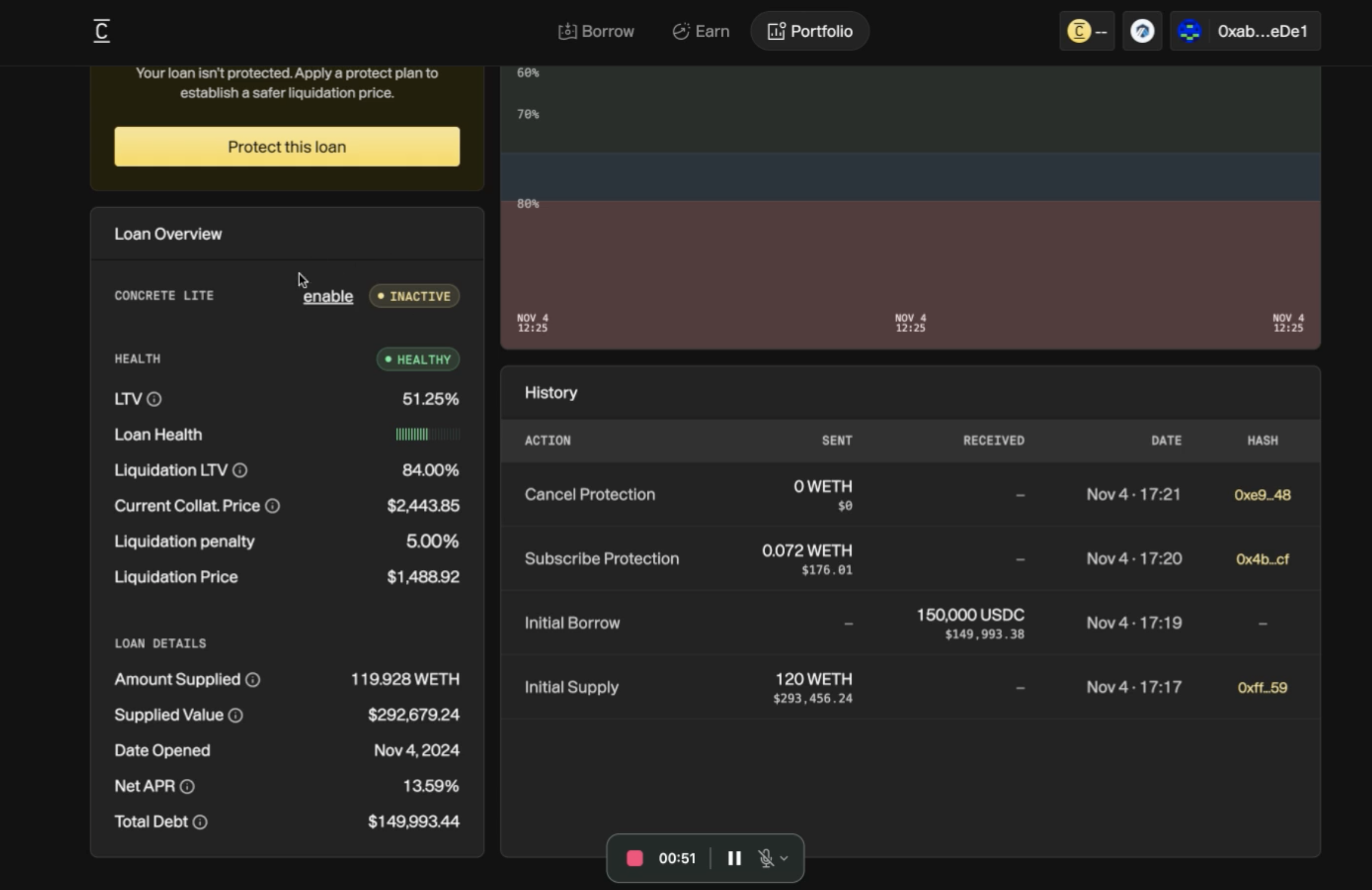
1. **View Loan Overview**:
- The loan dashboard shows the current [LTV](https://docs.concrete.xyz/glossary/#ltv), liquidation threshold, and the status of Concrete Lite.
2. **Enable or Disable Protection**:
- Users can choose to disable the default protection by toggling the **disable** button next to the **Concrete Lite** status.
- If disabled, users are fully exposed to the underlying market’s liquidation penalties.
### Loan Overview Details
1. **LTV (Loan-to-Value):**
- Displays the percentage of the loan amount relative to the value of the collateral.
- In this case, the LTV is 51.23%, indicating the health of the position.
2. **Loan Health:**
- A visual bar showing the current health status of the loan.
- As marked "Healthy," it shows that the loan is far from the liquidation threshold.
3. **Liquidation LTV & Price:**
- Liquidation LTV: 80.80%, representing the point at which liquidation occurs.
- Liquidation Price: $1,547.89, the collateral value at which liquidation would be triggered.
4. **Current Collateral Price:**
- The market price of the collateralized asset, $2,443.85.
5. **Concrete Lite Status:**
- **Active** status indicates automatic foreclosure protection is enabled.
- Reduces liquidation penalties by performing a controlled foreclosure before full liquidation occurs, minimizing user losses.
### Loan Details
1. **Amount Supplied & Supplied Value:**
- Indicates the user deposited 119.928 [WETH](https://docs.concrete.xyz/glossary/#weth), valued at $292,811.70.
2. **Total Debt & Net [APR](https://docs.concrete.xyz/glossary/#apr):**
- Displays the current outstanding loan value ($149,993.45) and the applied interest rate (13.59% Net APR).
3. **History Section:**
- A record of all loan-related actions, including:
- **Initial Borrow**: User borrowed $150,000 [USDC](https://docs.concrete.xyz/glossary/#usdc).
- **Subscribe Protection**: Protection Status.
- **Cancel Protection**: Shows attempts to deactivate protection.
---
# Document 53: How to Borrow From External Market
Source: src/03-Borrow/open-loan-externally.md
Doc ID: Borrow/open-loan-externally
Public URL: https://docs.concrete.xyz/Borrow/open-loan-externally/
In active sidebar: no
Description: Concrete Borrow documentation for how to Borrow From External Market, including loan lifecycle, collateral behavior, and repayment workflows.
Concrete offers an efficient interface to initiate borrowing on external markets such as Aave, leveraging its optimization features to secure the best rates. Here's how to proceed:
## Step 1: Connect Your Wallet
- From the Concrete dashboard, click **Connect** to link your wallet. Ensure the wallet is compatible and holds sufficient collateral.
## Step 2: Navigate to the Borrow Tab
- Go to the **Borrow** tab. Here, you'll find a list of available borrowing opportunities.
## Step 3: Select Supply and Borrow Assets
- Choose the asset you wish to supply (e.g., **[WETH](https://docs.concrete.xyz/glossary/#weth)**).
- Select the asset you want to borrow (e.g., **[USDC](https://docs.concrete.xyz/glossary/#usdc)**).
- You can also specify the external market where you'd like the transaction to take place. For instance, choose **Aave** as the borrowing platform.
## Step 4: Initiate the Loan
- Click **Open Loan**.
- In the subsequent window, enter the amount of the selected collateral (supply amount) and the amount you wish to borrow.
- Review the provided details such as:
- **[LTV](https://docs.concrete.xyz/glossary/#ltv) (Loan-to-Value)** percentage
- **Asset Prices** (current collateral and liquidation prices)
- **Net [APR](https://docs.concrete.xyz/glossary/#apr)** (interest rate post-optimization)
## Step 5: Confirm and Finalize
- Once satisfied, click **Continue**.
- You'll be prompted to approve the transaction through your wallet.
- After final confirmation, your loan is successfully opened on the selected market, with optimized rates provided by Concrete.
---
# Document 54: How to Borrow Against Collateral
Source: src/03-Borrow/open-loan.md
Doc ID: Borrow/open-loan
Public URL: https://docs.concrete.xyz/Borrow/open-loan/
In active sidebar: no
Description: Concrete Borrow documentation for how to Borrow Against Collateral, including loan lifecycle, collateral behavior, and repayment workflows.
## 1. Access the Borrow Interface
Navigate to the **Borrow** tab and select a loan pair, such as [WETH](https://docs.concrete.xyz/glossary/#weth)/[USDC](https://docs.concrete.xyz/glossary/#usdc).
Example: Choose **WETH to borrow USDC** on **Arbitrum**.
## 2. Open Loan
- Click **Open Loan** to proceed. This will display loan options across supported platforms (e.g., Aave, Compound) with optimized Net [APR](https://docs.concrete.xyz/glossary/#apr) details.
## 3. Specify Loan Parameters
- Enter the amount of collateral (e.g., 120 [WETH](https://docs.concrete.xyz/glossary/#weth)) and the desired borrow amount (e.g., 150,000 [USDC](https://docs.concrete.xyz/glossary/#usdc)). The system will automatically calculate your Loan-to-Value ([LTV](https://docs.concrete.xyz/glossary/#ltv)), current asset prices, liquidation threshold, and Net [APR](https://docs.concrete.xyz/glossary/#apr).
- Click **Continue**.
## 4. Supply Collateral
- Confirm the collateral amount by clicking **Supply**.
- Approve the transaction in MetaMask or any connected wallet.
## 5. Borrow Against Supplied Collateral
- Once collateral is supplied, click **Borrow**.
- Confirm this transaction in MetaMask.
## 6. Select a Protection Plan (Optional)
If you do not select any plans then by default you will be getting the Concrete Borrow Lite. By default, Concrete Borrow comes with **Concrete Lite**, which forecloses loans early, reducing the risk of liquidation penalties.
After the loan is created, you'll be presented with Concrete protection plans (e.g., Foundation, Fortitude, Fortress). These plans offer different liquidation thresholds and fees.
- Select a plan or opt to add protection later.
- Confirm the protection to apply it to your loan.
If a protection plan is enabled, you'll see the estimated gas savings, lower liquidation penalty, and improved liquidation price compared to borrowing directly on Aave.
## 7. Loan Management
Your loan is now active and protected (if selected).
You can manage your loan in the **Portfolio** tab, which displays:
- Loan health ([LTV](https://docs.concrete.xyz/glossary/#ltv), collateral price, etc.)
- Protection plan status
- Loan history (transaction details)
---
# Document 55: Overview
Source: src/03-Borrow/overview.md
Doc ID: Borrow/overview
Public URL: https://docs.concrete.xyz/Borrow/overview/
In active sidebar: no
Description: Concrete Borrow documentation for overview, including loan lifecycle, collateral behavior, and repayment workflows.
**Concrete Borrow** is Concrete Protocol’s decentralized lending and borrowing feature, designed to streamline access to liquidity across top [DeFi](https://docs.concrete.xyz/glossary/#defi) money markets while offering unique protections. By integrating directly with multiple platforms such as Aave, Compound, and Silo, Concrete Borrow enables users to seamlessly find the most favorable rates, manage loans in one unified view, and benefit from unique protections like **Concrete Lite**. This article provides a technical breakdown of how Concrete Borrow works and the features that distinguish it from traditional DeFi borrowing.
| **Feature** | **Concrete Borrow** |
|----------------------------|--------------------------------------------------------------------------|
| **Collateral Management** | Deposits secured in Concrete Vault, issued as tokenized cETH |
| **Rate Optimization** | Aggregates best rates across Aave, Compound, Silo, and Radiant |
| **Unified Management** | One interface for managing loans across multiple DeFi money markets |
| **Liquidation Protection** | Concrete Lite activated by default, with flash loan foreclosure at 2% |
| **Gas Cost Reduction** | Concrete subsidizes a portion of gas costs |
| **Historical Rate Data** | 90-day interest rate tracking for user insight |
## Key Benefits
Concrete Borrow is crafted to address two primary user needs: accessing optimal borrowing rates and minimizing liquidation risks. Here’s a closer look at the advantages:
### Rate Optimization Across Multiple Markets
Concrete aggregates rates from various money markets and displays the most competitive borrowing options, saving users the hassle of manually comparing platforms. This optimization leverages smart contract architecture to automatically route users’ loans to platforms offering the best terms based on real-time market data.
### Unified Loan Management
By consolidating loans from multiple platforms into a single interface, Concrete Borrow enables users to view, track, and manage all of their loans in one dashboard. This simplifies portfolio monitoring and management, especially for users who hold loans across different platforms.
### Reduced Gas Costs
Concrete subsidizes a significant portion of the gas costs associated with borrowing, making transactions more cost-effective for users. This makes borrowing through Concrete particularly appealing for high-frequency users and larger portfolios where gas costs could otherwise add up.
### Enhanced Protection Against Liquidation
With **Concrete Lite** enabled by default, borrowers benefit from a foreclosure mechanism that intervenes before their position is fully liquidated. Unlike traditional [DeFi](https://docs.concrete.xyz/glossary/#defi) platforms, which impose 5-15% liquidation penalties, Concrete Lite forecloses the loan early with a reduced 2% fee, helping users retain more of their assets.
## How Concrete Borrow Works
### 1. Deposit Collateral
To begin borrowing, users first deposit assets (e.g., [ETH](https://docs.concrete.xyz/glossary/#eth)) into a **Concrete Vault**. In return, they receive a tokenized proof of deposit, known as **Concrete ETH (cETH)**, which represents their collateral on the platform. This token can be used to secure loans within the Concrete ecosystem.
### 2. Borrow Against Collateral
Using their cETH as collateral, users can borrow stablecoins or other assets. Concrete Borrow automatically finds the best rates from integrated money markets, ensuring that users receive the most competitive loan terms available. The protocol’s integration includes Aave, Compound, Silo, and Radiant, with plans to expand to additional [DeFi](https://docs.concrete.xyz/glossary/#defi) platforms.
### 3. Rate Aggregation and Dynamic Optimization
Concrete Borrow’s backend is engineered to monitor rates, collateral limits (LTVs), and liquidity pools across all supported money markets. This allows Concrete to dynamically adjust the borrowing route and ensure users always have access to optimal rates. By implementing smart contract proxies, Concrete can move users’ loans to more favorable rates if they fluctuate significantly, effectively providing a “hot swap” of lending platforms without additional user input.
### 4. Liquidation Protection through Concrete Lite
Concrete Lite, enabled by default, protects users from standard liquidation events. When a position’s [LTV](https://docs.concrete.xyz/glossary/#ltv) ratio approaches the threshold for liquidation, Concrete’s foreclosure mechanism initiates a flash loan to cover the debt. This ensures the user’s position is closed with a minimal 2% fee rather than incurring the typical 5-15% penalty.
- **Opt-Out Flexibility**: Users can choose to opt out of Concrete Lite if they prefer to manage liquidation risk manually.
- **Automatic Intervention**: The foreclosure process activates automatically without user intervention, providing peace of mind and asset preservation.
### 5. Repayment and Withdrawal
To close a position, users must repay the borrowed amount. Once the loan is fully repaid, they can redeem their tokens for the original ETH deposit. Concrete ensures all assets remain accessible upon loan closure, with no additional withdrawal fees.
## Technical Infrastructure and Optimization
Concrete Borrow leverages a robust technical infrastructure to deliver seamless access to borrowing across [DeFi](https://docs.concrete.xyz/glossary/#defi) platforms. Here’s a breakdown of how Concrete optimizes loan management:
1. **Smart Contract Architecture for Rate Aggregation**
Concrete’s blueprint includes a smart contract system designed to manage user accounts across multiple money markets. Each borrower’s profile is stored as a unique **blueprint** that tracks positions and integrates with Aave, Compound, and other markets in real time.
2. **Flash Loan Mechanism**
The foreclosure feature in Concrete Lite is powered by flash loans, which enable the protocol to cover users’ positions without holding excess capital. By taking a temporary flash loan to cover collateral at risk, Concrete forecloses and returns assets with a much lower penalty compared to standard liquidation.
3. **Comprehensive Monitoring**
Concrete’s monitoring system continuously tracks all integrated money markets, updating metrics like interest rates, LTVs, liquidation activity, and liquidity availability. This data enables Concrete to optimize loan allocations and maintain a reliable, up-to-date portfolio view for users.
4. **User-Centric Rate Transparency**
While Concrete does not provide financial advice, it offers historical rate data (e.g., 90-day interest rate ranges) for users to assess market trends. Concrete allows users to compare current rates with historical averages, helping them make informed borrowing decisions.
## Workflow Overview: From Loan Initiation to Repayment
Here’s a step-by-step outline of the complete Concrete Borrow process:
1. **Collateral Deposit**
The user deposits assets into a Concrete Vault, receiving cETH as collateral.
2. **Borrowing Initiation**
Using cETH, the user borrows stablecoins or other assets. Concrete Borrow selects the best market rate from integrated platforms, ensuring competitive loan terms.
3. **Rate Management and Dynamic Optimization**
Concrete monitors rates continuously and adjusts the user’s borrowing route if necessary, ensuring the lowest cost of capital across the portfolio.
4. **Protection and Foreclosure**
Concrete Lite’s foreclosure feature activates if the position approaches liquidation, executing a flash loan to cover the user’s position. This minimizes liquidation penalties to a 2% fee instead of the standard 5-15%.
5. **Repayment and Collateral Withdrawal**
The user repays the loan, redeems their cETH for the original collateral, and can withdraw assets from the Concrete Vault.
## Fees
| **Fee Type** | **Amount** | **Denomination** | **Description** |
|--------------------------|-------------------------|------------------|---------------------------------------------------------------------------------------------------------------------|
| Borrow & Supply Service | None | N/A | No additional fees from Concrete; users only pay underlying market fees. Designed to attract high-volume users and institutional participants. |
| Opening Fee | None | N/A | No cost to activate Concrete Lite, making it an accessible entry point for users seeking foreclosure protection. |
| Early Safe Closure | None | N/A | Users who close their positions safely before foreclosure incur no charges. |
| Foreclosure Fee | 3.5% of borrowed amount | Collateral | Applied only if foreclosure occurs. Replaces traditional liquidation penalties (typically 5% or more). Split as follows: 0.3% to Earn Vault, 3.2% to Concrete Treasury for operational costs. |
---
# Document 56: Quick Start (Plug-and-Play Integration)
Source: src/03-Developers/SDK/quick-start.md
Doc ID: Developers/SDK/quick-start
Public URL: https://docs.concrete.xyz/Developers/SDK/quick-start/
In active sidebar: no
Description: Concrete Earn V2 SDK documentation for quick Start, with implementation guidance for production-grade integrations.
Concrete's [SDK](https://docs.concrete.xyz/glossary/#sdk) provides ready-to-use React and Wagmi hooks for integrating deposits, withdrawals, and balance views in a few lines of code.
These hooks combine viem, wagmi, and the Concrete SDK internals under the hood. You can use them to go from setup to a live app in minutes.
## Quick Wagmi setup
If you use Wagmi hooks like `useVaultDeposit()` or `useVaultWithdraw()`, you only need a minimal vault configuration object.
Concrete's hooks automatically detect your connected wallet and network from Wagmi.
The following example shows a vault configuration:
```tsx
// src/vault-config.ts
export const vault = {
version: "v1",
address: "0x6d8d73bD121970e7c12c34caac9ce9bc975c0a9", // Example vault
chainId: 42161, // Arbitrum
fallbackRpcUrl: "https://arb1.arbitrum.io/rpc", // Optional fallback
} as const;
```
:::tip
Developers already familiar with Wagmi can use their existing configuration. This snippet is only a quick reference. For full setup details, see [Setup Configuration](https://docs.concrete.xyz/Developers/SDK/setup-configuration/) in the main [SDK](https://docs.concrete.xyz/glossary/#sdk) documentation.
:::
## [SDK](https://docs.concrete.xyz/glossary/#sdk) Playground
Concrete provides a live SDK Playground inside Concrete Enterprise: a web interface that demonstrates the SDK and Wagmi hooks in real time.
It is the fastest way to explore the SDK without setting up a full app. You can view vault details, deposit, withdraw, and monitor balances from your browser.
### Try it yourself
[Open the Concrete SDK Playground](https://build.concrete.xyz/). Requires a wallet connection. Runs on test vaults or live networks.
### Features
| Tab | Description | SDK hook |
| --- | --- | --- |
| **Vault details** | Displays live vault metadata and totals | `useVaultDetails()` |
| **Deposits** | Deposit with auto approvals and conversions | `useVaultDeposit()` |
| **Withdrawals** | Redeem shares for underlying assets | `useVaultWithdraw()` |
| **Balances** | Show current user balances | `useVaultUserBalance()` |
## Simple [USDC](https://docs.concrete.xyz/glossary/#usdc) Deposit
```tsx
import { useVaultDeposit } from "@concrete-xyz/sdk/wagmi";
import { vault } from "src/vault-config";
function DepositUSDC() {
const deposit = useVaultDeposit(
vault,
{ amount: "100", amountToBigInt: true }
);
return (
);
}
```
## Withdraw Hook
```tsx
import { useVaultWithdraw } from "@concrete-xyz/sdk/wagmi";
import { vault } from "src/vault-config";
export default function VaultWithdrawPage() {
const [amount, setAmount] = useState("0");
const withdraw = useVaultWithdraw(vault, { amount, amountToBigInt: true });
if (withdraw.loading) return
Loading...
;
return (
setAmount(e.target.value)}
placeholder="Amount to withdraw"
/>
{withdraw.withdraw.isPending && "In progress..."}
{withdraw.withdraw.isSuccess && "✅ Success!"}
{withdraw.withdraw.isError && `❌ ${withdraw.withdraw.error.message}`}
);
}
```
## Deposit [ETH](https://docs.concrete.xyz/glossary/#eth) → [WETH](https://docs.concrete.xyz/glossary/#weth) Vault
```tsx
import { useState } from "react";
import { useVaultDeposit } from "@concrete-xyz/sdk/wagmi";
import { vault } from "src/vault-config";
function DepositETH() {
const [amount, setAmount] = useState("1");
const deposit = useVaultDeposit(vault, {
amount, // accepts string or number
amountToBigInt: true, // auto converts based on vault decimals
useEther: true, // wraps ETH → WETH automatically
});
const handleDeposit = () => deposit.mutate({});
return (
setAmount(e.target.value)}
placeholder="Amount in ETH"
/>
{deposit.isSuccess &&
Deposit confirmed ✅
}
{deposit.isError &&
Error: {String(deposit.error)}
}
);
}
export default DepositETH;
```
### What happens under the hood
1. Resolves the public and wallet clients from your Wagmi config.
2. Converts human-readable values to `BigInt` based on vault decimals.
3. Auto-wraps ETH to WETH when `useEther` is `true`.
4. Handles approvals automatically.
5. Executes the deposit and updates transaction state.
6. Returns `isPending`, `isSuccess`, `isError`, and a `mutate()` trigger.
## Hook options
```tsx
const deposit = useVaultDeposit(vaultConfig, options);
```
| Option | Type | Default | Description |
| --- | --- | --- | --- |
| `amount` | `string \| number \| bigint` | – | Amount to deposit. Pass a human value when using `amountToBigInt: true`, or a `BigInt` in base units otherwise. |
| `amountToBigInt` | `boolean` | `false` | When `true`, converts `amount` to a `BigInt` using the vault's underlying decimals. |
| `useEther` | `boolean` | `false` | Wrap native [ETH](https://docs.concrete.xyz/glossary/#eth) to [WETH](https://docs.concrete.xyz/glossary/#weth) before depositing. |
| `onSuccess` | `function` | – | Callback when the transaction confirms. |
| `onError` | `function` | – | Callback on transaction failure. |
| `onSettled` | `function` | – | Runs after success or error. |
---
# Document 57: How to Activate Concrete Protect
Source: src/04-Protect/activate-concrete-protect.md
Doc ID: Protect/activate-concrete-protect
Public URL: https://docs.concrete.xyz/Protect/activate-concrete-protect/
In active sidebar: no
Description: Concrete Protect documentation for how to Activate Concrete Protect, covering activation, mechanics, and risk-management behavior.
Concrete Protect offers a higher level of security beyond the default Concrete Borrow (Lite) protection. It injects credit into your loan to improve the Loan-to-Value ([LTV](https://docs.concrete.xyz/glossary/#ltv)) ratio, reducing the risk of liquidation. Fees for upgrading are calculated based on the selected plan and protection duration.
Here’s how to activate it for individual positions (applied separately for each loan):
## 1. Access Your Portfolio
Users can manage all protected positions from the Portfolio:
- From the dashboard, click on the **Portfolio** tab.
- Under **Active Loans**, find the loan position you want to upgrade.
## 2. Manage the Loan
- Click the **Manage** button next to your desired loan position.
## 3. Initiate Protection
- In the loan management view, locate the **Protect This Loan** button.
- Click the button to explore available protection plans.
## 4. Select a Protection Plan
- Choose from the available plans (e.g., Foundation, Fortitude, Fortress).
- Review the details, including credit injection, liquidation price improvements, and associated fees.
## 5. Confirm Protection
- Once you select a plan, click on **Protect Loan with Selected Plan**.
- Approve the transaction through MetaMask.
## 6. Protection Activated
- After confirmation, your loan will display its protection status and updated [LTV](https://docs.concrete.xyz/glossary/#ltv) in the Portfolio.
- You’ll also see the applied credit line and its remaining balance under the loan details.
---
# Document 58: Overview
Source: src/04-Protect/overview.md
Doc ID: Protect/overview
Public URL: https://docs.concrete.xyz/Protect/overview/
In active sidebar: no
Description: Concrete Protect documentation for overview, covering activation, mechanics, and risk-management behavior.
**Concrete Protect** is Concrete Protocol's advanced liquidation prevention service, designed for users who require robust protection to avoid liquidation events entirely. Unlike Concrete Lite, which reduces liquidation penalties, Concrete Protect actively prevents liquidations by injecting capital into positions as Loan-to-Value ([LTV](https://docs.concrete.xyz/glossary/#ltv)) ratios approach risk thresholds.
## Key Components
Concrete Protect integrates proactive monitoring and automated credit injection to secure users’ positions in times of market volatility. Here’s a breakdown of its key functionalities:
### Credit Injection
At the heart of Concrete Protect is the **credit injection mechanism**, which prevents liquidation by recalibrating the [LTV](https://docs.concrete.xyz/glossary/#ltv) ratio of a loan when it approaches a critical level. Instead of waiting for the collateral to liquidate, Concrete Protect injects a credit line directly into the loan, reducing the LTV and pulling it back to safe levels.
### Tranche-Based Structure
Concrete Protect operates with a **tranche-based model**. Each tranche represents a line of credit that users purchase in advance, which activates automatically as the LTV nears the liquidation threshold. Users can purchase multiple tranches, which layer additional protective buffers to mitigate liquidation risk. This model provides granular control, allowing users to scale their protection based on the volatility of their collateral or their specific risk management goals.
### 30-Day Policy Cycle
Concrete Protect functions on a **30-day policy term**, with all fees structured upfront for transparency. Upon purchasing a policy, users gain credit protection for the full 30-day term, with predefined costs for each credit injection event. Users can renew or modify their coverage as needed at the end of each cycle.
### Transparent Cost Structure
Concrete Protect employs a fixed cost model, where users pay a single Opening Fee upon policy initiation and incur additional Claim Fees per credit injection. There is no ongoing interest on the injected credit, ensuring that users know their maximum protection cost in advance.
### Automated Management and User Notifications
Once activated, Concrete Protect autonomously monitors LTV ratios and manages credit injections when necessary. Users receive notifications in their portfolio dashboard whenever a credit tranche is activated. Alerts may also be provided through external channels, like Telegram or Discord, for additional convenience.
## General Workflow
Concrete Protect follows a systematic workflow to ensure that user assets are secured without requiring continuous management from the user. Here’s a step-by-step outline of the technical operations within Concrete Protect:
### 1. [LTV](https://docs.concrete.xyz/glossary/#ltv) Monitoring
Concrete Protocol’s infrastructure continuously tracks the LTV ratio of each position protected by Concrete Protect. This is achieved through real-time asset pricing data, ensuring that any drop in collateral value or increase in debt is immediately detected.
### 2. Automatic Credit Injection
When the LTV nears the preset threshold, Concrete Protect activates the first available tranche, injecting credit into the loan. This injection recalibrates the LTV, providing a buffer against further market declines. The number of tranches purchased defines how many injections are available within a single 30-day policy cycle.
### 3. Sequential Tranche Activation
Each tranche is activated independently, one at a time, as the LTV ratio requires correction. This ensures that only the necessary amount of credit is deployed, preserving the remaining tranches for potential future needs within the same policy period.
### 4. User Notification
Users are notified in their portfolio dashboard each time a tranche is activated. Additional notifications can be enabled through Concrete’s external communication options, providing users with a seamless way to stay informed.
### 5. Post-Protection Procedures
If the market continues to decline after all tranches have been exhausted, Concrete Protect will aim for a controlled exit by closing the position in a way that maximizes the amount of collateral returned. This final exit strategy minimizes user losses and ensures that any remaining assets are returned in the most favorable manner possible.
## Fees
| **Fee Type** | **Amount** | **Denomination** | **Description** |
|----------------------|------------------------------------------------------|------------------|---------------------------------------------------------------------------------------------------------------------------------------------------------------|
| Opening Fee | 0.5% - 0.65% of the promised amount | Collateral | A one-time fee based on the user’s proximity to liquidation ([LTV](https://docs.concrete.xyz/glossary/#ltv)). Higher fees apply to users closer to liquidation, reflecting increased risk. The entire fee goes to the Concrete Treasury. |
| Claim Fee | [BTC](https://docs.concrete.xyz/glossary/#btc): 1.65%, [ETH](https://docs.concrete.xyz/glossary/#eth): 2.95% per disbursed credit tranche | Collateral | Charged for each credit line disbursement (up to 3 times). 80% of this fee goes to the Earn Vault, rewarding liquidity providers, while 20% goes to the Concrete Treasury. |
| Early Cancellation Fee | 0% | N/A | No fee for early cancellation, allowing users to cancel protection without penalty before the policy term ends. |
| Foreclosure Fee | 3.5% of the foreclosed amount | Collateral | Similar to Concrete Lite, this fee replaces high liquidation penalties with a predictable 3.5% charge. The fee distribution mirrors Concrete Lite: 0.3% to Earn Vault, 3.2% to Concrete Treasury. |
## Ideal Use Cases
Concrete Protect is engineered for users who require proactive asset security and aim to avoid liquidation events under any circumstances. It is especially suited for:
- **High-Risk Positions**: Users with volatile assets that could experience rapid [LTV](https://docs.concrete.xyz/glossary/#ltv) increases benefit from Concrete Protect’s capital injection.
- **Strategic Investors**: Those aiming to maximize the longevity of their positions without actively monitoring market shifts.
- **Institutional and High-Net-Worth Users**: Investors managing larger portfolios that need granular control over liquidation thresholds and cost predictability.
## Concrete Protect vs. Concrete Lite
| **Feature** | **Concrete Lite** | **Concrete Protect** |
|------------------------|-------------------------------------------|-------------------------------------------------------------------|
| **Primary Purpose** | Mitigate liquidation penalties | Actively prevent liquidation through [LTV](https://docs.concrete.xyz/glossary/#ltv) management |
| **Activation** | Free (default with borrowing) | Optional, user-enabled protection policy |
| **LTV Management** | Closes position pre-liquidation | Injects credit to maintain safe LTV levels |
| **User Cost** | 3.5% foreclosure fee if liquidated | Opening Fee + Claim Fees per credit injection |
| **Policy Term** | Automatic with borrow | 30-day renewable term with tranche-based credit injections |
---
# Static Asset Index
Binary and media assets are indexed by source path and public URL. Their full binary contents are not embedded.
## .gif files
- static/img/earn-2.gif (795700 bytes): https://docs.concrete.xyz/img/earn-2.gif
## .ico files
- static/favicon.ico (3364 bytes): https://docs.concrete.xyz/favicon.ico
## .mp4 files
- static/vid/borrow-against-collateral.mp4 (8933270 bytes): https://docs.concrete.xyz/vid/borrow-against-collateral.mp4
- static/vid/borrow-external.mp4 (8434264 bytes): https://docs.concrete.xyz/vid/borrow-external.mp4
- static/vid/close-loan-withdraw.mp4 (437788 bytes): https://docs.concrete.xyz/vid/close-loan-withdraw.mp4
- static/vid/earn3.mp4 (2984774 bytes): https://docs.concrete.xyz/vid/earn3.mp4
- static/vid/enable-protect.mp4 (7254223 bytes): https://docs.concrete.xyz/vid/enable-protect.mp4
- static/vid/get-lite.mp4 (636312 bytes): https://docs.concrete.xyz/vid/get-lite.mp4
- static/vid/main-dashboard.mp4 (1578071 bytes): https://docs.concrete.xyz/vid/main-dashboard.mp4
## .pdf files
- static/files/AssetCT.pdf (5774810 bytes): https://docs.concrete.xyz/files/AssetCT.pdf
- static/files/AssetCX-OFT-and-OFT-Adapter.pdf (5490832 bytes): https://docs.concrete.xyz/files/AssetCX-OFT-and-OFT-Adapter.pdf
- static/files/Async-Implementation.pdf (9946822 bytes): https://docs.concrete.xyz/files/Async-Implementation.pdf
- static/files/cantinacode-concrete-finance.pdf (501056 bytes): https://docs.concrete.xyz/files/cantinacode-concrete-finance.pdf
- static/files/Code4rena-Review-Part-1-SSC.pdf (5186528 bytes): https://docs.concrete.xyz/files/Code4rena-Review-Part-1-SSC.pdf
- static/files/Code4rena-Review-Part-2-SSC.pdf (5151742 bytes): https://docs.concrete.xyz/files/Code4rena-Review-Part-2-SSC.pdf
- static/files/Curve-Pendle-Strategy-Report.pdf (6939777 bytes): https://docs.concrete.xyz/files/Curve-Pendle-Strategy-Report.pdf
- static/files/Earn_1.4__AssetCx_1.2___SSC.pdf (5734210 bytes): https://docs.concrete.xyz/files/Earn_1.4__AssetCx_1.2___SSC.pdf
- static/files/Earn_v2__Hurdle_Rate___SSC.pdf (10590187 bytes): https://docs.concrete.xyz/files/Earn_v2__Hurdle_Rate___SSC.pdf
- static/files/Earn_V2_1.5__AssetCx_1.3.pdf (7390278 bytes): https://docs.concrete.xyz/files/Earn_V2_1.5__AssetCx_1.3.pdf
- static/files/Earn_V2_Improvements___SSC.pdf (10153337 bytes): https://docs.concrete.xyz/files/Earn_V2_Improvements___SSC.pdf
- static/files/Earn-V1-Halborn.pdf (12312616 bytes): https://docs.concrete.xyz/files/Earn-V1-Halborn.pdf
- static/files/Earn-v2-1.6-and-AssetCx-1.4.pdf (10947486 bytes): https://docs.concrete.xyz/files/Earn-v2-1.6-and-AssetCx-1.4.pdf
- static/files/Earn-v2-1.7-Multi-Asset-Deposit-Vault.pdf (5704966 bytes): https://docs.concrete.xyz/files/Earn-v2-1.7-Multi-Asset-Deposit-Vault.pdf
- static/files/Earn-v2-Whitelisting-Hook.pdf (10473810 bytes): https://docs.concrete.xyz/files/Earn-v2-Whitelisting-Hook.pdf
- static/files/harvestRewards-Function-Improvements-SSC.pdf (9923270 bytes): https://docs.concrete.xyz/files/harvestRewards-Function-Improvements-SSC.pdf
- static/files/HUB-v1.pdf (10375508 bytes): https://docs.concrete.xyz/files/HUB-v1.pdf
- static/files/Looping-Strategy-Swapper-Contract.pdf (5496005 bytes): https://docs.concrete.xyz/files/Looping-Strategy-Swapper-Contract.pdf
- static/files/Morpho-Strategy-Auto-Compounding-SSC.pdf (9976970 bytes): https://docs.concrete.xyz/files/Morpho-Strategy-Auto-Compounding-SSC.pdf
- static/files/Morpho-V1-Lender-Integration-SSC.pdf (10636557 bytes): https://docs.concrete.xyz/files/Morpho-V1-Lender-Integration-SSC.pdf
- static/files/Morpho-Vault-Strategy-SSC.pdf (6599441 bytes): https://docs.concrete.xyz/files/Morpho-Vault-Strategy-SSC.pdf
- static/files/Position_Management_Helper_-_Standalone_Contract___SSC.pdf (5805961 bytes): https://docs.concrete.xyz/files/Position_Management_Helper_-_Standalone_Contract___SSC.pdf
- static/files/Predeposit-Vault.pdf (10606996 bytes): https://docs.concrete.xyz/files/Predeposit-Vault.pdf
- static/files/Preview-Withdrawal-Pause-SSC.pdf (9581350 bytes): https://docs.concrete.xyz/files/Preview-Withdrawal-Pause-SSC.pdf
- static/files/Rewards-Distribution.pdf (6179249 bytes): https://docs.concrete.xyz/files/Rewards-Distribution.pdf
- static/files/Spokes-Contracts.pdf (9695999 bytes): https://docs.concrete.xyz/files/Spokes-Contracts.pdf
- static/files/Spokes-V1.pdf (11346536 bytes): https://docs.concrete.xyz/files/Spokes-V1.pdf
- static/files/Standard-Implementation.pdf (10349311 bytes): https://docs.concrete.xyz/files/Standard-Implementation.pdf
- static/files/Strategies.pdf (9967030 bytes): https://docs.concrete.xyz/files/Strategies.pdf
- static/files/Upgradable-Multisig-and-Queue-Changes.pdf (5589371 bytes): https://docs.concrete.xyz/files/Upgradable-Multisig-and-Queue-Changes.pdf
- static/files/Upgradeable-Migration-Assessment.pdf (9824156 bytes): https://docs.concrete.xyz/files/Upgradeable-Migration-Assessment.pdf
- static/files/Vault-Manager.pdf (9459459 bytes): https://docs.concrete.xyz/files/Vault-Manager.pdf
- static/files/Withdrawal-Queue-Delay-SSC.pdf (5206305 bytes): https://docs.concrete.xyz/files/Withdrawal-Queue-Delay-SSC.pdf
- static/files/Zellic-Audit-Report.pdf (942027 bytes): https://docs.concrete.xyz/files/Zellic-Audit-Report.pdf
## .png files
- static/apple-touch-icon.png (1527 bytes): https://docs.concrete.xyz/apple-touch-icon.png
- static/favicon-96x96.png (2423 bytes): https://docs.concrete.xyz/favicon-96x96.png
- static/img/borrow-1.png (501966 bytes): https://docs.concrete.xyz/img/borrow-1.png
- static/img/borrow-2.png (352268 bytes): https://docs.concrete.xyz/img/borrow-2.png
- static/img/borrow-3.png (343722 bytes): https://docs.concrete.xyz/img/borrow-3.png
- static/img/borrow-4.png (680882 bytes): https://docs.concrete.xyz/img/borrow-4.png
- static/img/bridge-1.png (272369 bytes): https://docs.concrete.xyz/img/bridge-1.png
- static/img/change-1.png (204256 bytes): https://docs.concrete.xyz/img/change-1.png
- static/img/change-2.png (326868 bytes): https://docs.concrete.xyz/img/change-2.png
- static/img/concrete-mark.png (11869 bytes): https://docs.concrete.xyz/img/concrete-mark.png
- static/img/defi-usdt-withdrawal-schedule.png (90524 bytes): https://docs.concrete.xyz/img/defi-usdt-withdrawal-schedule.png
- static/img/defi-usdt-withdrawal-tab.png (173991 bytes): https://docs.concrete.xyz/img/defi-usdt-withdrawal-tab.png
- static/img/earn-1.png (380947 bytes): https://docs.concrete.xyz/img/earn-1.png
- static/img/earn-3.png (1507105 bytes): https://docs.concrete.xyz/img/earn-3.png
- static/img/earn-4.png (728419 bytes): https://docs.concrete.xyz/img/earn-4.png
- static/img/logo.png (1485 bytes): https://docs.concrete.xyz/img/logo.png
- static/img/og-image.png (28693 bytes): https://docs.concrete.xyz/img/og-image.png
- static/img/portfolio-1.png (363429 bytes): https://docs.concrete.xyz/img/portfolio-1.png
- static/img/portfolio.png (290967 bytes): https://docs.concrete.xyz/img/portfolio.png
- static/img/qf.png (180482 bytes): https://docs.concrete.xyz/img/qf.png
- static/img/withdraw-1.png (1028203 bytes): https://docs.concrete.xyz/img/withdraw-1.png
- static/img/withdraw-2.png (699252 bytes): https://docs.concrete.xyz/img/withdraw-2.png
- static/img/withdraw-3.png (942448 bytes): https://docs.concrete.xyz/img/withdraw-3.png
- static/img/withdraw-4.png (956207 bytes): https://docs.concrete.xyz/img/withdraw-4.png
- static/img/withdraw-5.png (921300 bytes): https://docs.concrete.xyz/img/withdraw-5.png
## .svg files
- static/favicon.svg (1180 bytes): https://docs.concrete.xyz/favicon.svg
- static/img/logo.svg (6438 bytes): https://docs.concrete.xyz/img/logo.svg
- static/img/undraw_docusaurus_mountain.svg (31486 bytes): https://docs.concrete.xyz/img/undraw_docusaurus_mountain.svg
- static/img/undraw_docusaurus_react.svg (36002 bytes): https://docs.concrete.xyz/img/undraw_docusaurus_react.svg
- static/img/undraw_docusaurus_tree.svg (11887 bytes): https://docs.concrete.xyz/img/undraw_docusaurus_tree.svg
## .txt files
- static/750029c12f39eefaafff73f117c0e946.txt (32 bytes): https://docs.concrete.xyz/750029c12f39eefaafff73f117c0e946.txt
- static/robots.txt (109 bytes): https://docs.concrete.xyz/robots.txt
## .unknown files
- static/.nojekyll (0 bytes): https://docs.concrete.xyz/.nojekyll